Having recently returned from a tropical worksite let me inform you who might want to go about a few things to take:
1. Suntan lotion, SPF45 or so
2. Bug repellent, as strong as you can stand
3. Zip lock bags (large ones!)
4. Patience
5. Diarrhea medicine
6. Sinus medicine
7. Desiccant packs
8. Anti-itch cream
Ok, items 1 and 2 are probably self evident. Item 3 is used for dirty clothes, packing food away from various local bugs, storing things that might leak in a suitcase, etc. However, the most important thing for item 3, zip lock bag, or a resealable, airtight bag, is for transporting your laptop. Usually the offices and hotels will be airconditioned and low humidity. However, as soon as you step outside the heat and humidity smack you like a piece of liver warmed in the microwave, it also smacks your laptop. My Vaio just died, well, actually its power switch did, due to I believe, to excess of humidity.
By placing the laptop into a large, sealable bag with a couple of desiccant packs (those things that look like packages of salt which usually say “Do Not Eat” on them) and then transporting the laptop between office and hotel an untimely demise can be prevented.
Item 4, patience, the heat and the humidity have resulted in the natives taking a rather laid back view where the word rush is unknown. They learn early in life that the person who rushes about tends to get heat stroke. This can take some getting used to. Plan on long lunches and long dinners. If you go expecting things to be like they are where you come from (or rather insisting) you are in for a hard time of it.
Item 5, diarrhea medicine. Even if you take care not to eat fresh (perhaps unwashed or washed in local water) vegetables, not drink the water, not use the water for brushing teeth, etc., you can still get this travelers nightmare, diarrhea. I usually have a bit of a cast iron stomach after traveling as much as I have, but even I get a case once in a while. It is strongly suggested to carry various medicines for gastro-intestinal difficulties just in case that tropical feast you were just dying to try, does you in.
Item 6, sinus medicine. There are pollens in tropical areas that you have never heard of, neither has your doctor. There are molds, fungus and just about all other types of allergens you can imagine. Bring allergy and sinus medicine.
Item 7: desiccant packs. Collect them from the various electronics you buy. Reuse them to keep moisture from delicate circuits. See the section on ziplock bags.
Item 8: No matter how strong your bug repellent is, some will get through. Anti-itch cream (benadril, Hydrocortizone, etc.) can be a real relief when bugs get through.
Don’t get me wrong, I love to travel to the tropics, like to work there and love the people. You just have to take a few precautions to make sure the dream assignment, doesn’t turn into a nightmare.
Mike
Sunday, August 28, 2005
Thursday, August 11, 2005
Cursors! Shared Again!
Back in version 8i when we first were introduced to the CURSOR_SHARING initializaiton parameter we thought it was a great idea. However, several false starts, multiple bugs and performance that didn't quite meet expectations caused most users to shelve the idea of CURSOR_SHARING until a more stable release. Essentailly there were two options for the CURSOR_SHARING parameter; EXACT, which meant the cursors (SQL statements) had to be exact in order to be shared, and FORCE which means every literal was replaced with a bind variable. The attraction was, many users were (and are) stuck with poorly implemented applications form third-parties that couldn't have the source code altered except by an act of God, so the ability to force bind variable use seemed a good idea.
We soon discovered that it wasn't always a good idea to force bind variables for 100% of statements. When a bind variable was what is known as "unsafe", that is, it directly affects the execution plan depending on its value (such as in a range type query, or when an IN list is used) then it wasn't such a good idea to replace the literals in a statement with a bind variable. Luckily, in 9i, or so we thought, they gave us SIMILAR which supposedly would only substitute when the bind variable was "safe". However, this doesn't seem to be the case.
At a recent client site I had the perturbing problem that the shared pool (at over 500 megabytes) was filled to 100%, but only with a little over 1700 SQL objects! For those familiar with shared pools and the amount of SQL they can hold, you will realize this size pool should be able to hold 30,000 or more SQL areas. Looking at the statspack SQL reports, showed some of the SQL areas had as many as 900 versions. In V$SQLAREA, these versions all get showed as one object so typical monitoring using counts of the SQL areas in V$SQLAREA didn't show this issue.
Further investigation using the V$SQL_SHARED_CURSOR view showed that in the case of one SQL with over 700 versions, only 7 showed any indication that they shouldn't be shared. We attempted to reconcile this using:
"_sqlexec_progression_cost=0"
"session_shared_cursors=150"
and based on some metalink research, setting event "10503 trace name context forever, level 128" which was suposed to correct some issues when character, raw, long raw and long values where replaced with bind variables. We bounced the database and found absolutely no difference. Using a search on v$sql_shared_cursor (searchs against various forms of "high number of SQL versions" proved fruitless) found bug report 3406977.8 which talked about a bug, 3406977, which affects versions 9.2.0.2 through 9.2.0.5 and is fixed in 9.2.0.6 that causes statements like "select * from test where id in (1,2,3);" and "select * from test where id in (2,2,3);" to be made into multiple versions if CURSOR_SHARING is set to FORCE or SIMILAR!
Luckily there is a back port for 9.2.0.5 for both platforms (AIX 5L and Solaris 64 Bit) at the client site that we can apply that (crossing my virtual fingers) will fix the issue. Some of the effects of this also cause high CPU usage (CPU Usage showing as a major amount of the response time, with the result of CPU usage - (CPU recursive + CPU Parse) being a major fraction, in our case CPU Recursive and the result of the equation (known as CPU Other) where both near 50% of the total CPU Usage with CPU parse being at 2%. This large value for the CPU other calculation points at the multi-versioning as being a possible issue. I will keep you all posted on the results of the patch.
We soon discovered that it wasn't always a good idea to force bind variables for 100% of statements. When a bind variable was what is known as "unsafe", that is, it directly affects the execution plan depending on its value (such as in a range type query, or when an IN list is used) then it wasn't such a good idea to replace the literals in a statement with a bind variable. Luckily, in 9i, or so we thought, they gave us SIMILAR which supposedly would only substitute when the bind variable was "safe". However, this doesn't seem to be the case.
At a recent client site I had the perturbing problem that the shared pool (at over 500 megabytes) was filled to 100%, but only with a little over 1700 SQL objects! For those familiar with shared pools and the amount of SQL they can hold, you will realize this size pool should be able to hold 30,000 or more SQL areas. Looking at the statspack SQL reports, showed some of the SQL areas had as many as 900 versions. In V$SQLAREA, these versions all get showed as one object so typical monitoring using counts of the SQL areas in V$SQLAREA didn't show this issue.
Further investigation using the V$SQL_SHARED_CURSOR view showed that in the case of one SQL with over 700 versions, only 7 showed any indication that they shouldn't be shared. We attempted to reconcile this using:
"_sqlexec_progression_cost=0"
"session_shared_cursors=150"
and based on some metalink research, setting event "10503 trace name context forever, level 128" which was suposed to correct some issues when character, raw, long raw and long values where replaced with bind variables. We bounced the database and found absolutely no difference. Using a search on v$sql_shared_cursor (searchs against various forms of "high number of SQL versions" proved fruitless) found bug report 3406977.8 which talked about a bug, 3406977, which affects versions 9.2.0.2 through 9.2.0.5 and is fixed in 9.2.0.6 that causes statements like "select * from test where id in (1,2,3);" and "select * from test where id in (2,2,3);" to be made into multiple versions if CURSOR_SHARING is set to FORCE or SIMILAR!
Luckily there is a back port for 9.2.0.5 for both platforms (AIX 5L and Solaris 64 Bit) at the client site that we can apply that (crossing my virtual fingers) will fix the issue. Some of the effects of this also cause high CPU usage (CPU Usage showing as a major amount of the response time, with the result of CPU usage - (CPU recursive + CPU Parse) being a major fraction, in our case CPU Recursive and the result of the equation (known as CPU Other) where both near 50% of the total CPU Usage with CPU parse being at 2%. This large value for the CPU other calculation points at the multi-versioning as being a possible issue. I will keep you all posted on the results of the patch.
Saturday, August 06, 2005
Hard at Work in Paradise

Well, here in paradise we are working hard. Between the lessons and tuning we also squeeze in a bit of recreation. Lucky for me I am a diver and believe me here there is no shortage of prime diving.
Here I am on a recent dive as you can see, I also do underwater photography.
Of course working hard, I generally only get to do night dives. They are a pleasure unto themslves. The night dive wraps you in a world of darkness with only your dive light, and those of your buddies, to reveal the wonders around you.
Of course Don is asking for us to work as much as possible, so after a bit of a search I found the following:
http://wetpc.com.au/html/technology/wearable.htm
And now I fear that Don may have us tuning databases at 100 feet down while diving! I tried to explain that you need to concentrate on diving when you dive, but I fear a wearable dive capable computer is probably in my future.
Anyway, until that happens I get to do normal diving and will be able to enjoy working in paradise as well as dive there when I get the chance.
Here is a sea turtle I recently photographed on one of my day dives. They are all over here in paradise and it is rare not to see one on a dive.
Also to be seen are eels, many breeds of sharks, and all the tropical fish you could ask for. Of course on night dives you get to see the exotic creatures such as the numerous types of squid, shrimp and of course, the king of the night underwater, the octopus.
The octopus are fascinating creatures able to change color and so flexible they can easily squeeze into crevices you would feel certain couldn't contain them. You can generally find them by looking for coral heads that have fish waiting around them, the other fish let the octopus scare out the small fish they desire to consume.

In the shallows here the sting rays are used to being hand fed and as soon as you start to wade they literally come up and eat right out of your hand. Of course be sure to keep you fingers together as they can't see what they are eating as their eyes are on the top of their bodies and their mouths are on the bottom. They suck up the food given like an ocean going vacuum cleaner. Like I said, it isn't but a few minutes after you start wading until these kittens of the deep come zooming in looking for handouts. I call them kittens of the deep because they tend to rub up against your legs just like a kitten as they try to get your attention so you will feed them.
Well, got to get to bed after a hard day of ...working.

We know this is going to lead to many more assignments in this area of the world, believe me, I really look forward to it...even if I do start tuning databases at 100 feet down....
From somewhere warm and tropical...
Mike
Thursday, July 21, 2005
DBA's Desiderata
When I was a teen in the 60's and 70's there was a poem called "Desiderata" that gave simple suggestions for living a good life. I couldn't help when I came across it the other day converting it to a DBA's Desiderata:
DBA'S DESIDERATA
GO PLACIDLY AMID THE NOISE AND HASTE,
AND REMEMEMBER WHAT PEACE THERE IS IN GOOD BACKUPS.
AS MUCH AS POSSIBLE WITHOUT SURRENDER
BE ON GOOD TERMS WITH ALL PERSONS, EVEN MANAGERS.
SPEAK YOUR TRUTH QUIETLY AND CLEARLY,
AND LISTEN TO OTHERS,
EVEN THE DULL, IGNORANT AND SYSTEM ADMINS, THEY TOO HAVE THEIR STORY.
AVOID LOUD AND AGGRESSIVE SALESPEOPLE,
THEY ARE A VEXATION TO THE SPIRIT.
IF YOU COMPARE YOUR DATABASE WITH OTHERS,
YOU MAY BECOME VAIN OR BITTER, FOR ALWAYS THERE WILL
BE GREATER AND LESSER DATABASES THAN YOURS.
ENJOY YOUR ORACLE ACHIEVEMENTS AS WELL AS YOUR PLANS.
KEEP INTERESTED IN YOUR OWN ORACLE CAREER,
HOWEVER HUMBLE,
IT IS A REAL POSSESSION IN THE CHANGING
FORTUNES OF BUSINESS.
EXERCISE CAUTION IN YOUR DATABASE MANAGEMENT,
FOR THE DBA WORLD IS FULL OF QUACKERY,
BUT LET THIS NOT BLIND YOU TO WHAT VIRTUE THERE IS,
MANY DBAS STRIVE FOR HIGH IDEALS,
AND EVERYWHERE LIFE IS FULL OF PROPER TECHNIQUES.
BE YOURSELF.
ESPECIALLY, DO NOT FEIGN AFFECTION FOR OTHER DATABASES.
NEITHER BE CYNICAL ABOUT TUNING,
FOR IN THE FACE OF ALL ARIDITY AND DISENCHANTMENT
IT'S NEED IS AS PERENNIAL AS THE GRASS.
TAKE KINDLY THE COUNSEL OF THE YEARS,
GRACEFULLY SURRENDERING THE BELIEFS OF YOUTH.
NUTURE STRENGTH OF BANK ACCOUNT TO SHIELD YOU
IN SUDDEN LAYOFF,
BUT DO NOT DISTRESS YOURSELF WITH IMAGININGS.
MANY FEARS ARE BORN OF FATIGUE, LONELINESS AND BABYSITTING UPGRADES.
BEYOND A WHOLESOME DISCIPLINE,
BE GENTLE WITH THE DATABASE.
IT IS A CHILD OF THE ORACLE UNIVERSE,
NO LESS THAT THE OLTPS AND THE DWHS,
IT HAS A RIGHT TO BE HERE.
AND WHETHER OR NOT IT IS CLEAR TO YOU,
NO DOUBT THE DATABASE IS ROLLING BACK AS IT SHOULD.
THEREFORE BE AT PEACE WITH ELLISON,
WHATEVER YOU CONCEIVE HIM TO BE,
AND WHATEVER YOUR LABORS AND ASPIRATIONS,
IN THE NOISY CONFUSION OF BUSINESS
KEEP MONITORING YOUR DATABASE.
WITH ALL ITS SHAM, DRUDGERY AND BROKEN DREAMS,
ORACLE IS STILL A GOOD DATABASE.
BE CAREFUL WITH UPGRADES.
STRIVE TO BE HAPPY.
Mike ...from DB central, Alpharetta, Ga.
And now...for a commercial message...Burleson Consulting job openings for 5-10 certified Oracle DBA’s with HTML-DB experience. It’s a long-term contract, 100% work-at-home, developing an exciting online system with HTML-DB. If you meet the minimum requirements, just click here to submit your Curriculum Vitae or Resume for immediate consideration.
DBA'S DESIDERATA
GO PLACIDLY AMID THE NOISE AND HASTE,
AND REMEMEMBER WHAT PEACE THERE IS IN GOOD BACKUPS.
AS MUCH AS POSSIBLE WITHOUT SURRENDER
BE ON GOOD TERMS WITH ALL PERSONS, EVEN MANAGERS.
SPEAK YOUR TRUTH QUIETLY AND CLEARLY,
AND LISTEN TO OTHERS,
EVEN THE DULL, IGNORANT AND SYSTEM ADMINS, THEY TOO HAVE THEIR STORY.
AVOID LOUD AND AGGRESSIVE SALESPEOPLE,
THEY ARE A VEXATION TO THE SPIRIT.
IF YOU COMPARE YOUR DATABASE WITH OTHERS,
YOU MAY BECOME VAIN OR BITTER, FOR ALWAYS THERE WILL
BE GREATER AND LESSER DATABASES THAN YOURS.
ENJOY YOUR ORACLE ACHIEVEMENTS AS WELL AS YOUR PLANS.
KEEP INTERESTED IN YOUR OWN ORACLE CAREER,
HOWEVER HUMBLE,
IT IS A REAL POSSESSION IN THE CHANGING
FORTUNES OF BUSINESS.
EXERCISE CAUTION IN YOUR DATABASE MANAGEMENT,
FOR THE DBA WORLD IS FULL OF QUACKERY,
BUT LET THIS NOT BLIND YOU TO WHAT VIRTUE THERE IS,
MANY DBAS STRIVE FOR HIGH IDEALS,
AND EVERYWHERE LIFE IS FULL OF PROPER TECHNIQUES.
BE YOURSELF.
ESPECIALLY, DO NOT FEIGN AFFECTION FOR OTHER DATABASES.
NEITHER BE CYNICAL ABOUT TUNING,
FOR IN THE FACE OF ALL ARIDITY AND DISENCHANTMENT
IT'S NEED IS AS PERENNIAL AS THE GRASS.
TAKE KINDLY THE COUNSEL OF THE YEARS,
GRACEFULLY SURRENDERING THE BELIEFS OF YOUTH.
NUTURE STRENGTH OF BANK ACCOUNT TO SHIELD YOU
IN SUDDEN LAYOFF,
BUT DO NOT DISTRESS YOURSELF WITH IMAGININGS.
MANY FEARS ARE BORN OF FATIGUE, LONELINESS AND BABYSITTING UPGRADES.
BEYOND A WHOLESOME DISCIPLINE,
BE GENTLE WITH THE DATABASE.
IT IS A CHILD OF THE ORACLE UNIVERSE,
NO LESS THAT THE OLTPS AND THE DWHS,
IT HAS A RIGHT TO BE HERE.
AND WHETHER OR NOT IT IS CLEAR TO YOU,
NO DOUBT THE DATABASE IS ROLLING BACK AS IT SHOULD.
THEREFORE BE AT PEACE WITH ELLISON,
WHATEVER YOU CONCEIVE HIM TO BE,
AND WHATEVER YOUR LABORS AND ASPIRATIONS,
IN THE NOISY CONFUSION OF BUSINESS
KEEP MONITORING YOUR DATABASE.
WITH ALL ITS SHAM, DRUDGERY AND BROKEN DREAMS,
ORACLE IS STILL A GOOD DATABASE.
BE CAREFUL WITH UPGRADES.
STRIVE TO BE HAPPY.
Mike ...from DB central, Alpharetta, Ga.
And now...for a commercial message...Burleson Consulting job openings for 5-10 certified Oracle DBA’s with HTML-DB experience. It’s a long-term contract, 100% work-at-home, developing an exciting online system with HTML-DB. If you meet the minimum requirements, just click here to submit your Curriculum Vitae or Resume for immediate consideration.
Tuesday, July 19, 2005
Tailoring Parameters in Oracle By User
Many times I am asked how to tailor the initialization parameters for a specific process or user. Essentially the easiest way to set custom initialization parameters for a particular session is to use the ALTER SESSION SET command in a logon trigger keyed to a specific schema or schemas. For example, say we had an application where we wanted to setup cursor sharing and all of the users who will need it are prefixed with “APPL” the logon trigger would resemble:
CREATE OR REPLACE TRIGGER set_cursor_sharing AFTER LOGON ON DATABASE
DECLARE
username VARCHAR2(30);
cmmd VARCHAR2(64);
BEGIN
cmmd:='ALTER SESSION SET CURSOR_SHARING=SIMILAR';
username:=SYS_CONTEXT('USERENV','SESSION_USER');
IF username LIKE 'APPL%' then
EXECUTE IMMEDIATE cmmd;
END IF;
EXCEPTION
WHEN OTHERS THEN
NULL;
END;
/
However, this is a very simplistic trigger and should only be used as a template. If you are in an environment where the usernames aren’t quite so restricted you could either use and IN list, or, better yet and offering the most flexibility, a small table, which could contain both the username and the parameter as well as the required setting. For example:
SQL> desc user_param
Name Null? Type
----------------------------------------- -------- ------------
USERNAME NOT NULL VARCHAR2(64)
PARAMETER_NAME NOT NULL VARCHAR2(64)
SETTING NOT NULL VARCHAR2(64)
Also make a primary key across the first two columns to make sure no duplicates get entered:
(Thanks Ajay for catching this)
SQL> alter table user_param add constraint pk_user_param primary key (username, parameter_name);
Then the trigger becomes:
CREATE OR REPLACE TRIGGER set_cursor_sharing AFTER
LOGON ON DATABASE
DECLARE
usern VARCHAR2(30);
username varchar2(30);
cmmd VARCHAR2(64);
i integer;
cursor get_values(usern varchar2) IS
SELECT * FROM user_param where username=usern;
type usernt is table of user_param%ROWTYPE;
user_param_t usernt;
BEGIN
username:=SYS_CONTEXT('USERENV','SESSION_USER');
FOR user_param_t in get_values(username)
LOOP
IF substr(user_param_t.parameter_name,1,1)!='_'
THEN
SELECT
'ALTER SESSION SET '
user_param_t.parameter_name'='
user_param_t.setting INTO cmmd FROM dual;
ELSE
SELECT
'ALTER SESSION SET 'chr(34)
user_param_t.parameter_namechr(34)'='
user_param_t.setting INTO cmmd FROM dual;
END IF;
-- dbms_output.put_line(cmmd);
EXECUTE IMMEDIATE cmmd;
END LOOP;
EXCEPTION
WHEN OTHERS THEN
NULL;
-- dbms_output.put_line('err on: 'cmmd);
END;
/
Now we can simply add a row to our user_param table and next time the user logs in they will get the new setting. This new form also allows us to have different settings for different schemas. We may want to make a specific users sort area larger, or smaller, another we may want to set specific hash or other settings. Any settings added must be session alterable.
For example:
SQL> insert into user_param values (‘APPLTEST’,’SORT_AREA_SIZE’,’10M’);
Will reset the user APPLTEST’s sort_area_size to 10m on next login.
The procedure will also handle any undocumented parameters that begin with an underscore, or event settings.
The above trigger should be modified to include more robust exception handling and is for example purposes only.
And now...for a commercial message...
Burleson Consulting job openings for 5-10 certified Oracle DBA’s with HTML-DB experience. It’s a long-term contract, 100% work-at-home, developing an exciting online system with HTML-DB. If you meet the minimum requirements, just click here to submit your Curriculum Vitae or Resume for immediate consideration.
CREATE OR REPLACE TRIGGER set_cursor_sharing AFTER LOGON ON DATABASE
DECLARE
username VARCHAR2(30);
cmmd VARCHAR2(64);
BEGIN
cmmd:='ALTER SESSION SET CURSOR_SHARING=SIMILAR';
username:=SYS_CONTEXT('USERENV','SESSION_USER');
IF username LIKE 'APPL%' then
EXECUTE IMMEDIATE cmmd;
END IF;
EXCEPTION
WHEN OTHERS THEN
NULL;
END;
/
However, this is a very simplistic trigger and should only be used as a template. If you are in an environment where the usernames aren’t quite so restricted you could either use and IN list, or, better yet and offering the most flexibility, a small table, which could contain both the username and the parameter as well as the required setting. For example:
SQL> desc user_param
Name Null? Type
----------------------------------------- -------- ------------
USERNAME NOT NULL VARCHAR2(64)
PARAMETER_NAME NOT NULL VARCHAR2(64)
SETTING NOT NULL VARCHAR2(64)
Also make a primary key across the first two columns to make sure no duplicates get entered:
(Thanks Ajay for catching this)
SQL> alter table user_param add constraint pk_user_param primary key (username, parameter_name);
Then the trigger becomes:
CREATE OR REPLACE TRIGGER set_cursor_sharing AFTER
LOGON ON DATABASE
DECLARE
usern VARCHAR2(30);
username varchar2(30);
cmmd VARCHAR2(64);
i integer;
cursor get_values(usern varchar2) IS
SELECT * FROM user_param where username=usern;
type usernt is table of user_param%ROWTYPE;
user_param_t usernt;
BEGIN
username:=SYS_CONTEXT('USERENV','SESSION_USER');
FOR user_param_t in get_values(username)
LOOP
IF substr(user_param_t.parameter_name,1,1)!='_'
THEN
SELECT
'ALTER SESSION SET '
user_param_t.parameter_name'='
user_param_t.setting INTO cmmd FROM dual;
ELSE
SELECT
'ALTER SESSION SET 'chr(34)
user_param_t.parameter_namechr(34)'='
user_param_t.setting INTO cmmd FROM dual;
END IF;
-- dbms_output.put_line(cmmd);
EXECUTE IMMEDIATE cmmd;
END LOOP;
EXCEPTION
WHEN OTHERS THEN
NULL;
-- dbms_output.put_line('err on: 'cmmd);
END;
/
Now we can simply add a row to our user_param table and next time the user logs in they will get the new setting. This new form also allows us to have different settings for different schemas. We may want to make a specific users sort area larger, or smaller, another we may want to set specific hash or other settings. Any settings added must be session alterable.
For example:
SQL> insert into user_param values (‘APPLTEST’,’SORT_AREA_SIZE’,’10M’);
Will reset the user APPLTEST’s sort_area_size to 10m on next login.
The procedure will also handle any undocumented parameters that begin with an underscore, or event settings.
The above trigger should be modified to include more robust exception handling and is for example purposes only.
And now...for a commercial message...
Burleson Consulting job openings for 5-10 certified Oracle DBA’s with HTML-DB experience. It’s a long-term contract, 100% work-at-home, developing an exciting online system with HTML-DB. If you meet the minimum requirements, just click here to submit your Curriculum Vitae or Resume for immediate consideration.
Monday, July 11, 2005
Don't be a zero case for a social virus!
Many of you won’t know what I am referring to when I say a social virus in relation to the Internet. Essentially a social virus is an email that by itself is totally harmless but because of its content it inspires good meaning people to send it out to a group of other good meaning people.
Now maybe this doesn’t sound so bad, a nice social thing to do. But let’s do the math. Joe sends out the email to 10 folks. Three of the ten send it out to an additional 10 folks and so forth, essentially we have what is known as a power equation here, at each branch of the power equation the number of emails doubles or triples, maybe worse. This is how one little neutron turns in to an atomic blast. Now imagine this happening thousands of times every day all over the world. While the Internet is a wonderful thing it wasn’t really designed for this type of base loading. Many times the emails that become social virus may have started out a good thing, a fund raising effort, an attempt to raise consciousness or awareness. However they soon morph into a bad thing, unfortunately they don’t come with an expiration date. I have seen most of the social virus varieties multiple times, sometimes the names are different, and sometimes the bill number, but essentially they are the same emails. One persistent problem with social virus is that the senders don't master the art of using a bcc send, a bcc (I believe it is blank-carbon-copy) allows you to send to a list of folks without exposing their emails to everyone else on the list. Using bcc helps prevent spammers from getting email addresses and also helps reduce the email traffic.
Perhaps the ones I have the greatest difficulty with are those that admonish you that you aren’t a good Christian if you don’t pass it on to everyone on your email list. When I examine the email lists that are attached to these messages of faith invariably they are being sent out to family and friends. In my environment virtually all of my contacts are business related and while I won’t debate whether it is a good thing or a bad thing, my company would frown on me sending such messages to my clients. Of course in these situations I remember the biblical quote (sorry, can’t remember chapter and verse) that basically says: “Do not stand on the street corner and pray as the hypocrites do, seeking recognition for their piousness, for they will have received their reward. Instead go into your closet and pray” My relationship with God is private. I have made it clear I believe (go to a book store, find one of my books and look at the dedication page.) I have never denied Jesus or God and will never deny him. Refusing to pass along a social virus, clothed as a message of faith, is not denying God; it is showing good Internet manners.
The Internet for me is a work place and a place I do research. Just as someone standing up in the middle of a library and preaching the word of God would be frowned on, so are the religious emails that seem to go around and around the internet. It isn’t the inspirational stories I mind, but I do mind the ones that tell me I am a bad Christian if I don’t immediately pass it along.
Many times we are duped into passing these along because it sounds like a good cause, rescue so-and-so, prevent this bill from becoming law, help so-and-so reach this goal, etc. However, before you pass them along to all and sundry on your mailing list, do a simple search at www.google.com for the names, bill numbers or other details. If your message or one very similar shows up on one of the hoax sites, do not pass it on. I would actually prefer a personal note once in while telling me how you are and what’s happening in your life.
It hasn’t happened yet, maybe because the real virus writers feel they are above (or are) God, but I am waiting for one of these inspirational stories to have attached a dangerous worm or other virus that is quickly spread by well meaning people. Social virus emails are the chain letters of this millennium, do yourself and all the rest of us a favor, and break the chain. Do not pass this on to all your friends. You will have bad luck if you do so. Joe Stromworthy passed this on to 10 of his friends and I punched him in the nose….
Oh, and I don't care what country you are from, how much money you are trying to steal, sneak out, get out of a bank, transfer to a US account, don't email me, I want nothing to do with it...
My .02 worth,
Mike Ault
Now maybe this doesn’t sound so bad, a nice social thing to do. But let’s do the math. Joe sends out the email to 10 folks. Three of the ten send it out to an additional 10 folks and so forth, essentially we have what is known as a power equation here, at each branch of the power equation the number of emails doubles or triples, maybe worse. This is how one little neutron turns in to an atomic blast. Now imagine this happening thousands of times every day all over the world. While the Internet is a wonderful thing it wasn’t really designed for this type of base loading. Many times the emails that become social virus may have started out a good thing, a fund raising effort, an attempt to raise consciousness or awareness. However they soon morph into a bad thing, unfortunately they don’t come with an expiration date. I have seen most of the social virus varieties multiple times, sometimes the names are different, and sometimes the bill number, but essentially they are the same emails. One persistent problem with social virus is that the senders don't master the art of using a bcc send, a bcc (I believe it is blank-carbon-copy) allows you to send to a list of folks without exposing their emails to everyone else on the list. Using bcc helps prevent spammers from getting email addresses and also helps reduce the email traffic.
Perhaps the ones I have the greatest difficulty with are those that admonish you that you aren’t a good Christian if you don’t pass it on to everyone on your email list. When I examine the email lists that are attached to these messages of faith invariably they are being sent out to family and friends. In my environment virtually all of my contacts are business related and while I won’t debate whether it is a good thing or a bad thing, my company would frown on me sending such messages to my clients. Of course in these situations I remember the biblical quote (sorry, can’t remember chapter and verse) that basically says: “Do not stand on the street corner and pray as the hypocrites do, seeking recognition for their piousness, for they will have received their reward. Instead go into your closet and pray” My relationship with God is private. I have made it clear I believe (go to a book store, find one of my books and look at the dedication page.) I have never denied Jesus or God and will never deny him. Refusing to pass along a social virus, clothed as a message of faith, is not denying God; it is showing good Internet manners.
The Internet for me is a work place and a place I do research. Just as someone standing up in the middle of a library and preaching the word of God would be frowned on, so are the religious emails that seem to go around and around the internet. It isn’t the inspirational stories I mind, but I do mind the ones that tell me I am a bad Christian if I don’t immediately pass it along.
Many times we are duped into passing these along because it sounds like a good cause, rescue so-and-so, prevent this bill from becoming law, help so-and-so reach this goal, etc. However, before you pass them along to all and sundry on your mailing list, do a simple search at www.google.com for the names, bill numbers or other details. If your message or one very similar shows up on one of the hoax sites, do not pass it on. I would actually prefer a personal note once in while telling me how you are and what’s happening in your life.
It hasn’t happened yet, maybe because the real virus writers feel they are above (or are) God, but I am waiting for one of these inspirational stories to have attached a dangerous worm or other virus that is quickly spread by well meaning people. Social virus emails are the chain letters of this millennium, do yourself and all the rest of us a favor, and break the chain. Do not pass this on to all your friends. You will have bad luck if you do so. Joe Stromworthy passed this on to 10 of his friends and I punched him in the nose….
Oh, and I don't care what country you are from, how much money you are trying to steal, sneak out, get out of a bank, transfer to a US account, don't email me, I want nothing to do with it...
My .02 worth,
Mike Ault
Wednesday, July 06, 2005
Automatic UNDO...almost!
I’ve been doing a lot of database health checks on 9i and now 10g databases recently. Most are using the automatic undo management feature and on the whole it does a pretty good job of managing the undo segments (for you other old timers, rollback segments).
However, I have been noticing, shall I say, some rather retro behavior as a result of the automatic undo management. In the bad old days when we managed the undo segments manually we would tune to reduce extends and the subsequent shrinks which resulted. The shrinks would cause waits on the next session to use the segment as the segment shrank back to the “optimal” setting.
The usual method to set the initial, next and optimal was to examine the rollback segment views and determine such values as average transaction size, max transaction size and also, determine the number of active DML and DDL statements (SELECT didn’t and doesn’t really count for much in rollback/undo activity, generally speaking). From these values we could set initial, next and optimal to reduce over extending the segments and reduce the subsequent shrinks and waits as well as the needed number of segments.
What seems to be happening is that Oracle looks at two basic parameters, TRANSACTIONS (based on 1.1*SESSIONS) and TRANSACTIONS_PER_ROLLBACK_SEGMENT, and then uses an internal algorithm to determine the number of undo segments to create in the undo tablespace. The size seems to be determined by the number created and the overall size of the tablespace. So, if you set up for 300 SESSIONS this usually means about 330 TRANSACTIONS, the TRANSACTIONS_PER_ROLLBACK_SEGMENT defaults to 5 so Oracle right from the gate assumes you will ultimately need 66 undo segments. Seems they forgot that generally speaking, only about 1 in 10 “transactions” in most databases actually do DML/DDL and that 90% are usually SELECT. I have seen in almost all Oracle databases with automatic undo used, that reach near the setting of SESSIONS number of actual connected users, that Oracle over allocates the number of undo segments leaving sometimes dozens offline and never used.
The other thing I see a great deal of is the old extends, shrinks and waits we used to spend so much time tuning away. In many cases I also see the old ORA-01555 (snapshot too old) errors coming back. If the undo segment tablespace is too small and Oracle creates too many small segments, then it is quite easy to see why.
So, am I saying don’t use automatic undo? No, not at all. I say use the automatic undo, but understand how to use it wisely. Essentially, utilize the TRANSACTIONS_PER_ROLLBACK_SEGMENT to control the number of segments created, and size the undo tablespace large enough that the segments are sized appropriately. In addition, if you are not going to use 300 sessions, don’t set the SESSIONS to 300! Make sure to align the SESSIONS parameter to the proper number of expected sessions.
If you need to change the undo segment configuration in your environment (look at the v$rollstat view to see if you have excessive waits, shrinks and extends) you will need to alter the parameters, configure a second undo segment tablespace, and then restart the database (if you changed SESSIONS or TRANSACTIONS_PER_ROLLBACK_SEGMENT) to utilize the new settings.
What seems to be happening, is that as a start the Oracle algorithm will create 10 active undo segments and sets the MAX_ROLLBACK_SEGMENTS parameter equal to the value TRANSACTIONS/TRANSACTIONS_PER_ROLLBACK_SEGMENT, as the number of session increases, Oracle adds a new segment at each increment of TRANSACTIONS_PER_ROLLBACK_SEGMENT above 10*TRANSACTIONS_PER_ROLLBACK_SEGMENT that your user count reaches. It doesn’t seem to care if the session is doing anything, it just has to be present. Oracle leaves the new segment offline, just taking up space, unless the user does DML or DDL. The minimum setting Oracle seems to utilize is 30 for MAX_ROLLBACK_SEGMENTS. For example, with a SESSIONS setting of 300, this resulted in a TRANSACTIONS setting of 330, with a default TRANSACTIONS_PER_ROLLBACK_SEGMENT of 5, the MAX_ROLLBACK_SEGMENTS parameter was set to 66. With a setting of 20, instead of a new setting of 17 (330/20 rounded up) we get a setting of 30. If we set it to 10, we get a setting of 33. Note that even with manually setting the parameter MAX_ROLLBACK_SEGMENTS, if automatic UNDO management is turned on, your setting will be overridden with the calculated one.
So watch the settings of SESSIONS, TRANSACTIONS_PER_ROLLBACK_SEGMENT and the size of the undo tablespace to properly use the automatic undo feature in Oracle9i and 10g.
However, I have been noticing, shall I say, some rather retro behavior as a result of the automatic undo management. In the bad old days when we managed the undo segments manually we would tune to reduce extends and the subsequent shrinks which resulted. The shrinks would cause waits on the next session to use the segment as the segment shrank back to the “optimal” setting.
The usual method to set the initial, next and optimal was to examine the rollback segment views and determine such values as average transaction size, max transaction size and also, determine the number of active DML and DDL statements (SELECT didn’t and doesn’t really count for much in rollback/undo activity, generally speaking). From these values we could set initial, next and optimal to reduce over extending the segments and reduce the subsequent shrinks and waits as well as the needed number of segments.
What seems to be happening is that Oracle looks at two basic parameters, TRANSACTIONS (based on 1.1*SESSIONS) and TRANSACTIONS_PER_ROLLBACK_SEGMENT, and then uses an internal algorithm to determine the number of undo segments to create in the undo tablespace. The size seems to be determined by the number created and the overall size of the tablespace. So, if you set up for 300 SESSIONS this usually means about 330 TRANSACTIONS, the TRANSACTIONS_PER_ROLLBACK_SEGMENT defaults to 5 so Oracle right from the gate assumes you will ultimately need 66 undo segments. Seems they forgot that generally speaking, only about 1 in 10 “transactions” in most databases actually do DML/DDL and that 90% are usually SELECT. I have seen in almost all Oracle databases with automatic undo used, that reach near the setting of SESSIONS number of actual connected users, that Oracle over allocates the number of undo segments leaving sometimes dozens offline and never used.
The other thing I see a great deal of is the old extends, shrinks and waits we used to spend so much time tuning away. In many cases I also see the old ORA-01555 (snapshot too old) errors coming back. If the undo segment tablespace is too small and Oracle creates too many small segments, then it is quite easy to see why.
So, am I saying don’t use automatic undo? No, not at all. I say use the automatic undo, but understand how to use it wisely. Essentially, utilize the TRANSACTIONS_PER_ROLLBACK_SEGMENT to control the number of segments created, and size the undo tablespace large enough that the segments are sized appropriately. In addition, if you are not going to use 300 sessions, don’t set the SESSIONS to 300! Make sure to align the SESSIONS parameter to the proper number of expected sessions.
If you need to change the undo segment configuration in your environment (look at the v$rollstat view to see if you have excessive waits, shrinks and extends) you will need to alter the parameters, configure a second undo segment tablespace, and then restart the database (if you changed SESSIONS or TRANSACTIONS_PER_ROLLBACK_SEGMENT) to utilize the new settings.
What seems to be happening, is that as a start the Oracle algorithm will create 10 active undo segments and sets the MAX_ROLLBACK_SEGMENTS parameter equal to the value TRANSACTIONS/TRANSACTIONS_PER_ROLLBACK_SEGMENT, as the number of session increases, Oracle adds a new segment at each increment of TRANSACTIONS_PER_ROLLBACK_SEGMENT above 10*TRANSACTIONS_PER_ROLLBACK_SEGMENT that your user count reaches. It doesn’t seem to care if the session is doing anything, it just has to be present. Oracle leaves the new segment offline, just taking up space, unless the user does DML or DDL. The minimum setting Oracle seems to utilize is 30 for MAX_ROLLBACK_SEGMENTS. For example, with a SESSIONS setting of 300, this resulted in a TRANSACTIONS setting of 330, with a default TRANSACTIONS_PER_ROLLBACK_SEGMENT of 5, the MAX_ROLLBACK_SEGMENTS parameter was set to 66. With a setting of 20, instead of a new setting of 17 (330/20 rounded up) we get a setting of 30. If we set it to 10, we get a setting of 33. Note that even with manually setting the parameter MAX_ROLLBACK_SEGMENTS, if automatic UNDO management is turned on, your setting will be overridden with the calculated one.
So watch the settings of SESSIONS, TRANSACTIONS_PER_ROLLBACK_SEGMENT and the size of the undo tablespace to properly use the automatic undo feature in Oracle9i and 10g.
Wednesday, June 29, 2005
Just a little 10g Bug
Found an interesting bug in Oracle 10g Release 1 yesterday. While working with a MERGE command we got the following results:
SQL> select count(*) from indv_d;
COUNT(*)
----------
62579
SQL> merge into dw1.indv_d f
2 using
3 (select a.cwin, a.dob, nvl(a.ethn_cd,'NA') ethn_cd,
4 nvl(b.ethic_desc,' Not Available') ethic_desc, a.sex_cd, c.sex_desc, a.prm_lang_cd,
5 nvl(d.lang_name,' Not Available') lang_name
6 from hra1.indv a
7 left outer join cis0.rt_ethic b
8 on a.ethn_cd = b.ethic_cd
9 left outer join cis0.rt_sex c
10 on a.sex_cd = c.sex_cd
11 left outer join cis0.rt_lang d
12 on a.prm_lang_cd = d.lang_cd
13 order by a.cwin
14 ) e
15 on
16 (
17 get_sign(e.cwinto_char(trunc(e.dob))e.ethn_cde.ethic_desce.sex_cd
18 e.sex_desce.prm_lang_cde.lang_name)
=
get_sign(f.cwinto_char(trunc(f.dob))f.ethn_cdf.ethic_descf.sex_cd
f.sex_descf.prm_lang_cdf.lang_name)
19 20 21 22 )
23 when not matched
24 then insert
25 (cwin, dob, ethn_cd,
26 ethic_desc, sex_cd, sex_desc, prm_lang_cd,
27 lang_name, indv_d_as_of)
28 values(e.cwin, e.dob, e.ethn_cd,
29 e.ethic_desc, e.sex_cd, e.sex_desc, e.prm_lang_cd,
30 e.lang_name, to_date('31-may-2005'))
31 ;
3179 rows merged.
SQL> select count(*) from indv_d;
COUNT(*)
----------
62579
SQL> select distinct indv_d_as_of, count(*)
2 from indv_d
3 group by indv_d_as_of;
INDV_D_AS COUNT(*)
--------- ----------
30-APR-05 62579
SQL> commit;
Commit complete.
Hmm…not quite what we expected….let’s do that again…
SQL> merge into dw1.indv_d f
2 using
3 (select a.cwin, a.dob, nvl(a.ethn_cd,'NA') ethn_cd,
4 nvl(b.ethic_desc,' Not Available') ethic_desc, a.sex_cd, c.sex_desc, a.prm_lang_cd,
5 nvl(d.lang_name,' Not Available') lang_name
6 from hra1.indv a
7 left outer join cis0.rt_ethic b
8 on a.ethn_cd = b.ethic_cd
9 left outer join cis0.rt_sex c
10 on a.sex_cd = c.sex_cd
11 left outer join cis0.rt_lang d
12 on a.prm_lang_cd = d.lang_cd
13 order by a.cwin
14 ) e
15 on
16 (
17 get_sign(e.cwinto_char(trunc(e.dob))e.ethn_cde.ethic_desce.sex_cd
18 e.sex_desce.prm_lang_cde.lang_name)
19 =
20 get_sign(f.cwinto_char(trunc(f.dob))f.ethn_cdf.ethic_descf.sex_cd
21 f.sex_descf.prm_lang_cdf.lang_name)
22 )
23 when not matched
24 then insert
25 (cwin, dob, ethn_cd,
26 ethic_desc, sex_cd, sex_desc, prm_lang_cd,
27 lang_name, indv_d_as_of)
28 values(e.cwin, e.dob, e.ethn_cd,
29 e.ethic_desc, e.sex_cd, e.sex_desc, e.prm_lang_cd,
30 e.lang_name, to_date('31-may-2005'))
31 ;
0 rows merged.
SQL> select count(*) from indv_d;
COUNT(*)
----------
62579
So, something happened to make it so that the source and target of the merge are no longer out of sync, but the good old standby “SELECT COUNT(*)” doesn’t seem to be working…let’s look at some additional queries and see what happens…
SQL> select count(*)
2 from hra1.indv a
3 left outer join cis0.rt_ethic b
4 on a.ethn_cd = b.ethic_cd
5 left outer join cis0.rt_sex c
6 on a.sex_cd = c.sex_cd
7 left outer join cis0.rt_lang d
8 on a.prm_lang_cd = d.lang_cd
9 order by a.cwin;
COUNT(*)
----------
64570
SQL> select (64570-62579) from dual;
(64570-62579)
-------------
1991
Hmm…seems we have a slight discrepancy here…let’ do some further investigation.
SQL> select distinct scn_to_timestamp(ora_rowscn), count(*)
2 from indv_d
3* group by scn_to_timestamp(ora_rowscn)
SQL> /
SCN_TO_TIMESTAMP(ORA_ROWSCN) COUNT(*)
------------------------------------------- --------
27-JUN-05 01.28.57.000000000 PM 2354
27-JUN-05 01.29.00.000000000 PM 12518
27-JUN-05 01.29.03.000000000 PM 7117
27-JUN-05 01.29.06.000000000 PM 8062
27-JUN-05 01.29.09.000000000 PM 7329
27-JUN-05 01.29.12.000000000 PM 7119
27-JUN-05 01.29.15.000000000 PM 7471
27-JUN-05 01.29.18.000000000 PM 7522
27-JUN-05 01.29.21.000000000 PM 2996
27-JUN-05 02.54.22.000000000 PM 3270
10 rows selected.
The total of the SCN counts above is 65758, so obviously something is hooky with the COUNT(*) process.
A check of the explain plan for the COUNT(*) (sorry, I didn’t get a capture of that, it was done in PL/SQL Developer) shows the COUNT(*) is using one of our bitmap indexes to resolve the count, which makes sense as the COUNT(*) has been optimized to use the lowest cost path and since bitmaps also index NULL values, it should be quickest. However, a quick metalink check (armed with the proper search criteria now (bitmap count(*)) brings up the following:
BUG: 4243687
Problem statement: COUNT(*) WRONG RESULTS WITH MERGE INSERT AND BITMAP INDEXES
Which goes on to explain:
While inserting a record with the merge insert, maintenance of bitmap indexes is not done.
Just a bit of an annoyance.
So be careful out there in 10g release 1 when using bitmaps and merge based inserts as this is not scheduled to be fixed until Release 2. Always drop the bitmap indexes before a merge insert and rebuild the bitmap indexes after your merge completes.
When we dropped the bitmap indexes we got the proper results and we also got the proper counts after rebuilding them.
From somewhere in coastal California, this is Mike Ault signing off…
SQL> select count(*) from indv_d;
COUNT(*)
----------
62579
SQL> merge into dw1.indv_d f
2 using
3 (select a.cwin, a.dob, nvl(a.ethn_cd,'NA') ethn_cd,
4 nvl(b.ethic_desc,' Not Available') ethic_desc, a.sex_cd, c.sex_desc, a.prm_lang_cd,
5 nvl(d.lang_name,' Not Available') lang_name
6 from hra1.indv a
7 left outer join cis0.rt_ethic b
8 on a.ethn_cd = b.ethic_cd
9 left outer join cis0.rt_sex c
10 on a.sex_cd = c.sex_cd
11 left outer join cis0.rt_lang d
12 on a.prm_lang_cd = d.lang_cd
13 order by a.cwin
14 ) e
15 on
16 (
17 get_sign(e.cwinto_char(trunc(e.dob))e.ethn_cde.ethic_desce.sex_cd
18 e.sex_desce.prm_lang_cde.lang_name)
=
get_sign(f.cwinto_char(trunc(f.dob))f.ethn_cdf.ethic_descf.sex_cd
f.sex_descf.prm_lang_cdf.lang_name)
19 20 21 22 )
23 when not matched
24 then insert
25 (cwin, dob, ethn_cd,
26 ethic_desc, sex_cd, sex_desc, prm_lang_cd,
27 lang_name, indv_d_as_of)
28 values(e.cwin, e.dob, e.ethn_cd,
29 e.ethic_desc, e.sex_cd, e.sex_desc, e.prm_lang_cd,
30 e.lang_name, to_date('31-may-2005'))
31 ;
3179 rows merged.
SQL> select count(*) from indv_d;
COUNT(*)
----------
62579
SQL> select distinct indv_d_as_of, count(*)
2 from indv_d
3 group by indv_d_as_of;
INDV_D_AS COUNT(*)
--------- ----------
30-APR-05 62579
SQL> commit;
Commit complete.
Hmm…not quite what we expected….let’s do that again…
SQL> merge into dw1.indv_d f
2 using
3 (select a.cwin, a.dob, nvl(a.ethn_cd,'NA') ethn_cd,
4 nvl(b.ethic_desc,' Not Available') ethic_desc, a.sex_cd, c.sex_desc, a.prm_lang_cd,
5 nvl(d.lang_name,' Not Available') lang_name
6 from hra1.indv a
7 left outer join cis0.rt_ethic b
8 on a.ethn_cd = b.ethic_cd
9 left outer join cis0.rt_sex c
10 on a.sex_cd = c.sex_cd
11 left outer join cis0.rt_lang d
12 on a.prm_lang_cd = d.lang_cd
13 order by a.cwin
14 ) e
15 on
16 (
17 get_sign(e.cwinto_char(trunc(e.dob))e.ethn_cde.ethic_desce.sex_cd
18 e.sex_desce.prm_lang_cde.lang_name)
19 =
20 get_sign(f.cwinto_char(trunc(f.dob))f.ethn_cdf.ethic_descf.sex_cd
21 f.sex_descf.prm_lang_cdf.lang_name)
22 )
23 when not matched
24 then insert
25 (cwin, dob, ethn_cd,
26 ethic_desc, sex_cd, sex_desc, prm_lang_cd,
27 lang_name, indv_d_as_of)
28 values(e.cwin, e.dob, e.ethn_cd,
29 e.ethic_desc, e.sex_cd, e.sex_desc, e.prm_lang_cd,
30 e.lang_name, to_date('31-may-2005'))
31 ;
0 rows merged.
SQL> select count(*) from indv_d;
COUNT(*)
----------
62579
So, something happened to make it so that the source and target of the merge are no longer out of sync, but the good old standby “SELECT COUNT(*)” doesn’t seem to be working…let’s look at some additional queries and see what happens…
SQL> select count(*)
2 from hra1.indv a
3 left outer join cis0.rt_ethic b
4 on a.ethn_cd = b.ethic_cd
5 left outer join cis0.rt_sex c
6 on a.sex_cd = c.sex_cd
7 left outer join cis0.rt_lang d
8 on a.prm_lang_cd = d.lang_cd
9 order by a.cwin;
COUNT(*)
----------
64570
SQL> select (64570-62579) from dual;
(64570-62579)
-------------
1991
Hmm…seems we have a slight discrepancy here…let’ do some further investigation.
SQL> select distinct scn_to_timestamp(ora_rowscn), count(*)
2 from indv_d
3* group by scn_to_timestamp(ora_rowscn)
SQL> /
SCN_TO_TIMESTAMP(ORA_ROWSCN) COUNT(*)
------------------------------------------- --------
27-JUN-05 01.28.57.000000000 PM 2354
27-JUN-05 01.29.00.000000000 PM 12518
27-JUN-05 01.29.03.000000000 PM 7117
27-JUN-05 01.29.06.000000000 PM 8062
27-JUN-05 01.29.09.000000000 PM 7329
27-JUN-05 01.29.12.000000000 PM 7119
27-JUN-05 01.29.15.000000000 PM 7471
27-JUN-05 01.29.18.000000000 PM 7522
27-JUN-05 01.29.21.000000000 PM 2996
27-JUN-05 02.54.22.000000000 PM 3270
10 rows selected.
The total of the SCN counts above is 65758, so obviously something is hooky with the COUNT(*) process.
A check of the explain plan for the COUNT(*) (sorry, I didn’t get a capture of that, it was done in PL/SQL Developer) shows the COUNT(*) is using one of our bitmap indexes to resolve the count, which makes sense as the COUNT(*) has been optimized to use the lowest cost path and since bitmaps also index NULL values, it should be quickest. However, a quick metalink check (armed with the proper search criteria now (bitmap count(*)) brings up the following:
BUG: 4243687
Problem statement: COUNT(*) WRONG RESULTS WITH MERGE INSERT AND BITMAP INDEXES
Which goes on to explain:
While inserting a record with the merge insert, maintenance of bitmap indexes is not done.
Just a bit of an annoyance.
So be careful out there in 10g release 1 when using bitmaps and merge based inserts as this is not scheduled to be fixed until Release 2. Always drop the bitmap indexes before a merge insert and rebuild the bitmap indexes after your merge completes.
When we dropped the bitmap indexes we got the proper results and we also got the proper counts after rebuilding them.
From somewhere in coastal California, this is Mike Ault signing off…
Monday, June 13, 2005
Using Extended Memory in RedHat
In order to move above the 1.7-2.7 gig limit on SGA size for 32 bit Linux, many sites look at using the PAE capability with the shm or ramfs file system to utilize up to 62 gigabytes of memory for db block buffers. This is accomplished by using a 36 rather than a 32 bit addressing for the memory area and mapping the extended memory through the PAE (Page Address Extensions) to the configured memory file system. If upgrade to 64 bit CPUs and Linux is not an option, then this is a viable option. It is easy to accomplish:
1. Use the hugemem kernel in Linux RedHat 3.0 AS enterprise version.
2. Set up the shm file system or the ramfs filesystem to the size you want the upper memory for Oracle, plus about 10% or so.
3. Set use_indirect_data_buffers to true
For example:
· Mount the shmfs file system as root using command:
% mount -t shm shmfs -o nr_blocks=8388608 /dev/shm
· Set the shmmax parameter to half of RAM size
$ echo 3000000000 >/proc/sys/kernel/shmmax
· Set the init.ora parameter use_indirect_data_buffers=true
· Startup oracle.
However there are catches.
In recent testing it was found that unless the size of the memory used in the PAE extended memory configuration exceeded twice that available in the base 4 gigabytes, little was gained. However, the testing performed may not have been large enough to truly test the memory configuration. The test consisted of replay of a trace file through a testing tool to simulate multiple users performing statements. During this testing it was found that unless the memory is to be set at twice to three times the amount available in the base configuration using the PAE extensions may not be advisable.
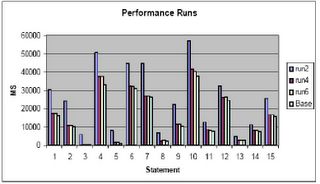
Memory Testing
In this chart I show:
Base Run: Run with 300 megabytes in lower memory
Run2: Run with 300 megabytes in upper memory
Run4: Run with 800 megabytes in upper memory
Run6: Run with 1200 megabytes in upper memory
In my opinion do not implement PAE unless larger memory sizes must be implemented than can be handled by the normal 4 gigabytes of lower memory. Unless you can double the available lower memory, that is, for a 1.7 gigabyte lower db_cache_size, to get similar performance, you must implement nearly a 3.4 gigabyte upper memory cache, you may not see a benefit, in fact, your performance may suffer. As can be seen from a comparison of the base run (300 megabytes lower memory) to run2 (run1 was to establish base load of the cache) performance actually decreased by 68% overall!
As you can see, even with 1200 megabytes in upper memory we still don’t get equal to the performance of 300 megabytes in lower memory (performance is still 7% worse than the base run). I can only conjecture at this point that the test:
1. Only utilized around 300 megabytes of cache or less
2. Should have performed more IO and had more users
3. All of the above
4. Shows you get a diminishing return as you add upper memory.
I tend to believe it is a combination of 1,2 and 4. There may be addition parameter tuning that could be applied to achieve better results (setting of the AWE_MEMORY_WINDOW parameter away from the default of 512M). If anyone knows of any, post them and I will see if I can get the client to retest.
1. Use the hugemem kernel in Linux RedHat 3.0 AS enterprise version.
2. Set up the shm file system or the ramfs filesystem to the size you want the upper memory for Oracle, plus about 10% or so.
3. Set use_indirect_data_buffers to true
For example:
· Mount the shmfs file system as root using command:
% mount -t shm shmfs -o nr_blocks=8388608 /dev/shm
· Set the shmmax parameter to half of RAM size
$ echo 3000000000 >/proc/sys/kernel/shmmax
· Set the init.ora parameter use_indirect_data_buffers=true
· Startup oracle.
However there are catches.
In recent testing it was found that unless the size of the memory used in the PAE extended memory configuration exceeded twice that available in the base 4 gigabytes, little was gained. However, the testing performed may not have been large enough to truly test the memory configuration. The test consisted of replay of a trace file through a testing tool to simulate multiple users performing statements. During this testing it was found that unless the memory is to be set at twice to three times the amount available in the base configuration using the PAE extensions may not be advisable.

Memory Testing
In this chart I show:
Base Run: Run with 300 megabytes in lower memory
Run2: Run with 300 megabytes in upper memory
Run4: Run with 800 megabytes in upper memory
Run6: Run with 1200 megabytes in upper memory
In my opinion do not implement PAE unless larger memory sizes must be implemented than can be handled by the normal 4 gigabytes of lower memory. Unless you can double the available lower memory, that is, for a 1.7 gigabyte lower db_cache_size, to get similar performance, you must implement nearly a 3.4 gigabyte upper memory cache, you may not see a benefit, in fact, your performance may suffer. As can be seen from a comparison of the base run (300 megabytes lower memory) to run2 (run1 was to establish base load of the cache) performance actually decreased by 68% overall!
As you can see, even with 1200 megabytes in upper memory we still don’t get equal to the performance of 300 megabytes in lower memory (performance is still 7% worse than the base run). I can only conjecture at this point that the test:
1. Only utilized around 300 megabytes of cache or less
2. Should have performed more IO and had more users
3. All of the above
4. Shows you get a diminishing return as you add upper memory.
I tend to believe it is a combination of 1,2 and 4. There may be addition parameter tuning that could be applied to achieve better results (setting of the AWE_MEMORY_WINDOW parameter away from the default of 512M). If anyone knows of any, post them and I will see if I can get the client to retest.
Wednesday, June 01, 2005
Are READ-ONLY Tablespaces Faster?
In a recent online article it was claimed that read-only tablespaces performed better than read-write tablespaces for SELECT type transactions. As could be predicted many folks jumped up and down about this saying this was not true. I decided rather than do a knee jerk reaction as these folks have done I would do something radical, I would test the premise using an actual database.
For my test I selected a 2,545,000 row table in a tablespace that has been placed on a 7X1 disk RAID-5 array attached to a 3 Ghtz CPU Linux Redhat 3.4 based server running Oracle Enterprise Version 10.1.0.3. The query was chosen to force a full table scan against the table by calculating an average of a non-indexed numeric field.
The table structure was:
SQL> desc merged_patient_counts_ru
Name--------------------------------------Null?----Type
----------------------------------------- -------- ----------------
SOURCE---------------------------------------------VARCHAR2(10)
PATIENT_NAME---------------------------------------VARCHAR2(128)
DMIS-----------------------------------------------VARCHAR2(4)
MEPRS----------------------------------------------VARCHAR2(32)
DIVISION_NAME--------------------------------------VARCHAR2(30)
MONTH----------------------------------------------VARCHAR2(6)
ICD9-----------------------------------------------VARCHAR2(9)
ICD9_CODE_DIAGNOSIS--------------------------------VARCHAR2(30)
ENCOUNTER_ADMISSION_DATETIME-----------------------DATE
ENCOUNTER_DISCHARGE_DATETIME-----------------------DATE
APP_COUNT------------------------------------------NUMBER
ADMIT_COUNT----------------------------------------NUMBER
ER_COUNT-------------------------------------------NUMBER
The SELECT statement used for the test was:
SQL> SELECT avg(app_count) FROM MERGED_PATIENT_COUNTS_RU;
AVG(APP_COUNT)
--------------
86.4054172
The explain plan and statistics (identical for both READ WRITE and READ ONLY executions) was:
Elapsed: 00:00:01.52
Execution Plan
----------------------------------------------------------
0---SELECT STATEMENT Optimizer=ALL_ROWS (Cost=1102 Card=1 Bytes=3)
1 0--SORT (AGGREGATE)
2 1--PX COORDINATOR
3 2--PX SEND* (QC (RANDOM)) OF ':TQ10000' :Q1000
4 3--SORT* (AGGREGATE) :Q1000
5 4--PX BLOCK* (ITERATOR) (Cost=1102 Card=2545000 Bytes :Q1000 =7635000)
6 5--TABLE ACCESS* (FULL) OF 'MERGED_PATIENT_COUNTS_R :Q1000
U' (TABLE) (Cost=1102 Card=2545000 Bytes=7635000)
3 PARALLEL_TO_SERIAL
4 PARALLEL_COMBINED_WITH_PARENT
5 PARALLEL_COMBINED_WITH_CHILD
6 PARALLEL_COMBINED_WITH_PARENT
Statistics
----------------------------------------------------------
12----recursive calls
0-----db block gets
21024-consistent gets
19312-physical reads
0-----redo size
418---bytes sent via SQL*Net to client
512---bytes received via SQL*Net from client
2-----SQL*Net roundtrips to/from client
53----sorts (memory)
0-----sorts (disk)
1-----rows processed
The process used for testing was:
1. Set timing on
2. Set autotrace on
3. Gather explain plans and statistics for both READ WRITE and READ ONLY runs, allowing statistics to stabilize.
4. Set autotrace off
5. Set tablespace status to READ WRITE
6. Execute SELECT 15 times
7. Set tablespace status to READ ONLY
8. Execute SELECT 15 times
The results are shown in table 1.
Reading Read Only Read Write
1-------1.49------1.56
2-------1.45------1.49
3-------1.39------1.37
4-------1.45------1.5
5-------1.5-------1.55
6-------1.3-------1.46
7-------1.43------1.5
8-------1.42------1.46
9-------1.35------1.38
10------1.4-------1.43
11------1.47------1.5
12------1.49------1.46
13------1.44------1.33
14------1.43------1.47
15------1.45------1.56
Avg-----1.430667--1.468
Table 1: Results from Performance Test of READ-ONLY Tablespace
As can be seen from the table, the performance of the READ-ONLY tablespace was marginally better (1.4307 verses 1.468 seconds on the average) than the READ-WRITE tablespace.
Based on these results, the article was correct in the assertion that the performance of READ-ONLY tablespaces is better than that of READ-WRITE tablespaces for SELECT transactions. While the performance difference is only a couple of percent it is still a measurable affect.
For my test I selected a 2,545,000 row table in a tablespace that has been placed on a 7X1 disk RAID-5 array attached to a 3 Ghtz CPU Linux Redhat 3.4 based server running Oracle Enterprise Version 10.1.0.3. The query was chosen to force a full table scan against the table by calculating an average of a non-indexed numeric field.
The table structure was:
SQL> desc merged_patient_counts_ru
Name--------------------------------------Null?----Type
----------------------------------------- -------- ----------------
SOURCE---------------------------------------------VARCHAR2(10)
PATIENT_NAME---------------------------------------VARCHAR2(128)
DMIS-----------------------------------------------VARCHAR2(4)
MEPRS----------------------------------------------VARCHAR2(32)
DIVISION_NAME--------------------------------------VARCHAR2(30)
MONTH----------------------------------------------VARCHAR2(6)
ICD9-----------------------------------------------VARCHAR2(9)
ICD9_CODE_DIAGNOSIS--------------------------------VARCHAR2(30)
ENCOUNTER_ADMISSION_DATETIME-----------------------DATE
ENCOUNTER_DISCHARGE_DATETIME-----------------------DATE
APP_COUNT------------------------------------------NUMBER
ADMIT_COUNT----------------------------------------NUMBER
ER_COUNT-------------------------------------------NUMBER
The SELECT statement used for the test was:
SQL> SELECT avg(app_count) FROM MERGED_PATIENT_COUNTS_RU;
AVG(APP_COUNT)
--------------
86.4054172
The explain plan and statistics (identical for both READ WRITE and READ ONLY executions) was:
Elapsed: 00:00:01.52
Execution Plan
----------------------------------------------------------
0---SELECT STATEMENT Optimizer=ALL_ROWS (Cost=1102 Card=1 Bytes=3)
1 0--SORT (AGGREGATE)
2 1--PX COORDINATOR
3 2--PX SEND* (QC (RANDOM)) OF ':TQ10000' :Q1000
4 3--SORT* (AGGREGATE) :Q1000
5 4--PX BLOCK* (ITERATOR) (Cost=1102 Card=2545000 Bytes :Q1000 =7635000)
6 5--TABLE ACCESS* (FULL) OF 'MERGED_PATIENT_COUNTS_R :Q1000
U' (TABLE) (Cost=1102 Card=2545000 Bytes=7635000)
3 PARALLEL_TO_SERIAL
4 PARALLEL_COMBINED_WITH_PARENT
5 PARALLEL_COMBINED_WITH_CHILD
6 PARALLEL_COMBINED_WITH_PARENT
Statistics
----------------------------------------------------------
12----recursive calls
0-----db block gets
21024-consistent gets
19312-physical reads
0-----redo size
418---bytes sent via SQL*Net to client
512---bytes received via SQL*Net from client
2-----SQL*Net roundtrips to/from client
53----sorts (memory)
0-----sorts (disk)
1-----rows processed
The process used for testing was:
1. Set timing on
2. Set autotrace on
3. Gather explain plans and statistics for both READ WRITE and READ ONLY runs, allowing statistics to stabilize.
4. Set autotrace off
5. Set tablespace status to READ WRITE
6. Execute SELECT 15 times
7. Set tablespace status to READ ONLY
8. Execute SELECT 15 times
The results are shown in table 1.
Reading Read Only Read Write
1-------1.49------1.56
2-------1.45------1.49
3-------1.39------1.37
4-------1.45------1.5
5-------1.5-------1.55
6-------1.3-------1.46
7-------1.43------1.5
8-------1.42------1.46
9-------1.35------1.38
10------1.4-------1.43
11------1.47------1.5
12------1.49------1.46
13------1.44------1.33
14------1.43------1.47
15------1.45------1.56
Avg-----1.430667--1.468
Table 1: Results from Performance Test of READ-ONLY Tablespace
As can be seen from the table, the performance of the READ-ONLY tablespace was marginally better (1.4307 verses 1.468 seconds on the average) than the READ-WRITE tablespace.
Based on these results, the article was correct in the assertion that the performance of READ-ONLY tablespaces is better than that of READ-WRITE tablespaces for SELECT transactions. While the performance difference is only a couple of percent it is still a measurable affect.
Sunday, May 29, 2005
Creating a Cross Tab Report
I see quite a few questions about creating a crosstab table. While working with a good friend, Gary Withrow, who works for Santa Cruz County, California, he showed me a great technique for doing crosstabs that he has given me permission to share. Essentially it involves using the capability of embedding expressions into the COUNT or other functions available in Oracle.
In 9i and above, of particular use in generating crosstabs is the CASE structure, for example:
-- Crosstab of owner and object_type
--
col owner format a10
set numwidth 8
set lines 132
set pages 50
select DECODE(GROUPING(a.owner), 1, 'All Owners',
a.owner) AS "Owner",
count(case when a.object_type = 'TABLE' then 1 else null end) "Tables",
count(case when a.object_type = 'INDEX' then 1 else null end) "Indexes",
count(case when a.object_type = 'PACKAGE' then 1 else null end) "Packages",
count(case when a.object_type = 'SEQUENCE' then 1 else null end) "Sequences",
count(case when a.object_type = 'TRIGGER' then 1 else null end) "Triggers",
count(case when a.object_type not in
('PACKAGE','TABLE','INDEX','SEQUENCE','TRIGGER') then 1 else null end) "Other",
count(case when 1 = 1 then 1 else null end) "Total"
from dba_objects a
group by rollup(a.owner)
/
The above SQL will generate a crosstab report on Object owner verses counts of the various type of objects they own as well as totals across all columns:
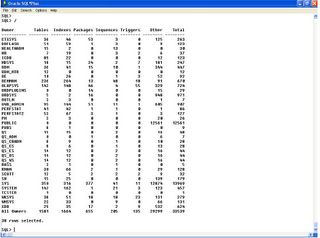
SQL Result
In 9i and above, of particular use in generating crosstabs is the CASE structure, for example:
-- Crosstab of owner and object_type
--
col owner format a10
set numwidth 8
set lines 132
set pages 50
select DECODE(GROUPING(a.owner), 1, 'All Owners',
a.owner) AS "Owner",
count(case when a.object_type = 'TABLE' then 1 else null end) "Tables",
count(case when a.object_type = 'INDEX' then 1 else null end) "Indexes",
count(case when a.object_type = 'PACKAGE' then 1 else null end) "Packages",
count(case when a.object_type = 'SEQUENCE' then 1 else null end) "Sequences",
count(case when a.object_type = 'TRIGGER' then 1 else null end) "Triggers",
count(case when a.object_type not in
('PACKAGE','TABLE','INDEX','SEQUENCE','TRIGGER') then 1 else null end) "Other",
count(case when 1 = 1 then 1 else null end) "Total"
from dba_objects a
group by rollup(a.owner)
/
The above SQL will generate a crosstab report on Object owner verses counts of the various type of objects they own as well as totals across all columns:

SQL Result
As you can see, this is a very useful technique.
In older versions of Oracle where the CASE is not available use DECODE instead:
select DECODE(GROUPING(a.owner), 1, 'All Owners',
a.owner) AS "Owner",
count(decode( a.object_type,'TABLE',1,null)) "Tables",
count(decode( a.object_type,'INDEX' ,1,null)) "Indexes",
count(decode( a.object_type,'PACKAGE',1,null)) "Packages",
count(decode( a.object_type,'SEQUENCE',1,null)) "Sequences",
count(decode( a.object_type,'TRIGGER',1,null)) "Triggers",
count(decode( a.object_type,'PACKAGE',null,'TABLE',null,'INDEX',null,'SEQUENCE',null,'TRIGGER',null, 1)) "Other",
count(1) "Total"
from dba_objects a
group by rollup(a.owner)
/
In older versions of Oracle where the CASE is not available use DECODE instead:
select DECODE(GROUPING(a.owner), 1, 'All Owners',
a.owner) AS "Owner",
count(decode( a.object_type,'TABLE',1,null)) "Tables",
count(decode( a.object_type,'INDEX' ,1,null)) "Indexes",
count(decode( a.object_type,'PACKAGE',1,null)) "Packages",
count(decode( a.object_type,'SEQUENCE',1,null)) "Sequences",
count(decode( a.object_type,'TRIGGER',1,null)) "Triggers",
count(decode( a.object_type,'PACKAGE',null,'TABLE',null,'INDEX',null,'SEQUENCE',null,'TRIGGER',null, 1)) "Other",
count(1) "Total"
from dba_objects a
group by rollup(a.owner)
/
I have tested this in 8i, 9i and 10g and it works in all versions.
Thanks Gary for finding it and sharing it!
Thanks Gary for finding it and sharing it!
Wednesday, May 25, 2005
Using a HASH Signature in Data Warehouses
On my current assignment I am dealing with slowly changing dimensions, I found an interesting technique I would like to share.
In data warehouses one item that can be difficult to deal with are slowly changing dimensions. Slowly changing dimensions are dimensions whose values may alter over time such as addresses, deployments, etc. Often it is a desire of the data warehouse manager to maintain a running history of these changes over time, this makes the dimension a type 2 dimension. The reason these are difficult to deal with is because determining what has changed becomes difficult if there are more than a few fields in the dimension. The data warehouse manager has the choice of a difficult, field by field verification of each field in the record or using some other form of field verification to determine if a record has changed in a dimension thus requiring a new record insertion. When the new record is inserted into a slowly changing dimension the old record is marked as invalid either by a flag or via a date field or set of date fields allowing for a bi-temporal dimension.
One method for finding out if a record has a changed field is to generate a CRC or a hash for the entire pertinent sections of the record, store this signature with the record and then on each record that is to be inserted, a signature is calculated for the important sections of the record. This new signature is compared to the stored signature and if the signatures match, the record is tossed, if the signature is changed, the new record is inserted, the old is marked as invalid and the new marked as the current record, if the new record matches none of the existing signatures, the record is inserted but no existing records are altered.
However, calculating a CRC or HASH can be difficult, unless you know something about what Oracle provides in the various packages contained in Oracle. For example the OUTLN_EDIT_PKG contains the GENERATE_SIGNATURE package. The GENERATE_SIGNATURE package creates a 32 byte hash signature for up to a 32k-1 sized string value passed to it either internally or via a procedure call. If the pass-in is from a procedure call from SQL then the length would be limited to 4000 bytes. Providing your critical columns are less than 4000 bytes concatenated length you can generate a signature that can be used to compare records, in this scenario, each date or number field should be converted using the appropriate function to a character equivalent.
To use the OUTLN_EDIT_PKG.GENERATE_SIGNATURE package the first thing to do is make sure your user that owns the schema for the data warehouse (DWH) has EXECUTE privilege on the OUTLN_EDIT_PKG:
From the owner of the OUTLN_EDIT_PKG, the user SYS, grant the proper privilege:
GRANT EXECUTE ON outln_edit_pkg TO;
In order to use the GENERATE_SIGNATURE package most effectively, I suggest wrapping it into a deterministic function, for example:
From the DWH user you could create a function similar to:
CREATE OR REPLACE FUNCTION get_sign (text VARCHAR2)
RETURN RAW
DETERMINISTIC
AS
signature RAW(32);
text2 VARCHAR2(32767);
BEGIN
text2:=text;
IF text2 IS NULL THEN
text2:='1';
END IF;
sys.outln_edit_pkg.generate_signature(text2,signature);
RETURN signature;
END;
/
Note that this is just a bare-bones function, exception checking should be added.
Notice I use a default value of '1' if the input value is null, because the function generates a hash signature you cannot pass it a null value, so in the case of a null value we change it to a 1, you of course could use any string value you desire, just be sure to document it!
Once you have a deterministic function you can either use it as an INSERT into a table column, or, use it to generate a function based index. By using a function based index and query re-write you can eliminate the need to have a column in the table. This allows you to regenerate the matching columns without having to update the complete dimension each time there may be columns added to the dimension. Also, there are performance benefits to using a function based index or an internal column over doing either a column by column match. Let's look at some examples:
First, we have our test table TEST, in this case I created it from the DBA_OBJECTS view using a simple CTAS.
SQL> DESC test
Name Null? Type
----------------------------------------- -------- -------------------
OWNER VARCHAR2(30)
OBJECT_NAME VARCHAR2(128)
SUBOBJECT_NAME VARCHAR2(30)
OBJECT_ID NUMBER
DATA_OBJECT_ID NUMBER
OBJECT_TYPE VARCHAR2(18)
CREATED DATE
LAST_DDL_TIME DATE
TIMESTAMP VARCHAR2(19)
STATUS VARCHAR2(7)
TEMPORARY VARCHAR2(1)
GENERATED VARCHAR2(1)
SECONDARY VARCHAR2(1)
SQL> SELECT COUNT(*) FROM test;
COUNT(*)
----------
32359
Once we have our test table, we create our function to call the GENERATE_SIGNATURE and then use it to create a function based index:
SQL> CREATE INDEX test_fbi ON test(get_sign(ownerobject_namesubobject_name));
Index created.
Before we can use query rewrite we must analyze the table and index as well as set the proper initialization parameters, (query_rewrite_enabled = true and query_rewrite_integrity = trusted).
SQL> ANALYZE TABLE test COMPUTE STATISTICS;
Table analyzed.
Let's look at a query that will use this index and see what the performance is like.
SQL> SELECT a.object_id FROM test a
2 WHERE
3 get_sign('SYSTEM''TEST''') = get_sign(a.ownera.object_namea.subobject_name);
OBJECT_ID
----------
35567
Elapsed: 00:00:00.00
Execution Plan
----------------------------------------------------------
0 SELECT STATEMENT Optimizer=CHOOSE (Cost=2 Card=324
Bytes=11016)
1 0 TABLE ACCESS (BY INDEX ROWID) OF 'TEST' (Cost=2 Card=324
Bytes=11016)
2 1 INDEX (RANGE SCAN) OF 'TEST_FBI' (NON-UNIQUE) (Cost=2
Card=129)
Statistics
----------------------------------------------------------
74 recursive calls
0 db block gets
14 consistent gets
1 physical reads
0 redo size
382 bytes sent via SQL*Net to client
499 bytes received via SQL*Net from client
2 SQL*Net roundtrips to/from client
0 sorts (memory)
0 sorts (disk)
1 rows processed
SQL> /
OBJECT_ID
----------
35567
Elapsed: 00:00:00.00
Execution Plan
----------------------------------------------------------
0 SELECT STATEMENT Optimizer=CHOOSE (Cost=2 Card=1 Bytes=34)
1 0 TABLE ACCESS (BY INDEX ROWID) OF 'TEST' (Cost=2 Card=1
Bytes=34)
2 1 INDEX (RANGE SCAN) OF 'TEST_FBI' (NON-UNIQUE) (Cost=2
Card=1)
Statistics
----------------------------------------------------------
0 recursive calls
0 db block gets
4 consistent gets
0 physical reads
0 redo size
382 bytes sent via SQL*Net to client
499 bytes received via SQL*Net from client
2 SQL*Net roundtrips to/from client
0 sorts (memory)
0 sorts (disk)
1 rows processed
SQL> /
OBJECT_ID
----------
35567
Elapsed: 00:00:00.00
Execution Plan
----------------------------------------------------------
0 SELECT STATEMENT Optimizer=CHOOSE (Cost=2 Card=1 Bytes=34)
1 0 TABLE ACCESS (BY INDEX ROWID) OF 'TEST' (Cost=2 Card=1
Bytes=34)
2 1 INDEX (RANGE SCAN) OF 'TEST_FBI' (NON-UNIQUE) (Cost=2
Card=1)
Statistics
----------------------------------------------------------
0 recursive calls
0 db block gets
4 consistent gets
0 physical reads
0 redo size
382 bytes sent via SQL*Net to client
499 bytes received via SQL*Net from client
2 SQL*Net roundtrips to/from client
0 sorts (memory)
0 sorts (disk)
1 rows processed
Now let’s drop the index and re-run our query to check performance without it:
SQL> DROP INDEX test_fbi;
Index dropped.
SQL> SELECT a.object_id FROM test a
2 WHERE
3 get_sign('SYSTEM''TEST''') = get_sign(a.ownera.object_namea.subobject_name);
OBJECT_ID
----------
35567
Elapsed: 00:00:01.04
Execution Plan
----------------------------------------------------------
0 SELECT STATEMENT Optimizer=CHOOSE (Cost=138 Card=324
Bytes=11016)
1 0 TABLE ACCESS (FULL) OF 'TEST' (Cost=138 Card=324
Bytes=11016)
Statistics
----------------------------------------------------------
243 recursive calls
0 db block gets
526 consistent gets
0 physical reads
0 redo size
382 bytes sent via SQL*Net to client
499 bytes received via SQL*Net from client
2 SQL*Net roundtrips to/from client
6 sorts (memory)
0 sorts (disk)
1 rows processed
SQL> /
OBJECT_ID
----------
35567
Elapsed: 00:00:01.03
Execution Plan
----------------------------------------------------------
0 SELECT STATEMENT Optimizer=CHOOSE (Cost=138 Card=324
Bytes=11016)
1 0 TABLE ACCESS (FULL) OF 'TEST' (Cost=138 Card=324
Bytes=11016)
Statistics
----------------------------------------------------------
0 recursive calls
0 db block gets
486 consistent gets
0 physical reads
0 redo size
382 bytes sent via SQL*Net to client
499 bytes received via SQL*Net from client
2 SQL*Net roundtrips to/from client
0 sorts (memory)
0 sorts (disk)
1 rows processed
SQL> SELECT a.object_id FROM test a
2 WHERE
3 get_sign('SYSTEM''TEST''') = get_sign(a.ownera.object_namea.subobject_name);
OBJECT_ID
----------
35567
Elapsed: 00:00:01.03
Execution Plan
----------------------------------------------------------
0 SELECT STATEMENT Optimizer=CHOOSE (Cost=132 Card=324
Bytes=11016)
1 0 TABLE ACCESS (FULL) OF 'TEST' (Cost=132 Card=324
Bytes=11016)
Statistics
----------------------------------------------------------
0 recursive calls
0 db block gets
446 consistent gets
0 physical reads
0 redo size
382 bytes sent via SQL*Net to client
499 bytes received via SQL*Net from client
2 SQL*Net roundtrips to/from client
0 sorts (memory)
0 sorts (disk)
1 rows processed
As you can see the simple SELECT statement using the function based index performs in too small a time interval for Oracle's timing command to measure (the test was run several times, with identical results), while the SELECT not able to use the index takes a consistent time just over 1 second (the tests were run several times, and the times averaged).
As you can see even when the table is read from memory (physical reads = 0) the consistent gets (446) are much higher than those from the index based selects ( consistent gets 4) and the index based query performs better even though it has 74 recursive calls. The recursive calls were only present on the first run, after that the recursive calls were 0.
In situations where the call is repeated many times, such as for loading dimension tables, then the performance improvement should be dramatic.
In other tests, using an added column SIGNATURE, a RAW(32), and an index on the column we can get identical performance to a function based index and table combination:
First, using a modified SELECT to go against the SIGNATURE column and no index:
SQL> alter table test add signature raw(32);
Table altered.
SQL> update test a set a.signature=get_sign(a.ownera.object_namea.subobject_name);
32359 rows updated.
SQL> commit;
Commit complete.
SQL> set autotrace on
SQL> set timing on
SQL> SELECT a.object_id FROM test a
2 WHERE
3 get_sign('SYSTEM''TEST''') = a.signature;
OBJECT_ID
----------
35567
Elapsed: 00:00:00.08
Execution Plan
----------------------------------------------------------
0 SELECT STATEMENT Optimizer=CHOOSE (Cost=116 Card=324
Bytes=7128)
1 0 TABLE ACCESS (FULL) OF 'TEST' (Cost=116 Card=324
Bytes=7128)
Statistics
----------------------------------------------------------
277 recursive calls
0 db block gets
534 consistent gets
3 physical reads
0 redo size
382 bytes sent via SQL*Net to client
499 bytes received via SQL*Net from client
2 SQL*Net roundtrips to/from client
4 sorts (memory)
0 sorts (disk)
1 rows processed
SQL> /
OBJECT_ID
----------
35567
Elapsed: 00:00:00.07
Execution Plan
----------------------------------------------------------
0 SELECT STATEMENT Optimizer=CHOOSE (Cost=116 Card=324
Bytes=7128)
1 0 TABLE ACCESS (FULL) OF 'TEST' (Cost=116 Card=324
Bytes=7128)
Statistics
----------------------------------------------------------
0 recursive calls
0 db block gets
486 consistent gets
0 physical reads
0 redo size
382 bytes sent via SQL*Net to client
499 bytes received via SQL*Net from client
2 SQL*Net roundtrips to/from client
0 sorts (memory)
0 sorts (disk)
1 rows processed
So without an index the use of a special SIGNATURE column performs worse than the table and function based index combination. However, when we add an index, the performance is the same from the timing and the statistics.
SQL> create index test_ui on test(signature);
Index created.
Elapsed: 00:00:00.07
SQL> analyze table test compute statistics;
Table analyzed.
Elapsed: 00:00:02.05
SQL> SELECT a.object_id FROM test a
2 WHERE
3 get_sign('SYSTEM''TEST''') = a.signature;
OBJECT_ID
----------
35567
Elapsed: 00:00:00.00
Execution Plan
----------------------------------------------------------
0 SELECT STATEMENT Optimizer=CHOOSE (Cost=2 Card=1 Bytes=20)
1 0 TABLE ACCESS (BY INDEX ROWID) OF 'TEST' (Cost=2 Card=1
Bytes=20)
2 1 INDEX (RANGE SCAN) OF 'TEST_UI' (NON-UNIQUE) (Cost=2
Card=1)
Statistics
----------------------------------------------------------
26 recursive calls
0 db block gets
8 consistent gets
0 physical reads
0 redo size
382 bytes sent via SQL*Net to client
499 bytes received via SQL*Net from client
2 SQL*Net roundtrips to/from client
0 sorts (memory)
0 sorts (disk)
1 rows processed
SQL> /
OBJECT_ID
----------
35567
Elapsed: 00:00:00.00
Execution Plan
----------------------------------------------------------
0 SELECT STATEMENT Optimizer=CHOOSE (Cost=2 Card=1 Bytes=20)
1 0 TABLE ACCESS (BY INDEX ROWID) OF 'TEST' (Cost=2 Card=1
Bytes=20)
2 1 INDEX (RANGE SCAN) OF 'TEST_UI' (NON-UNIQUE) (Cost=2
Card=1)
Statistics
----------------------------------------------------------
0 recursive calls
0 db block gets
4 consistent gets
0 physical reads
0 redo size
382 bytes sent via SQL*Net to client
499 bytes received via SQL*Net from client
2 SQL*Net roundtrips to/from client
0 sorts (memory)
0 sorts (disk)
1 rows processed
SQL> /
OBJECT_ID
----------
35567
Elapsed: 00:00:00.00
Execution Plan
----------------------------------------------------------
0 SELECT STATEMENT Optimizer=CHOOSE (Cost=2 Card=1 Bytes=20)
1 0 TABLE ACCESS (BY INDEX ROWID) OF 'TEST' (Cost=2 Card=1
Bytes=20)
2 1 INDEX (RANGE SCAN) OF 'TEST_UI' (NON-UNIQUE) (Cost=2
Card=1)
Statistics
----------------------------------------------------------
0 recursive calls
0 db block gets
4 consistent gets
0 physical reads
0 redo size
382 bytes sent via SQL*Net to client
499 bytes received via SQL*Net from client
2 SQL*Net roundtrips to/from client
0 sorts (memory)
0 sorts (disk)
1 rows processed
However, if there is a chance that columns will be added or removed using a column inside the dimension will require the entire dimension to be updated a row at a time. In low row-count dimensions this may be acceptable, in large dimensions with thousands of rows it may be better to use the table and function based index solution.
In data warehouses one item that can be difficult to deal with are slowly changing dimensions. Slowly changing dimensions are dimensions whose values may alter over time such as addresses, deployments, etc. Often it is a desire of the data warehouse manager to maintain a running history of these changes over time, this makes the dimension a type 2 dimension. The reason these are difficult to deal with is because determining what has changed becomes difficult if there are more than a few fields in the dimension. The data warehouse manager has the choice of a difficult, field by field verification of each field in the record or using some other form of field verification to determine if a record has changed in a dimension thus requiring a new record insertion. When the new record is inserted into a slowly changing dimension the old record is marked as invalid either by a flag or via a date field or set of date fields allowing for a bi-temporal dimension.
One method for finding out if a record has a changed field is to generate a CRC or a hash for the entire pertinent sections of the record, store this signature with the record and then on each record that is to be inserted, a signature is calculated for the important sections of the record. This new signature is compared to the stored signature and if the signatures match, the record is tossed, if the signature is changed, the new record is inserted, the old is marked as invalid and the new marked as the current record, if the new record matches none of the existing signatures, the record is inserted but no existing records are altered.
However, calculating a CRC or HASH can be difficult, unless you know something about what Oracle provides in the various packages contained in Oracle. For example the OUTLN_EDIT_PKG contains the GENERATE_SIGNATURE package. The GENERATE_SIGNATURE package creates a 32 byte hash signature for up to a 32k-1 sized string value passed to it either internally or via a procedure call. If the pass-in is from a procedure call from SQL then the length would be limited to 4000 bytes. Providing your critical columns are less than 4000 bytes concatenated length you can generate a signature that can be used to compare records, in this scenario, each date or number field should be converted using the appropriate function to a character equivalent.
To use the OUTLN_EDIT_PKG.GENERATE_SIGNATURE package the first thing to do is make sure your user that owns the schema for the data warehouse (DWH) has EXECUTE privilege on the OUTLN_EDIT_PKG:
From the owner of the OUTLN_EDIT_PKG, the user SYS, grant the proper privilege:
GRANT EXECUTE ON outln_edit_pkg TO
In order to use the GENERATE_SIGNATURE package most effectively, I suggest wrapping it into a deterministic function, for example:
From the DWH user you could create a function similar to:
CREATE OR REPLACE FUNCTION get_sign (text VARCHAR2)
RETURN RAW
DETERMINISTIC
AS
signature RAW(32);
text2 VARCHAR2(32767);
BEGIN
text2:=text;
IF text2 IS NULL THEN
text2:='1';
END IF;
sys.outln_edit_pkg.generate_signature(text2,signature);
RETURN signature;
END;
/
Note that this is just a bare-bones function, exception checking should be added.
Notice I use a default value of '1' if the input value is null, because the function generates a hash signature you cannot pass it a null value, so in the case of a null value we change it to a 1, you of course could use any string value you desire, just be sure to document it!
Once you have a deterministic function you can either use it as an INSERT into a table column, or, use it to generate a function based index. By using a function based index and query re-write you can eliminate the need to have a column in the table. This allows you to regenerate the matching columns without having to update the complete dimension each time there may be columns added to the dimension. Also, there are performance benefits to using a function based index or an internal column over doing either a column by column match. Let's look at some examples:
First, we have our test table TEST, in this case I created it from the DBA_OBJECTS view using a simple CTAS.
SQL> DESC test
Name Null? Type
----------------------------------------- -------- -------------------
OWNER VARCHAR2(30)
OBJECT_NAME VARCHAR2(128)
SUBOBJECT_NAME VARCHAR2(30)
OBJECT_ID NUMBER
DATA_OBJECT_ID NUMBER
OBJECT_TYPE VARCHAR2(18)
CREATED DATE
LAST_DDL_TIME DATE
TIMESTAMP VARCHAR2(19)
STATUS VARCHAR2(7)
TEMPORARY VARCHAR2(1)
GENERATED VARCHAR2(1)
SECONDARY VARCHAR2(1)
SQL> SELECT COUNT(*) FROM test;
COUNT(*)
----------
32359
Once we have our test table, we create our function to call the GENERATE_SIGNATURE and then use it to create a function based index:
SQL> CREATE INDEX test_fbi ON test(get_sign(ownerobject_namesubobject_name));
Index created.
Before we can use query rewrite we must analyze the table and index as well as set the proper initialization parameters, (query_rewrite_enabled = true and query_rewrite_integrity = trusted).
SQL> ANALYZE TABLE test COMPUTE STATISTICS;
Table analyzed.
Let's look at a query that will use this index and see what the performance is like.
SQL> SELECT a.object_id FROM test a
2 WHERE
3 get_sign('SYSTEM''TEST''') = get_sign(a.ownera.object_namea.subobject_name);
OBJECT_ID
----------
35567
Elapsed: 00:00:00.00
Execution Plan
----------------------------------------------------------
0 SELECT STATEMENT Optimizer=CHOOSE (Cost=2 Card=324
Bytes=11016)
1 0 TABLE ACCESS (BY INDEX ROWID) OF 'TEST' (Cost=2 Card=324
Bytes=11016)
2 1 INDEX (RANGE SCAN) OF 'TEST_FBI' (NON-UNIQUE) (Cost=2
Card=129)
Statistics
----------------------------------------------------------
74 recursive calls
0 db block gets
14 consistent gets
1 physical reads
0 redo size
382 bytes sent via SQL*Net to client
499 bytes received via SQL*Net from client
2 SQL*Net roundtrips to/from client
0 sorts (memory)
0 sorts (disk)
1 rows processed
SQL> /
OBJECT_ID
----------
35567
Elapsed: 00:00:00.00
Execution Plan
----------------------------------------------------------
0 SELECT STATEMENT Optimizer=CHOOSE (Cost=2 Card=1 Bytes=34)
1 0 TABLE ACCESS (BY INDEX ROWID) OF 'TEST' (Cost=2 Card=1
Bytes=34)
2 1 INDEX (RANGE SCAN) OF 'TEST_FBI' (NON-UNIQUE) (Cost=2
Card=1)
Statistics
----------------------------------------------------------
0 recursive calls
0 db block gets
4 consistent gets
0 physical reads
0 redo size
382 bytes sent via SQL*Net to client
499 bytes received via SQL*Net from client
2 SQL*Net roundtrips to/from client
0 sorts (memory)
0 sorts (disk)
1 rows processed
SQL> /
OBJECT_ID
----------
35567
Elapsed: 00:00:00.00
Execution Plan
----------------------------------------------------------
0 SELECT STATEMENT Optimizer=CHOOSE (Cost=2 Card=1 Bytes=34)
1 0 TABLE ACCESS (BY INDEX ROWID) OF 'TEST' (Cost=2 Card=1
Bytes=34)
2 1 INDEX (RANGE SCAN) OF 'TEST_FBI' (NON-UNIQUE) (Cost=2
Card=1)
Statistics
----------------------------------------------------------
0 recursive calls
0 db block gets
4 consistent gets
0 physical reads
0 redo size
382 bytes sent via SQL*Net to client
499 bytes received via SQL*Net from client
2 SQL*Net roundtrips to/from client
0 sorts (memory)
0 sorts (disk)
1 rows processed
Now let’s drop the index and re-run our query to check performance without it:
SQL> DROP INDEX test_fbi;
Index dropped.
SQL> SELECT a.object_id FROM test a
2 WHERE
3 get_sign('SYSTEM''TEST''') = get_sign(a.ownera.object_namea.subobject_name);
OBJECT_ID
----------
35567
Elapsed: 00:00:01.04
Execution Plan
----------------------------------------------------------
0 SELECT STATEMENT Optimizer=CHOOSE (Cost=138 Card=324
Bytes=11016)
1 0 TABLE ACCESS (FULL) OF 'TEST' (Cost=138 Card=324
Bytes=11016)
Statistics
----------------------------------------------------------
243 recursive calls
0 db block gets
526 consistent gets
0 physical reads
0 redo size
382 bytes sent via SQL*Net to client
499 bytes received via SQL*Net from client
2 SQL*Net roundtrips to/from client
6 sorts (memory)
0 sorts (disk)
1 rows processed
SQL> /
OBJECT_ID
----------
35567
Elapsed: 00:00:01.03
Execution Plan
----------------------------------------------------------
0 SELECT STATEMENT Optimizer=CHOOSE (Cost=138 Card=324
Bytes=11016)
1 0 TABLE ACCESS (FULL) OF 'TEST' (Cost=138 Card=324
Bytes=11016)
Statistics
----------------------------------------------------------
0 recursive calls
0 db block gets
486 consistent gets
0 physical reads
0 redo size
382 bytes sent via SQL*Net to client
499 bytes received via SQL*Net from client
2 SQL*Net roundtrips to/from client
0 sorts (memory)
0 sorts (disk)
1 rows processed
SQL> SELECT a.object_id FROM test a
2 WHERE
3 get_sign('SYSTEM''TEST''') = get_sign(a.ownera.object_namea.subobject_name);
OBJECT_ID
----------
35567
Elapsed: 00:00:01.03
Execution Plan
----------------------------------------------------------
0 SELECT STATEMENT Optimizer=CHOOSE (Cost=132 Card=324
Bytes=11016)
1 0 TABLE ACCESS (FULL) OF 'TEST' (Cost=132 Card=324
Bytes=11016)
Statistics
----------------------------------------------------------
0 recursive calls
0 db block gets
446 consistent gets
0 physical reads
0 redo size
382 bytes sent via SQL*Net to client
499 bytes received via SQL*Net from client
2 SQL*Net roundtrips to/from client
0 sorts (memory)
0 sorts (disk)
1 rows processed
As you can see the simple SELECT statement using the function based index performs in too small a time interval for Oracle's timing command to measure (the test was run several times, with identical results), while the SELECT not able to use the index takes a consistent time just over 1 second (the tests were run several times, and the times averaged).
As you can see even when the table is read from memory (physical reads = 0) the consistent gets (446) are much higher than those from the index based selects ( consistent gets 4) and the index based query performs better even though it has 74 recursive calls. The recursive calls were only present on the first run, after that the recursive calls were 0.
In situations where the call is repeated many times, such as for loading dimension tables, then the performance improvement should be dramatic.
In other tests, using an added column SIGNATURE, a RAW(32), and an index on the column we can get identical performance to a function based index and table combination:
First, using a modified SELECT to go against the SIGNATURE column and no index:
SQL> alter table test add signature raw(32);
Table altered.
SQL> update test a set a.signature=get_sign(a.ownera.object_namea.subobject_name);
32359 rows updated.
SQL> commit;
Commit complete.
SQL> set autotrace on
SQL> set timing on
SQL> SELECT a.object_id FROM test a
2 WHERE
3 get_sign('SYSTEM''TEST''') = a.signature;
OBJECT_ID
----------
35567
Elapsed: 00:00:00.08
Execution Plan
----------------------------------------------------------
0 SELECT STATEMENT Optimizer=CHOOSE (Cost=116 Card=324
Bytes=7128)
1 0 TABLE ACCESS (FULL) OF 'TEST' (Cost=116 Card=324
Bytes=7128)
Statistics
----------------------------------------------------------
277 recursive calls
0 db block gets
534 consistent gets
3 physical reads
0 redo size
382 bytes sent via SQL*Net to client
499 bytes received via SQL*Net from client
2 SQL*Net roundtrips to/from client
4 sorts (memory)
0 sorts (disk)
1 rows processed
SQL> /
OBJECT_ID
----------
35567
Elapsed: 00:00:00.07
Execution Plan
----------------------------------------------------------
0 SELECT STATEMENT Optimizer=CHOOSE (Cost=116 Card=324
Bytes=7128)
1 0 TABLE ACCESS (FULL) OF 'TEST' (Cost=116 Card=324
Bytes=7128)
Statistics
----------------------------------------------------------
0 recursive calls
0 db block gets
486 consistent gets
0 physical reads
0 redo size
382 bytes sent via SQL*Net to client
499 bytes received via SQL*Net from client
2 SQL*Net roundtrips to/from client
0 sorts (memory)
0 sorts (disk)
1 rows processed
So without an index the use of a special SIGNATURE column performs worse than the table and function based index combination. However, when we add an index, the performance is the same from the timing and the statistics.
SQL> create index test_ui on test(signature);
Index created.
Elapsed: 00:00:00.07
SQL> analyze table test compute statistics;
Table analyzed.
Elapsed: 00:00:02.05
SQL> SELECT a.object_id FROM test a
2 WHERE
3 get_sign('SYSTEM''TEST''') = a.signature;
OBJECT_ID
----------
35567
Elapsed: 00:00:00.00
Execution Plan
----------------------------------------------------------
0 SELECT STATEMENT Optimizer=CHOOSE (Cost=2 Card=1 Bytes=20)
1 0 TABLE ACCESS (BY INDEX ROWID) OF 'TEST' (Cost=2 Card=1
Bytes=20)
2 1 INDEX (RANGE SCAN) OF 'TEST_UI' (NON-UNIQUE) (Cost=2
Card=1)
Statistics
----------------------------------------------------------
26 recursive calls
0 db block gets
8 consistent gets
0 physical reads
0 redo size
382 bytes sent via SQL*Net to client
499 bytes received via SQL*Net from client
2 SQL*Net roundtrips to/from client
0 sorts (memory)
0 sorts (disk)
1 rows processed
SQL> /
OBJECT_ID
----------
35567
Elapsed: 00:00:00.00
Execution Plan
----------------------------------------------------------
0 SELECT STATEMENT Optimizer=CHOOSE (Cost=2 Card=1 Bytes=20)
1 0 TABLE ACCESS (BY INDEX ROWID) OF 'TEST' (Cost=2 Card=1
Bytes=20)
2 1 INDEX (RANGE SCAN) OF 'TEST_UI' (NON-UNIQUE) (Cost=2
Card=1)
Statistics
----------------------------------------------------------
0 recursive calls
0 db block gets
4 consistent gets
0 physical reads
0 redo size
382 bytes sent via SQL*Net to client
499 bytes received via SQL*Net from client
2 SQL*Net roundtrips to/from client
0 sorts (memory)
0 sorts (disk)
1 rows processed
SQL> /
OBJECT_ID
----------
35567
Elapsed: 00:00:00.00
Execution Plan
----------------------------------------------------------
0 SELECT STATEMENT Optimizer=CHOOSE (Cost=2 Card=1 Bytes=20)
1 0 TABLE ACCESS (BY INDEX ROWID) OF 'TEST' (Cost=2 Card=1
Bytes=20)
2 1 INDEX (RANGE SCAN) OF 'TEST_UI' (NON-UNIQUE) (Cost=2
Card=1)
Statistics
----------------------------------------------------------
0 recursive calls
0 db block gets
4 consistent gets
0 physical reads
0 redo size
382 bytes sent via SQL*Net to client
499 bytes received via SQL*Net from client
2 SQL*Net roundtrips to/from client
0 sorts (memory)
0 sorts (disk)
1 rows processed
However, if there is a chance that columns will be added or removed using a column inside the dimension will require the entire dimension to be updated a row at a time. In low row-count dimensions this may be acceptable, in large dimensions with thousands of rows it may be better to use the table and function based index solution.
Friday, May 20, 2005
It was the best of times...
I had a bit of a start the other day. I had a call from my brother in Florida telling me my Father was in the hospital for some "tests". Turns out his heart, which has been beating fiercely for nearly 70 years, has decided to take a rest every now and then. Probably he'll need a pace-maker, no big deal. No big deal, right, it gave me pause to think.
Over my life I've taken antibiotics, had inoculations (more than I care to remember courtesy of Uncle Sam), been in the hospital for stitches, an occasional kidney stone, etc. Even 80 years ago I might be dead instead of writing this. I know for a fact both my daughters and my wife, the central facets of my life, would be dead. Various infections, a blocked bowel requiring an emergency re-section, other things that we would take no notice of, polio, small pox, a plethora of deadlies would have stolen them from me, if not visa-versa.
People fantasize about simpler times. They can keep them. My Mother (god rest her) lost a brother, my Uncle, lost a son, my wife's paternal grandmother lost two children. Good old days, right. My father-in-law, a retired doctor, told the story of a patient who had come in complaining of shortness of breath, a check showed walking pneumonia, a quick prescription and poof! no more problem, 40 years earlier, it would have been a death sentence more than likely.
Perhaps we live in an age of information overload, where our lives are filled with stress and we run hither and yon after things our grandparents couldn't have conceived of. My Great grandmother, who passed away at 105 years of age, saw from wagon trains to space shuttles, all-in-all an incredible thing.
So many people seem to be longing for this age to end, whether it be through the "rapture" or whatever religious apocalyptic vision they have. They seem to fear how far we've come and how far we are likely to go. Many have forgotten history, how many-many times in the past the world has been a much more evil place than it is right now. Now we see the evil, in full color and sound, while before it could require generations for it to be seen.
I for one would not trade the current time for any I could think of in history. That we are standing on the brink of average life-times greater than 100 years is wonderful, maybe if we have longer lives we won't be so greedy with our time, maybe we will take the time to appreciate the good things instead of spending so much energy fleeing the bad. Maybe we will take the time to truly teach our children what they need to live, not just what they need to get by.
Anyway, just a few stray thoughts on this Friday in spring.
Over my life I've taken antibiotics, had inoculations (more than I care to remember courtesy of Uncle Sam), been in the hospital for stitches, an occasional kidney stone, etc. Even 80 years ago I might be dead instead of writing this. I know for a fact both my daughters and my wife, the central facets of my life, would be dead. Various infections, a blocked bowel requiring an emergency re-section, other things that we would take no notice of, polio, small pox, a plethora of deadlies would have stolen them from me, if not visa-versa.
People fantasize about simpler times. They can keep them. My Mother (god rest her) lost a brother, my Uncle, lost a son, my wife's paternal grandmother lost two children. Good old days, right. My father-in-law, a retired doctor, told the story of a patient who had come in complaining of shortness of breath, a check showed walking pneumonia, a quick prescription and poof! no more problem, 40 years earlier, it would have been a death sentence more than likely.
Perhaps we live in an age of information overload, where our lives are filled with stress and we run hither and yon after things our grandparents couldn't have conceived of. My Great grandmother, who passed away at 105 years of age, saw from wagon trains to space shuttles, all-in-all an incredible thing.
So many people seem to be longing for this age to end, whether it be through the "rapture" or whatever religious apocalyptic vision they have. They seem to fear how far we've come and how far we are likely to go. Many have forgotten history, how many-many times in the past the world has been a much more evil place than it is right now. Now we see the evil, in full color and sound, while before it could require generations for it to be seen.
I for one would not trade the current time for any I could think of in history. That we are standing on the brink of average life-times greater than 100 years is wonderful, maybe if we have longer lives we won't be so greedy with our time, maybe we will take the time to appreciate the good things instead of spending so much energy fleeing the bad. Maybe we will take the time to truly teach our children what they need to live, not just what they need to get by.
Anyway, just a few stray thoughts on this Friday in spring.
Wednesday, May 04, 2005
On the Demise of DBAs
Much is being said recently about how much the DBA job is changing. How soon there won't be a real need for hard-core DBAs. In a recent keynote (I was unfortunately called to a client site and it was given in my stead by David Scott, the President of the GOUSER (Georgia Oracle User) group) I addressed this issue. In an analysis of the changing DBA role I was able to identify that we have gone from the basic 13 items listed in the Version 6 Oracle Administrators guide for a description of the DBA job, to at least 2 dozen responsibilities as of 10g. The original list looked like so:
1. Installing and upgrading Oracle server and application tools.
2. Allocating system storage and planning future storage requirements for the database.
3. Creating primary database storage structures once developers have designed an application.
4. Creating primary database objects (tables, views, indexes) once the application designers have designed an application.
5. Modifying the database structure as necessary, from information given by application developers.
6. Enrolling users and maintaining system security.
7. Ensuring compliance with Oracle licensing agreements.
8. Controlling and monitoring user access to the database.
9. Monitoring and optimizing the performance of the database.
10. Planning for backup and recovery of database information.
11. Maintaining archived data on appropriate storage devices.
12. Backing up and restoring the database.
13. Contacting Oracle Corporation for technical support
The revised list:
1. Installing and upgrading Oracle server and application tools.
2. Allocating system storage and planning future storage requirements for the database.
3. Creating primary database storage structures once developers have designed an application.
4. Creating primary database objects (tables, views, indexes) once the application designers have designed an application.
5. Modifying the database structure as necessary, from information given by application developers.
6. Enrolling users and maintaining system security.
7. Ensuring compliance with Oracle licensing agreements.
8. Controlling and monitoring user access to the database.
9. Planning for backup and recovery of database information.
10. Maintaining archived data on appropriate storage devices.
11. Contacting Oracle Corporation for technical support.
12. Management of object related features.
13. Determination of LOB storage options.
14. Assistance with RAID configuration.
15. Determination of proper index strategy (normal, reverse, IOT, bitmapped)
16. Education of Developers in Oracle features and their use.
17. Management of distributed environments.
19. Management of parallel server and parallel query.
20. Determine and manage partitions and sub-partitions.
21. Determine proper use of outlines and SQL profiles
22. Create, manage and maintain resource groups,
23. Create manage and maintain global temporary tables.
24. Create and manage materialized views, summaries and snapshots.
25. Monitoring and managing the automatic and dynamic sizing parameters.
26. Monitoring and managing the automated UNDO (it isn’t set and forget)
27. Monitoring and tuning RAC environments, especially the cluster interconnect.
28. Manage and maintain fine grained auditing (HIPPA/SOX requirements)
29. Manage and maintain row level security28. Manage and maintain fine grained access controls.
Add to the above: Monitor and maintain application servers, web servers, connection managers, LDAP and other servers as well as the entire client to database environment in many shops the DBA does it all.
Now there may be arguments on both sides about some of the above rolling into some of the original listed general categories, but when some commands require multiple pages to just describe (CREATE TABLE for example), let alone show meaningful examples for, well, they need to be broken out as a responsibility.
However, as the features are improved I have no doubt they will automate the complete management of SQL, tables and indexes and tablespaces as well as some memory and tuning parameters. So the DBA will give up on items 12, 13, 24 and 25. Gee, how will the other 25 (26 if you include the final one added above) items fill our time? The death of the DBA has been greatly overstated.
A case in point. I am involved in producing some roll ups for use in feeding the Oracle Warehouse builder for a 10g DWH project. The roll ups are used to pe-flatten and tune the feeds, tuning is difficult if you use 100% OWB to do the flattening. Anyway during verification that the flattening was being effective I decided to test the Enterprise Manager SQL Tuning Advisor. Before tuning, the particular view being examined required 10 minutes to produce a count of its records, I put the SQL Tuning Advisor onto it and 8 minutes later it came up with its recommendations. I implemented them and then tried the count again. 39 minutes later it came back with the count. It didn't exactly produce the desired performance improvement. To be fair, on the one I ran through before this, it cut a 4 minute run to a 2 minute run on a different view. Could I have done a better job tunng it manually? We shall see (as soon as I figure out how to get the "SQL Profile" it created removed!)
So, needless to say, I feel safe in saying the imminent demise of the DBA though much sought after by Oracle Corporate (I kid you not, I was at a ECO conference and sat through a keynote by a VP of Oracle who obviously didn't realize he was talking to a room full of DBAS, which with great relish described how Oracle was attempting to do away with the job of DBA) is still a long way off. It seems for each job they "take away" they give us three more.
1. Installing and upgrading Oracle server and application tools.
2. Allocating system storage and planning future storage requirements for the database.
3. Creating primary database storage structures once developers have designed an application.
4. Creating primary database objects (tables, views, indexes) once the application designers have designed an application.
5. Modifying the database structure as necessary, from information given by application developers.
6. Enrolling users and maintaining system security.
7. Ensuring compliance with Oracle licensing agreements.
8. Controlling and monitoring user access to the database.
9. Monitoring and optimizing the performance of the database.
10. Planning for backup and recovery of database information.
11. Maintaining archived data on appropriate storage devices.
12. Backing up and restoring the database.
13. Contacting Oracle Corporation for technical support
The revised list:
1. Installing and upgrading Oracle server and application tools.
2. Allocating system storage and planning future storage requirements for the database.
3. Creating primary database storage structures once developers have designed an application.
4. Creating primary database objects (tables, views, indexes) once the application designers have designed an application.
5. Modifying the database structure as necessary, from information given by application developers.
6. Enrolling users and maintaining system security.
7. Ensuring compliance with Oracle licensing agreements.
8. Controlling and monitoring user access to the database.
9. Planning for backup and recovery of database information.
10. Maintaining archived data on appropriate storage devices.
11. Contacting Oracle Corporation for technical support.
12. Management of object related features.
13. Determination of LOB storage options.
14. Assistance with RAID configuration.
15. Determination of proper index strategy (normal, reverse, IOT, bitmapped)
16. Education of Developers in Oracle features and their use.
17. Management of distributed environments.
19. Management of parallel server and parallel query.
20. Determine and manage partitions and sub-partitions.
21. Determine proper use of outlines and SQL profiles
22. Create, manage and maintain resource groups,
23. Create manage and maintain global temporary tables.
24. Create and manage materialized views, summaries and snapshots.
25. Monitoring and managing the automatic and dynamic sizing parameters.
26. Monitoring and managing the automated UNDO (it isn’t set and forget)
27. Monitoring and tuning RAC environments, especially the cluster interconnect.
28. Manage and maintain fine grained auditing (HIPPA/SOX requirements)
29. Manage and maintain row level security28. Manage and maintain fine grained access controls.
Add to the above: Monitor and maintain application servers, web servers, connection managers, LDAP and other servers as well as the entire client to database environment in many shops the DBA does it all.
Now there may be arguments on both sides about some of the above rolling into some of the original listed general categories, but when some commands require multiple pages to just describe (CREATE TABLE for example), let alone show meaningful examples for, well, they need to be broken out as a responsibility.
However, as the features are improved I have no doubt they will automate the complete management of SQL, tables and indexes and tablespaces as well as some memory and tuning parameters. So the DBA will give up on items 12, 13, 24 and 25. Gee, how will the other 25 (26 if you include the final one added above) items fill our time? The death of the DBA has been greatly overstated.
A case in point. I am involved in producing some roll ups for use in feeding the Oracle Warehouse builder for a 10g DWH project. The roll ups are used to pe-flatten and tune the feeds, tuning is difficult if you use 100% OWB to do the flattening. Anyway during verification that the flattening was being effective I decided to test the Enterprise Manager SQL Tuning Advisor. Before tuning, the particular view being examined required 10 minutes to produce a count of its records, I put the SQL Tuning Advisor onto it and 8 minutes later it came up with its recommendations. I implemented them and then tried the count again. 39 minutes later it came back with the count. It didn't exactly produce the desired performance improvement. To be fair, on the one I ran through before this, it cut a 4 minute run to a 2 minute run on a different view. Could I have done a better job tunng it manually? We shall see (as soon as I figure out how to get the "SQL Profile" it created removed!)
So, needless to say, I feel safe in saying the imminent demise of the DBA though much sought after by Oracle Corporate (I kid you not, I was at a ECO conference and sat through a keynote by a VP of Oracle who obviously didn't realize he was talking to a room full of DBAS, which with great relish described how Oracle was attempting to do away with the job of DBA) is still a long way off. It seems for each job they "take away" they give us three more.
Saturday, April 30, 2005
More Random Data
I have been catching a load of grief over my random data post. Folks didn't like my procedure for loading the data, and folks didn't like that I said the EXCEPTIONS INTO seemed to be exhibiting anomalous behavior.
As to the first point, was I attempting to create a picture perfect, bullet proof general purpose data loader that was elegant, fully self documenting and blessed by all and sundry Oracle deities? No. Was I attempting to solve an immediate problem as quickly as possible? Yes. Did the procedure work for that? Yes.
As to the EXCEPTIONS clause, my understanding of an exception is that you get a ordinal value, a "zero" case, then, when duplicates (in the case of a primary key) are found, they are exceptions however, as has been shown to me, Oracle treats all occurrences, ordinal or not, as exceptions. So, Oracle is working as programmed. Do I agree with that? No. However, it has been that way for years. And darned of they will change it for me, imagine that!
In the SQL Manual they have a terse:
"exceptions_clause - Specify a table into which Oracle places the rowids of all rows violating the constraint. If you omit schema, then Oracle assumes the exceptions table is in your own schema. If you omit this clause altogether, then Oracle assumes that the table is named EXCEPTIONS. The exceptions table must be on your local database."
If you don't have an ordinal row, how can subsequent ones violate it?
In the Administrator's guide they provide a quick overview of the EXCEPTIONS clause with a small example. The small example (a single violation) does show two rows being mapped in the exceptions table. Taking some snippets from there:
“All rows that violate a constraint must be either updated or deleted from the table containing the constraint.” Which is incorrect. What if one of the rows is the proper row? Do I delete or update it? In the situation where there are multiple identical rows, except for a bogus artificial key, this statement would lead someone to believe all the rows needed to be deleted. The section only confuses the matter more if someone comes in with a misunderstanding about how the exception table is populated. A second line: “When managing exceptions, the goal is to eliminate all exceptions in your exception report table.”
Also seems to indicate that every line in the exceptions table is an exception, when there are clear cases where the line will be a valid row, not an exception. It all ties back to the definition of exception.
Here is the complete reference for those that doubt my veracity:
http://download-west.oracle.com/docs/cd/B10501_01/server.920/a96521/general.htm#13282
If I ask, in the following series of numbers how many unique, single digit values are there?
1,1,1,2,2,2,3,3,3,4
The answer is 4 (1,2,3,4) and 6 duplications of the numbers, not 1 (4) and 7 exceptions as Oracle’s exception processing would answer.
If you go into it with my initial understanding of what an exception is, then the documentation seems to confirm that, if you go into it with Oracle's understanding of an exception it proves that. I have asked that a simple definition of what Oracle defines an exception to be to be added if possible to the manuals (SQL and Aministrators guide) however I am meeting with extreme resistance.
So, the behavior noted in my previous blog is not a bug, just the way Oracle works. However, you need to take this into account when dealing with Oracle's EXCEPTIONS INTO clause. I would hate for some one working on critical data to use the same definition of exception I did and delete some very important data. When using the EXCEPTIONS INTO clause, be sure to test on a test platform with non-critical data any UPDATE or DELETE activities planned and completely understand the outcome before applying the usage to production data.
Oh, and for those that want to de-dup tables, accoring to Tom Kyte, here is the fastest method known to man:
http://asktom.oracle.com/pls/ask/f?p=4950:8:::::F4950_P8_DISPLAYID:1224636375004#29270521597750
As to the first point, was I attempting to create a picture perfect, bullet proof general purpose data loader that was elegant, fully self documenting and blessed by all and sundry Oracle deities? No. Was I attempting to solve an immediate problem as quickly as possible? Yes. Did the procedure work for that? Yes.
As to the EXCEPTIONS clause, my understanding of an exception is that you get a ordinal value, a "zero" case, then, when duplicates (in the case of a primary key) are found, they are exceptions however, as has been shown to me, Oracle treats all occurrences, ordinal or not, as exceptions. So, Oracle is working as programmed. Do I agree with that? No. However, it has been that way for years. And darned of they will change it for me, imagine that!
In the SQL Manual they have a terse:
"exceptions_clause - Specify a table into which Oracle places the rowids of all rows violating the constraint. If you omit schema, then Oracle assumes the exceptions table is in your own schema. If you omit this clause altogether, then Oracle assumes that the table is named EXCEPTIONS. The exceptions table must be on your local database."
If you don't have an ordinal row, how can subsequent ones violate it?
In the Administrator's guide they provide a quick overview of the EXCEPTIONS clause with a small example. The small example (a single violation) does show two rows being mapped in the exceptions table. Taking some snippets from there:
“All rows that violate a constraint must be either updated or deleted from the table containing the constraint.” Which is incorrect. What if one of the rows is the proper row? Do I delete or update it? In the situation where there are multiple identical rows, except for a bogus artificial key, this statement would lead someone to believe all the rows needed to be deleted. The section only confuses the matter more if someone comes in with a misunderstanding about how the exception table is populated. A second line: “When managing exceptions, the goal is to eliminate all exceptions in your exception report table.”
Also seems to indicate that every line in the exceptions table is an exception, when there are clear cases where the line will be a valid row, not an exception. It all ties back to the definition of exception.
Here is the complete reference for those that doubt my veracity:
http://download-west.oracle.com/docs/cd/B10501_01/server.920/a96521/general.htm#13282
If I ask, in the following series of numbers how many unique, single digit values are there?
1,1,1,2,2,2,3,3,3,4
The answer is 4 (1,2,3,4) and 6 duplications of the numbers, not 1 (4) and 7 exceptions as Oracle’s exception processing would answer.
If you go into it with my initial understanding of what an exception is, then the documentation seems to confirm that, if you go into it with Oracle's understanding of an exception it proves that. I have asked that a simple definition of what Oracle defines an exception to be to be added if possible to the manuals (SQL and Aministrators guide) however I am meeting with extreme resistance.
So, the behavior noted in my previous blog is not a bug, just the way Oracle works. However, you need to take this into account when dealing with Oracle's EXCEPTIONS INTO clause. I would hate for some one working on critical data to use the same definition of exception I did and delete some very important data. When using the EXCEPTIONS INTO clause, be sure to test on a test platform with non-critical data any UPDATE or DELETE activities planned and completely understand the outcome before applying the usage to production data.
Oh, and for those that want to de-dup tables, accoring to Tom Kyte, here is the fastest method known to man:
http://asktom.oracle.com/pls/ask/f?p=4950:8:::::F4950_P8_DISPLAYID:1224636375004#29270521597750
Wednesday, April 27, 2005
Random Data
Had an interesting bit of work come my way yesterday. For testing we needed a 600 row table with four fields. The first field had X possible entries, the second had Y and the third had Z with the last entry being a simulated count, one third of which had to be zero.
My thought was to use varray types and populate them with the various possible values, then use dbms_random.value to generate the index values for the various varrays. The count column was just a truncated call to dbms_random in the range of 1 to 600. All of this was of course placed into a procedure with the ability to give it the number of required values.
Essentially:
create or replace procedure load_random_data(cnt in number) as
define varray types;
define varrays using types;
declare loop interator;
begin
initialize varrays with allowed values;
start loop 1 to cnt times
set dbms_rabdom seed to loop interator;
insert using calls to dbms_random.value(1-n) as the indice for the various varrays;
end loop;
commit;
end;
This generated the rows and then using a primary key constraint with the exceptions clause I would then be able to delete the duplicates leaving my good rows.
create exceptions table using $ORACLE_HOME/rdbms/admin/utlexcpt.sql
alter table tab_z add constraint primary key (x,y,z) exceptions into exceptions;
delete tab_z where rowid in (select row_id from exceptions);
Well, the procedure worked as planned. However, when I attempted to use the exceptions clause on a concatenated key it did not work after the first run where it left 99 out of 600 rows it ended up rejecting all of the rows in the table on all subsequent runs! I tried it several times, each time it rejected every row in the table, even though I could clearly see by examining the first hundred or so rows that they weren't all duplicates.
The left me the old fallback of using the selection of the rowid values and then deleteing the min(rowid) values:
delete from tab_z Z
where z.rowid > (
select min(z2.rowid) from tab_z Z2
where Z.X = Z2.X and
Z.Y=Z2.Y and
Z.Z=Z2.Z);
This worked as expected. Of course you have to generate X(n1)*Z(n2)*Y(n3)*tab(n4) rows it seems to get the n4 number of rows where n1-3 are the count of the number of unique values for the given column and n4 is the number of rows in the table. For example, for my 600 rows I ended up needing to generate 30000 rows to get 600 non-dupes on the three index values. In the 30000 rows I ended up with 600 sets of duplicates in the range of 9-80 duplicates per entry. I re-seeded the random function using the loop interator with each pass through the loop.
Of course after all the work with dbms_random I figured out that it would have been easier just to cycle through the possible values for the varrays in a nested looping structure. Of course that would have led to a non-random ordered table. For the work we were doing it would have been ok to do it that way, but I can see other situations where the random technique would be beneficial.
My thought was to use varray types and populate them with the various possible values, then use dbms_random.value to generate the index values for the various varrays. The count column was just a truncated call to dbms_random in the range of 1 to 600. All of this was of course placed into a procedure with the ability to give it the number of required values.
Essentially:
create or replace procedure load_random_data(cnt in number) as
define varray types;
define varrays using types;
declare loop interator;
begin
initialize varrays with allowed values;
start loop 1 to cnt times
set dbms_rabdom seed to loop interator;
insert using calls to dbms_random.value(1-n) as the indice for the various varrays;
end loop;
commit;
end;
This generated the rows and then using a primary key constraint with the exceptions clause I would then be able to delete the duplicates leaving my good rows.
create exceptions table using $ORACLE_HOME/rdbms/admin/utlexcpt.sql
alter table tab_z add constraint primary key (x,y,z) exceptions into exceptions;
delete tab_z where rowid in (select row_id from exceptions);
Well, the procedure worked as planned. However, when I attempted to use the exceptions clause on a concatenated key it did not work after the first run where it left 99 out of 600 rows it ended up rejecting all of the rows in the table on all subsequent runs! I tried it several times, each time it rejected every row in the table, even though I could clearly see by examining the first hundred or so rows that they weren't all duplicates.
The left me the old fallback of using the selection of the rowid values and then deleteing the min(rowid) values:
delete from tab_z Z
where z.rowid > (
select min(z2.rowid) from tab_z Z2
where Z.X = Z2.X and
Z.Y=Z2.Y and
Z.Z=Z2.Z);
This worked as expected. Of course you have to generate X(n1)*Z(n2)*Y(n3)*tab(n4) rows it seems to get the n4 number of rows where n1-3 are the count of the number of unique values for the given column and n4 is the number of rows in the table. For example, for my 600 rows I ended up needing to generate 30000 rows to get 600 non-dupes on the three index values. In the 30000 rows I ended up with 600 sets of duplicates in the range of 9-80 duplicates per entry. I re-seeded the random function using the loop interator with each pass through the loop.
Of course after all the work with dbms_random I figured out that it would have been easier just to cycle through the possible values for the varrays in a nested looping structure. Of course that would have led to a non-random ordered table. For the work we were doing it would have been ok to do it that way, but I can see other situations where the random technique would be beneficial.
Tuesday, April 26, 2005
Ad Nauseum
Ad Nauseum, an interesting term. Usually used to indicate that a subject has continued beyond its useful lifetime. Several experts seem to want to continue on such subjects as index rebuilding, clustering factor discussions and updating data dictionary tables ad nauseum. I for one find it odd they have so much free time. Perhaps I should be complemented they feel this drive to snap at my heals so much.
Note to Oracle: Perhaps you should find more for your experts to do, they seem to be caught in a rut.
I have stated my opinions on the subjects of indexes, clustering factors and data dictionary tables. I see no need to reiterate them. I have recanted incorrect advice I have given in the past. It is time to move on. Aren't there more interesting topics? Or perhaps they find, rather like Pro Wrestling draws a number of viewers, a good bash fest draws in more readers. I guess that is what happens when there is no technical content they can present as their own.
Learning is an iterative process, and during that time mistakes can and will be made. However if every time someone makes a misstatement or an error we bash them about the head and shoulders and then remind them of their past mistakes at every opportunity, they will soon cease learning altogether. Makes me wonder how these other experts treat their co-workers and clients, if they berate them at every opportunity it is no wonder they have so much free time.
As for me, I have too much to do to worry overmuch about what tripe they are currently dishing up, in fact, I plan not to respond to them any longer as I am reminded of an old country saying:
"It does no good to get down in the mud and wrestle with pigs, you can't win and the pigs enjoy it."
So I shall spend my time working for my clients, researching and documenting Oracle behaviors, tips and techniques and acquiring new skills. Perhaps if these other experts would spend as much energy on putting out new material as they do circling the same issues over and over we would all benefit.
Note to Oracle: Perhaps you should find more for your experts to do, they seem to be caught in a rut.
I have stated my opinions on the subjects of indexes, clustering factors and data dictionary tables. I see no need to reiterate them. I have recanted incorrect advice I have given in the past. It is time to move on. Aren't there more interesting topics? Or perhaps they find, rather like Pro Wrestling draws a number of viewers, a good bash fest draws in more readers. I guess that is what happens when there is no technical content they can present as their own.
Learning is an iterative process, and during that time mistakes can and will be made. However if every time someone makes a misstatement or an error we bash them about the head and shoulders and then remind them of their past mistakes at every opportunity, they will soon cease learning altogether. Makes me wonder how these other experts treat their co-workers and clients, if they berate them at every opportunity it is no wonder they have so much free time.
As for me, I have too much to do to worry overmuch about what tripe they are currently dishing up, in fact, I plan not to respond to them any longer as I am reminded of an old country saying:
"It does no good to get down in the mud and wrestle with pigs, you can't win and the pigs enjoy it."
So I shall spend my time working for my clients, researching and documenting Oracle behaviors, tips and techniques and acquiring new skills. Perhaps if these other experts would spend as much energy on putting out new material as they do circling the same issues over and over we would all benefit.
Saturday, April 16, 2005
Standing By
In several posts at various Oracle related forums I have been taken to task for standing by Don Burleson. In the past I was also taken to task for standing by others such as Rich Niemiec. I have been repeatedly asked why I don't attack, belittle or otherwise "take on" many other experts.
Well, first, I believe people are entitled to their opinions.
Second, both of the above I consider to be friends. Where I come from you stand by your friends in public. Now in private I may tell them they are incorrect and suggest they alter their viewpoints, postings or papers, but not in a public forum where it could humiliate or embarrass them.
Others seem to enjoy laying about with wild abandon when someone is mistaken, falling all over each other like the spider creatures eating their wounded in the remake of "Lost In Space". They seem to enjoy laying scorn and abuse on others. This behavior is counter productive and leads to outright fear on the part of many neophytes about writing papers, posting answers or helping anyone anywhere online.
Of course the very folks that attack with guns blazing seem most upset when you fight back, rather like a school yard bully. They expect you to roll over and show your soft spots like a cur giving into a stronger dog. Sorry, can't do that, never did it, won't do it.
I will admit mistakes, and correct them when possible. I have done this in the past and will do it in the future. However I am a strong believer in positive feedback being more beneficial than negative feedback. I rarely listen to feedback that begins something like "You worthless git, your book/paper/presentation/tip is all bloody trash". However, I always open to "Mike, the tip is interesting, but here is a problem with what you have said", I may argue a bit, but I will listen and try to improve my knowledge and abilities. Be that as it may, you attack me in a public forum, I have no compunction about taking you to task over it, also in a public forum.
Anyway, enough rant.
Well, first, I believe people are entitled to their opinions.
Second, both of the above I consider to be friends. Where I come from you stand by your friends in public. Now in private I may tell them they are incorrect and suggest they alter their viewpoints, postings or papers, but not in a public forum where it could humiliate or embarrass them.
Others seem to enjoy laying about with wild abandon when someone is mistaken, falling all over each other like the spider creatures eating their wounded in the remake of "Lost In Space". They seem to enjoy laying scorn and abuse on others. This behavior is counter productive and leads to outright fear on the part of many neophytes about writing papers, posting answers or helping anyone anywhere online.
Of course the very folks that attack with guns blazing seem most upset when you fight back, rather like a school yard bully. They expect you to roll over and show your soft spots like a cur giving into a stronger dog. Sorry, can't do that, never did it, won't do it.
I will admit mistakes, and correct them when possible. I have done this in the past and will do it in the future. However I am a strong believer in positive feedback being more beneficial than negative feedback. I rarely listen to feedback that begins something like "You worthless git, your book/paper/presentation/tip is all bloody trash". However, I always open to "Mike, the tip is interesting, but here is a problem with what you have said", I may argue a bit, but I will listen and try to improve my knowledge and abilities. Be that as it may, you attack me in a public forum, I have no compunction about taking you to task over it, also in a public forum.
Anyway, enough rant.
Wednesday, April 13, 2005
Going Solid
(Note: This is a blog on a specific technical topic, solid state disk drives, any responses not germane to this topic will be deleted.)
Back in my days as a Nuclear Machinest Mate/ELT on board submarines in the USN, there was a condition known as "going solid" which referred to a controlled process where by the bubble of steam in the reactor coolant loop pressurizer was slowly compressed to force it back into water thus making the entire reactor loop solid with water. Under controlled conditions this was done for various reasons, if it happened by accident it was not good as you would have lost pressure control for the reactor cooling loop. So going solid in those days was both good (if done as a controlled exercise) and possibly very bad (if allowed to happen accidentally.) But that is not what I am referring to in this blog as going solid.
What I am referring to is the new trend (well, actually it has been around since the 90's) to move databases to solid state drives. In almost all cases this form of going solid leads to measurable performance improvements by elimination of the various latencies involved with the standard computer disk drive assemblies. Of course the removal of disk rotational and arm latencies is just one of the things that solid state drives bring to the table, the other is access to your data at near-memory speeds.
What solid state drives mean to an application is that if your application is currently suffering from IO problems some if not all of them are relieved. However, the benefits are a bit lop sided depending on the predominant type of IO wait your system is seeing. If your IO waits are due to contention during the retrieval of information (SELECT statements) then you can expect a dramatic increase in performance. In tests against standard disk arrays using the TPC-H benchmark I was able to achieve a 176 times performance increase for primarily retrieval based transactions. For what I refer to as IUD transactions (INSERT, UPDATE and DELETE) only a 30-60% performance improvement was shown.
Remember that retrieval requires no additional processing once the data location is returned from the search process, while IUD involves data verification via indexes, constraints and other internal processes that tend to slow down the process thus reducing the performance gains. Does solid state disk (SSD) technology eliminate waits? Of course not, what it does is reduce their duration. For example, looking at load times:
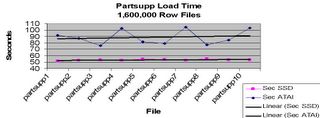
Load Graph Using SSD
You can from the graph that load times for standard disks was on the average about 30% slower than the load times for an equivalent SSD drive array.
However looking at query response time, we see an entirely different picture:
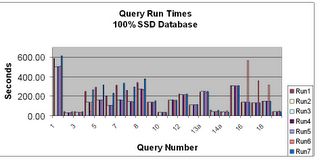
SSD Queries
When we compare the SSD times with the same queries, same OS settings and same layout on standard drives, we see a dramatic difference (notice the scale on this next graph is logarithmic, not linear):
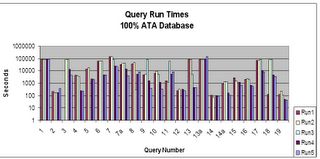
ATA Queries
The second graph really drives home the point, I had to make it logarithmic because of the great differences in time duration for the various queries when going to disks. What required a couple of hours (running the 20+ base queries) on SSD required 3 days on the average for the ATA drives.
Of course we don't remove the IO waits by using SSD, their duration is simply reduced to the point they are not a big factor anymore. Of course, for scalability and such you still will need to tune SQL.
Some how, I see going solid in our future.
For a complete copy of the testing look at:
http://www.rampant-books.com/book_2005_1_ssd.htm
For the latest in Solid State Drives look at:
http://www.texmemsys.com/
Back in my days as a Nuclear Machinest Mate/ELT on board submarines in the USN, there was a condition known as "going solid" which referred to a controlled process where by the bubble of steam in the reactor coolant loop pressurizer was slowly compressed to force it back into water thus making the entire reactor loop solid with water. Under controlled conditions this was done for various reasons, if it happened by accident it was not good as you would have lost pressure control for the reactor cooling loop. So going solid in those days was both good (if done as a controlled exercise) and possibly very bad (if allowed to happen accidentally.) But that is not what I am referring to in this blog as going solid.
What I am referring to is the new trend (well, actually it has been around since the 90's) to move databases to solid state drives. In almost all cases this form of going solid leads to measurable performance improvements by elimination of the various latencies involved with the standard computer disk drive assemblies. Of course the removal of disk rotational and arm latencies is just one of the things that solid state drives bring to the table, the other is access to your data at near-memory speeds.
What solid state drives mean to an application is that if your application is currently suffering from IO problems some if not all of them are relieved. However, the benefits are a bit lop sided depending on the predominant type of IO wait your system is seeing. If your IO waits are due to contention during the retrieval of information (SELECT statements) then you can expect a dramatic increase in performance. In tests against standard disk arrays using the TPC-H benchmark I was able to achieve a 176 times performance increase for primarily retrieval based transactions. For what I refer to as IUD transactions (INSERT, UPDATE and DELETE) only a 30-60% performance improvement was shown.
Remember that retrieval requires no additional processing once the data location is returned from the search process, while IUD involves data verification via indexes, constraints and other internal processes that tend to slow down the process thus reducing the performance gains. Does solid state disk (SSD) technology eliminate waits? Of course not, what it does is reduce their duration. For example, looking at load times:
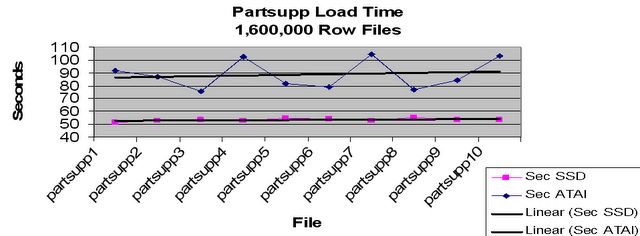
Load Graph Using SSD
You can from the graph that load times for standard disks was on the average about 30% slower than the load times for an equivalent SSD drive array.
However looking at query response time, we see an entirely different picture:

SSD Queries
When we compare the SSD times with the same queries, same OS settings and same layout on standard drives, we see a dramatic difference (notice the scale on this next graph is logarithmic, not linear):

ATA Queries
The second graph really drives home the point, I had to make it logarithmic because of the great differences in time duration for the various queries when going to disks. What required a couple of hours (running the 20+ base queries) on SSD required 3 days on the average for the ATA drives.
Of course we don't remove the IO waits by using SSD, their duration is simply reduced to the point they are not a big factor anymore. Of course, for scalability and such you still will need to tune SQL.
Some how, I see going solid in our future.
For a complete copy of the testing look at:
http://www.rampant-books.com/book_2005_1_ssd.htm
For the latest in Solid State Drives look at:
http://www.texmemsys.com/
Monday, April 11, 2005
Why No Comments
(Note: I have modified this blog, I stated in the first verison that the SQL execution plans didn't change, when actually we can't be sure, but from the bug reports and other statistics we gathered I had inferred this, sorry if I misled anyone.)
I have received a couple of rejoiners about not allowing comments on my last blog. I did this because I found that the people who were responding to other posts spent more time being negative than positive, more time tearing down then building up and more time to offer vindictive rather than constructive comments.
This entry, as the last, will not be allowing comments because I want it to stand by itself. When I make the next blog after this one, I will open it back up for comments. I indulged a bit of vindictive myself with my last blog, maybe it was justfied, maybe not. I just get tired of the self righteous experts out there that believe their way is the only way. I try to embrace whatever technologies will help my clients.
Let me explain how a typical client visit goes:
1. We get the call and issue a contract for the visit, let's say for a Database Healthcheck
2. The contract is assigned to a Senior DBA and it is determined to be either an onsite or remote job.
3. If onsite we go to the client and first review what problems they perceive they are having. This helps establish the parameters of the initial monitoring.
4. We then establish connectivity to the instance(s) to be monitored.
5. Using Oracle provided and self generated monitoring scripts the database is analyzed, usually for (not a complete list):
A. Wait events
B. IO spread and timing
C. Log events
D. Memory statistics and parameters
E. SQL usage
F. SQL statements which require too many resources
G. Access statistics if in 9i and 10g, otherwise major problem SQL is analyzed.
H. Parameter settings
6. The server is monitored for:
A. Disk IO
B. CPU usage statistics
C. Memory usage statistics
7. The system is reviewed for security and backup and recovery processes.
Usually one or more of the above causes the need for additional monitoring or analysis in a specific area, as time allows, this is done.
Using all of the above data, a detailed list of recommendations is prepared with actionable statements giving specific fixes and time estimates for the fixes. The "low hanging fruit" such as improvements to settings, server settings, addition of needed indexes, etc, are done, in a test environment if possible and the results analyzed (again if time and site procedures allow). The results of the analysis of the changes and the original data is used to prepare a final report with the actions suggested, actions taken, the results of the actions and the list of recommendations that still need to be implemented. Usually we include a whitepaper or two about the various techniques we may recommend.
We never go onsite and start issuing recommendations without analysis. The last time I saw this technique used was from Oracle support three days ago. Without looking at detailed statistics or analysis they suggested increasing the shared pool (even though all of it wasn't being used), increasing the database cache size (even though 30% of the buffers were free in V$BH), turn off MTS (we had already tried this and it made no difference) and several other Oracle "Silver Bullets", none of which made the slightest difference in the problem. It turned out the problem was that 10g has a default value of TRUE for the parameter _B_TREE_BITMAP_PLANS which, even though the application had been running for months, suddenly started making a difference. Note there were no bitmaps in the database other than those that Oracle had in their schemas. They offered no proofs, no explanations, just a sigh of relief that this Oracle Silver Bullet fixed the problem.
This is a classic example of why "simple", "repeatable" proofs can be hazardous. By all of the indications there was nothing wrong at the database level. No waits or events showed the problem, even plans for the SQL appaerently didn't change, since it was a systemic problem (any SQL causes the issue not just specific SQL) we didn't check plans before the fix was provided by Oracle support. Any SQL activity resulted in CPU spiking of up to 70-80%. However, the setting of this undocumented parameter had a profound effect on the optimizer and overall database performance. If an Oracle analyst hadn't "seen this before" and remembered this "Silver Bullet" the client would still be having problems. The troubled queries dropped form taking several minutes to 6 seconds.
When going from 7 to 8 to 8i to 9i to 10g Oracle has been notorious for resetting their undocumented parameters from true to false, false to true, adding new undocumented and documented parameters and of course varying the various number based parameters to get the right "mix". You have to understand this in order to trouble shoot Oracle performance problems. Even within the same release some of these change based on platform.
This is the point I am trying to make about single user, small database proofs, they are great for documenting Oracle behavior on single user, small databases. They would have been completely useless in this case.
Unless the "test" environment reached whatever trigger size caused the parameter to take precedence you could type in various proofs until your fingers were bloody and they would not have helped one iota.
In order to fully perceive a problem you have to look at it carefully, from both an atomic level and a holistic level or you will miss the tru solution in many cases. In others, you may know the solution (the application needs to be re-written) but it may be impossible to implement, either because of time or resource limits or because of support limits from vendors. In this case you must be prepared to treat symptoms to allow the database to function at an acceptable level.
That is the long and short of it.
I have received a couple of rejoiners about not allowing comments on my last blog. I did this because I found that the people who were responding to other posts spent more time being negative than positive, more time tearing down then building up and more time to offer vindictive rather than constructive comments.
This entry, as the last, will not be allowing comments because I want it to stand by itself. When I make the next blog after this one, I will open it back up for comments. I indulged a bit of vindictive myself with my last blog, maybe it was justfied, maybe not. I just get tired of the self righteous experts out there that believe their way is the only way. I try to embrace whatever technologies will help my clients.
Let me explain how a typical client visit goes:
1. We get the call and issue a contract for the visit, let's say for a Database Healthcheck
2. The contract is assigned to a Senior DBA and it is determined to be either an onsite or remote job.
3. If onsite we go to the client and first review what problems they perceive they are having. This helps establish the parameters of the initial monitoring.
4. We then establish connectivity to the instance(s) to be monitored.
5. Using Oracle provided and self generated monitoring scripts the database is analyzed, usually for (not a complete list):
A. Wait events
B. IO spread and timing
C. Log events
D. Memory statistics and parameters
E. SQL usage
F. SQL statements which require too many resources
G. Access statistics if in 9i and 10g, otherwise major problem SQL is analyzed.
H. Parameter settings
6. The server is monitored for:
A. Disk IO
B. CPU usage statistics
C. Memory usage statistics
7. The system is reviewed for security and backup and recovery processes.
Usually one or more of the above causes the need for additional monitoring or analysis in a specific area, as time allows, this is done.
Using all of the above data, a detailed list of recommendations is prepared with actionable statements giving specific fixes and time estimates for the fixes. The "low hanging fruit" such as improvements to settings, server settings, addition of needed indexes, etc, are done, in a test environment if possible and the results analyzed (again if time and site procedures allow). The results of the analysis of the changes and the original data is used to prepare a final report with the actions suggested, actions taken, the results of the actions and the list of recommendations that still need to be implemented. Usually we include a whitepaper or two about the various techniques we may recommend.
We never go onsite and start issuing recommendations without analysis. The last time I saw this technique used was from Oracle support three days ago. Without looking at detailed statistics or analysis they suggested increasing the shared pool (even though all of it wasn't being used), increasing the database cache size (even though 30% of the buffers were free in V$BH), turn off MTS (we had already tried this and it made no difference) and several other Oracle "Silver Bullets", none of which made the slightest difference in the problem. It turned out the problem was that 10g has a default value of TRUE for the parameter _B_TREE_BITMAP_PLANS which, even though the application had been running for months, suddenly started making a difference. Note there were no bitmaps in the database other than those that Oracle had in their schemas. They offered no proofs, no explanations, just a sigh of relief that this Oracle Silver Bullet fixed the problem.
This is a classic example of why "simple", "repeatable" proofs can be hazardous. By all of the indications there was nothing wrong at the database level. No waits or events showed the problem, even plans for the SQL appaerently didn't change, since it was a systemic problem (any SQL causes the issue not just specific SQL) we didn't check plans before the fix was provided by Oracle support. Any SQL activity resulted in CPU spiking of up to 70-80%. However, the setting of this undocumented parameter had a profound effect on the optimizer and overall database performance. If an Oracle analyst hadn't "seen this before" and remembered this "Silver Bullet" the client would still be having problems. The troubled queries dropped form taking several minutes to 6 seconds.
When going from 7 to 8 to 8i to 9i to 10g Oracle has been notorious for resetting their undocumented parameters from true to false, false to true, adding new undocumented and documented parameters and of course varying the various number based parameters to get the right "mix". You have to understand this in order to trouble shoot Oracle performance problems. Even within the same release some of these change based on platform.
This is the point I am trying to make about single user, small database proofs, they are great for documenting Oracle behavior on single user, small databases. They would have been completely useless in this case.
Unless the "test" environment reached whatever trigger size caused the parameter to take precedence you could type in various proofs until your fingers were bloody and they would not have helped one iota.
In order to fully perceive a problem you have to look at it carefully, from both an atomic level and a holistic level or you will miss the tru solution in many cases. In others, you may know the solution (the application needs to be re-written) but it may be impossible to implement, either because of time or resource limits or because of support limits from vendors. In this case you must be prepared to treat symptoms to allow the database to function at an acceptable level.
That is the long and short of it.

Subscribe to:
Posts (Atom)