Added 4/4/2006 - Did a bit more probing via the 10gR2 explain plan tool. What Oracle actually does with the 1=2 is replace it with the predicate NULL IS NOT NULL. Simply use this instead of the 1=2 to eliminate some parsing and confusion in your code. This also seems to indicate you can replace the 1=1 with NULL IS NULL. Anyway, it's been some interesting research.
Finally having some spare time I decided to perform a few more tests on the 1=2 situation. In actuality it seems to be another case of Oracle explain plans not actually matching what is happening in the database.
Observe the following:
SQL> create table test as select * from dba_objects;
Table created.
SQL> select count(*) from test;
COUNT(*)
----------
50115
SQL> create index test_idx on test(object_id);
Index created.
SQL> analyze table test compute statistics;
Table analyzed.
SQL> set autotrace on
SQL> select count(object_id) from test where 1=2;
COUNT(OBJECT_ID)
----------------
0
Execution Plan
----------------------------------------------------------
0 SELECT STATEMENT Optimizer=ALL_ROWS (Cost=23 Card=1 Bytes=4)
1 0 SORT (AGGREGATE)
2 1 FILTER
3 2 INDEX (FAST FULL SCAN) OF 'TEST_IDX' (INDEX) (Cost=23
Card=50115 Bytes=200460)
Statistics
----------------------------------------------------------
1 recursive calls
0 db block gets
0 consistent gets
0 physical reads
0 redo size
310 bytes sent via SQL*Net to client
496 bytes received via SQL*Net from client
2 SQL*Net roundtrips to/from client
0 sorts (memory)
0 sorts (disk)
1 rows processed
If we base our decision on cost, we see a cost of 23, but the true cost is in the statistics where it required only one recursive call, no db gets, consistent gets or physical reads. Now, if we flush the cache and shared pool we see the following:
SQL> alter system flush buffer_cache;
System altered.
SQL> alter system flush shared_pool;
System altered.
SQL> select count(object_id) from test where 1=2;
COUNT(OBJECT_ID)
----------------
0
Execution Plan
----------------------------------------------------------
0 SELECT STATEMENT Optimizer=ALL_ROWS (Cost=23 Card=1 Bytes=4)
1 0 SORT (AGGREGATE)
2 1 FILTER
3 2 INDEX (FAST FULL SCAN) OF 'TEST_IDX' (INDEX) (Cost=23
Card=50115 Bytes=200460)
Statistics
----------------------------------------------------------
297 recursive calls
0 db block gets
43 consistent gets
7 physical reads
0 redo size
310 bytes sent via SQL*Net to client
496 bytes received via SQL*Net from client
2 SQL*Net roundtrips to/from client
4 sorts (memory)
0 sorts (disk)
1 rows processed
So in adding parsing to the cost, we see that the recursive calls, consistent gets and physical reads do play a part, but only for the first execution. Now, dropping the index we see:
SQL> drop index test_idx;
Index dropped.
SQL> select count(object_id) from test where 1=2;
COUNT(OBJECT_ID)
----------------
0
Execution Plan
----------------------------------------------------------
0 SELECT STATEMENT Optimizer=ALL_ROWS (Cost=138 Card=1 Bytes=4
)
1 0 SORT (AGGREGATE)
2 1 FILTER
3 2 TABLE ACCESS (FULL) OF 'TEST' (TABLE) (Cost=138 Card=5
0115 Bytes=200460)
Statistics
----------------------------------------------------------
169 recursive calls
0 db block gets
18 consistent gets
0 physical reads
0 redo size
310 bytes sent via SQL*Net to client
496 bytes received via SQL*Net from client
2 SQL*Net roundtrips to/from client
3 sorts (memory)
0 sorts (disk)
1 rows processed
And now with cache and pool populated:
SQL> select count(object_id) from test where 1=2;
COUNT(OBJECT_ID)
----------------
0
Execution Plan
----------------------------------------------------------
0 SELECT STATEMENT Optimizer=ALL_ROWS (Cost=138 Card=1 Bytes=4
)
1 0 SORT (AGGREGATE)
2 1 FILTER
3 2 TABLE ACCESS (FULL) OF 'TEST' (TABLE) (Cost=138 Card=5
0115 Bytes=200460)
Statistics
----------------------------------------------------------
1 recursive calls
0 db block gets
0 consistent gets
0 physical reads
0 redo size
310 bytes sent via SQL*Net to client
496 bytes received via SQL*Net from client
2 SQL*Net roundtrips to/from client
0 sorts (memory)
0 sorts (disk)
1 rows processed
Again we see that while the cost figure is several times higher than with the index, the true cost in recursive calls, db block gets and physical reads is the same as with the index.
Now what about with a comparison to an impossible column value? Let’s see:
SQL> create index test_idx on test(object_id);
Index created.
SQL> analyze table test compute statistics;
Table analyzed.
SQL> alter system flush shared_pool;
System altered.
SQL> alter system flush buffer_cache;
System altered.
SQL> select count(object_id) from test where object_id=0;
COUNT(OBJECT_ID)
----------------
0
Execution Plan
----------------------------------------------------------
0 SELECT STATEMENT Optimizer=ALL_ROWS (Cost=1 Card=1 Bytes=4)
1 0 SORT (AGGREGATE)
2 1 INDEX (RANGE SCAN) OF 'TEST_IDX' (INDEX) (Cost=1 Card=1
Bytes=4)
Statistics
----------------------------------------------------------
294 recursive calls
0 db block gets
44 consistent gets
18 physical reads
0 redo size
310 bytes sent via SQL*Net to client
496 bytes received via SQL*Net from client
2 SQL*Net roundtrips to/from client
4 sorts (memory)
0 sorts (disk)
1 rows processed
With parsing we see the cost in recursive calls, db block gets and physical reads is very similar to the costs using 1=2, but how about once the statement is loaded and the buffer cache filled? Let’s look:
SQL> /
COUNT(OBJECT_ID)
----------------
0
Execution Plan
----------------------------------------------------------
0 SELECT STATEMENT Optimizer=ALL_ROWS (Cost=1 Card=1 Bytes=4)
1 0 SORT (AGGREGATE)
2 1 INDEX (RANGE SCAN) OF 'TEST_IDX' (INDEX) (Cost=1 Card=1
Bytes=4)
Statistics
----------------------------------------------------------
0 recursive calls
0 db block gets
2 consistent gets
0 physical reads
0 redo size
310 bytes sent via SQL*Net to client
496 bytes received via SQL*Net from client
2 SQL*Net roundtrips to/from client
0 sorts (memory)
0 sorts (disk)
1 rows processed
As you can see, the stated cost is much less, but the cost in consistent gets is 2. In timing, both statements showed a response time average of 0.05 seconds.
Conclusions
Oracle explain plans don’t always match what the database is doing, and costs can be next to useless in many situations always look at the underlying statistics to see what is happening. Always test in your own environment to ensure stated Oracle behavior from one OS to another remains constant.
As far as whether using 1=2 or using a comparison to an index column with a value that can’t exist is more efficient, using 1=2 is marginally better with 0 consistent gets verses 2 consistent gets however in performance tests the two statements performances where virtually indistinguishable.
Monday, March 27, 2006
Thursday, March 23, 2006
WHERE 1=2 and Parallel Isn't
In another blog out there in blogspace a fellow expert has called me on this tip. I can only report what we saw during our testing. First we saw a reduction in full table scans as indicated in the V$SQL_PLAN with a reduction in the indicated bytes processed. Allowing that this may be just an artifact of Oracle reporting it would use a FTS if it actually tried to resolve the query but really used predicate elimination to realize there was nothing to do, how does one expalin away the drastic reduction in physical IO and logical IO we noticed in enterprise manager screens after the changes? Anyway, don't take my word for it, no one has the absolute last word on anything Oracle in less they are peering at the souce code for your release on your OS while making their pronouncements. Test the results on your machine and for your version and go with what works in your environment. It's just that simple.
Found out some interesting things yesterday. First, while reviewing a clients Oracle application which had been ported from SQL Server, I noticed they were using the constructs “WHERE 1=1” and “WHERE 1=2” in order to build dynamic SQL for dynamic queries. In the first case of “WHERE 1=1” it was always followed by a group of one or more “AND” clauses so the optimizer would of course practice predicate elimination and remove it. However in the second case, “WHERE 1=2” it was being used to merely return the column headers to avoid error handling.
It is this second case, “WHERE 1=2” I want to talk about. Of course since 1 never equals 2 you never get a result back, however it forces a full table scan! In testing with 10gR1 version 10.1.0.4 and on 9iR2, 9.2.0.4 if there was no bitmap index on the table using the “WHERE 1=2” construct resulted in a full table scan. I tried using a unique and a non-unique B-Tree and they were ignored, seems only a bitmap index would allow the optimizer to determine that 1 would never equal 2, why this is so is a mystery since obviously the bitmap had nothing to do with whether 1=1 or 1=2.
In SQL Server, the optimizer is smart enough to realize 1 will never equal 2 and there, it simply returns the column list without any other action. Oracle, you paying attention? Make a note!
What we ended up doing in this clients case was to replace the “WHERE 1=2” with a clause that equated the primary key of the table with an impossible value for that key, in this case the ID was being passed in as a GUID (a hexadecimal value) so we use a “WHERE KEY=HEX(00)” and got a low cost unique index lookup instead of a costly full table scan.
A second item of note, one of the tables in a SQL involved in a match against values passed into a global table temporary table had a PARALLEL setting of 4, but the instance had a parallel min servers setting of 0 so there was no way that a parallel scan could be performed. However, the fun part in this situation comes up when you get an explain plan. Using the command line explain plan you get a perfectly reasonable plan using an index scan on the permanent table and a full scan on the global temp. However, when you check on this SQL in the V$SQL_PLAN table it is attempted a parallel query with a single query slave doing a full table scan on both the permanent and temporary table!
The proper plan for this non-parallel query being forced into a non-optimal parallel plan was also shown in the EM database control session SQL screen (since it is probably pulled from the DBA_HIST_SQL_PLAN which is a child of the V$SQL_PLAN table, this makes sense.) However, the developer, using the PL/SQL Developer tool, was getting the bad explain plan and couldn’t see the problem. We changed the PARALLEL to 1 on the table and the plans then matched between the online explain plan and the V$SQL_PLAN explain plan.
A second note for Oracle: If the PARALLEL is set on a table and the MIN_PARALLEL_SERVERS is set to 0, completely disregard the PARALLEL setting. In testing a setting of 0 resulted in no P000 processes starting so even with the resulting parallel plan the query was serialized.
And a final note: The plan generated by the EXPLAIN PLAN and AUTOTRACE commands should match the one generated into the V$SQL_PLAN table.
Mike
Found out some interesting things yesterday. First, while reviewing a clients Oracle application which had been ported from SQL Server, I noticed they were using the constructs “WHERE 1=1” and “WHERE 1=2” in order to build dynamic SQL for dynamic queries. In the first case of “WHERE 1=1” it was always followed by a group of one or more “AND” clauses so the optimizer would of course practice predicate elimination and remove it. However in the second case, “WHERE 1=2” it was being used to merely return the column headers to avoid error handling.
It is this second case, “WHERE 1=2” I want to talk about. Of course since 1 never equals 2 you never get a result back, however it forces a full table scan! In testing with 10gR1 version 10.1.0.4 and on 9iR2, 9.2.0.4 if there was no bitmap index on the table using the “WHERE 1=2” construct resulted in a full table scan. I tried using a unique and a non-unique B-Tree and they were ignored, seems only a bitmap index would allow the optimizer to determine that 1 would never equal 2, why this is so is a mystery since obviously the bitmap had nothing to do with whether 1=1 or 1=2.
In SQL Server, the optimizer is smart enough to realize 1 will never equal 2 and there, it simply returns the column list without any other action. Oracle, you paying attention? Make a note!
What we ended up doing in this clients case was to replace the “WHERE 1=2” with a clause that equated the primary key of the table with an impossible value for that key, in this case the ID was being passed in as a GUID (a hexadecimal value) so we use a “WHERE KEY=HEX(00)” and got a low cost unique index lookup instead of a costly full table scan.
A second item of note, one of the tables in a SQL involved in a match against values passed into a global table temporary table had a PARALLEL setting of 4, but the instance had a parallel min servers setting of 0 so there was no way that a parallel scan could be performed. However, the fun part in this situation comes up when you get an explain plan. Using the command line explain plan you get a perfectly reasonable plan using an index scan on the permanent table and a full scan on the global temp. However, when you check on this SQL in the V$SQL_PLAN table it is attempted a parallel query with a single query slave doing a full table scan on both the permanent and temporary table!
The proper plan for this non-parallel query being forced into a non-optimal parallel plan was also shown in the EM database control session SQL screen (since it is probably pulled from the DBA_HIST_SQL_PLAN which is a child of the V$SQL_PLAN table, this makes sense.) However, the developer, using the PL/SQL Developer tool, was getting the bad explain plan and couldn’t see the problem. We changed the PARALLEL to 1 on the table and the plans then matched between the online explain plan and the V$SQL_PLAN explain plan.
A second note for Oracle: If the PARALLEL is set on a table and the MIN_PARALLEL_SERVERS is set to 0, completely disregard the PARALLEL setting. In testing a setting of 0 resulted in no P000 processes starting so even with the resulting parallel plan the query was serialized.
And a final note: The plan generated by the EXPLAIN PLAN and AUTOTRACE commands should match the one generated into the V$SQL_PLAN table.
Mike
Friday, March 03, 2006
They AMM to Please...Sometimes
Just an insteresting addition to this (3/16/2006) was at another client site where we saw this behavior on a 10gR2 Enterprise release of RAC as well. - Mike
Ran into another undocumented feature in 10gR2 Standard edition using RAC today. On a RedHat 4.0 4-CPU Opteron (2-Chip, 4-core) using 6 gigabytes of memory in a 2-node RAC, the client kept getting ORA-07445’s when their user load exceeded 60 users per node. At 100 users per node they were getting these errors, a coredump for each and a trace file on each server, for each node, about twice per minute. There didn’t seem to be any operational errors associated with it, but it seriously affected IO rates to the SAN and filled up the UDUMP and BDUMP areas quickly. Of course when the BDUMP area filled up the database tends to choke.
The client is using AMM with SGA_TARGET and SGA_MAX_SIZE set and no hard settings for the cache or shared pool sizes. Initially we filed an ITar or SR or whatever they are calling them these days but didn’t get much response on it. So the client suffered until I could get on site and do some looking.
I looked at memory foot print, CPU foot print and user logins and compared them to the incident levels of the ORA-07445. There was a clear correlation to the number of users and memory usage. Remembering that the resize operations are recorded I then looked in the GV$SGA_RESIZE_OPS DPV and then correlated the various memory operations to the incidences of the ORA-07445, the errors only seemed to occur when a shrink occurred in the shared pool as we saw the error on node 1 where a shrink occurred and none on node 2 where no shrink had happened yet.
Sure enough, hard setting the SHARED_POOL_SIZE to a minimum value delayed the error so that it didn’t start occurring until the pool extended above the minimum then shrank back to it, however, not every time. We were able to boost the number of users to 80 before the error started occurring by hard setting the shared pool to 250 megabytes. A further boost to the shared pool size to 300 megabytes seems to have corrected the issue so far but we will have to monitor this as the number of user processes increases. Note that you need to look at the GV$SGA_RESIZE_OPS DPV to see what resize operations are occurring and the peak size reached to find the correct setting on your system.
It appears that there must some internal list of HASH values that is not being cleaned up when the shared pool is shrunk. This results in the kernel expecting to find a piece of code at a particular address, looking for it and not finding it, this generates the ORA-07445. Of course this is just speculation on my part.
So for you folks using 10gR2 Standard edition with RAC (not sure if it happens with Non-RAC, non-Standard) look at either not using AMM, or be sure to hard set the SHARED_POOL_SIZE to a value that can service your number of expected users and their code and dictionary needs.
Ran into another undocumented feature in 10gR2 Standard edition using RAC today. On a RedHat 4.0 4-CPU Opteron (2-Chip, 4-core) using 6 gigabytes of memory in a 2-node RAC, the client kept getting ORA-07445’s when their user load exceeded 60 users per node. At 100 users per node they were getting these errors, a coredump for each and a trace file on each server, for each node, about twice per minute. There didn’t seem to be any operational errors associated with it, but it seriously affected IO rates to the SAN and filled up the UDUMP and BDUMP areas quickly. Of course when the BDUMP area filled up the database tends to choke.
The client is using AMM with SGA_TARGET and SGA_MAX_SIZE set and no hard settings for the cache or shared pool sizes. Initially we filed an ITar or SR or whatever they are calling them these days but didn’t get much response on it. So the client suffered until I could get on site and do some looking.
I looked at memory foot print, CPU foot print and user logins and compared them to the incident levels of the ORA-07445. There was a clear correlation to the number of users and memory usage. Remembering that the resize operations are recorded I then looked in the GV$SGA_RESIZE_OPS DPV and then correlated the various memory operations to the incidences of the ORA-07445, the errors only seemed to occur when a shrink occurred in the shared pool as we saw the error on node 1 where a shrink occurred and none on node 2 where no shrink had happened yet.
Sure enough, hard setting the SHARED_POOL_SIZE to a minimum value delayed the error so that it didn’t start occurring until the pool extended above the minimum then shrank back to it, however, not every time. We were able to boost the number of users to 80 before the error started occurring by hard setting the shared pool to 250 megabytes. A further boost to the shared pool size to 300 megabytes seems to have corrected the issue so far but we will have to monitor this as the number of user processes increases. Note that you need to look at the GV$SGA_RESIZE_OPS DPV to see what resize operations are occurring and the peak size reached to find the correct setting on your system.
It appears that there must some internal list of HASH values that is not being cleaned up when the shared pool is shrunk. This results in the kernel expecting to find a piece of code at a particular address, looking for it and not finding it, this generates the ORA-07445. Of course this is just speculation on my part.
So for you folks using 10gR2 Standard edition with RAC (not sure if it happens with Non-RAC, non-Standard) look at either not using AMM, or be sure to hard set the SHARED_POOL_SIZE to a value that can service your number of expected users and their code and dictionary needs.
Monday, January 23, 2006
Adjusting Array Size in Oracle SQL*Plus
The default ARRAYSIZE in SQL*PLus is 15. This will show up during the analysis of the trace files by dividing the number of rows returned by the number of SQLNet roundtrips as the default size being using in the application. The ARRAYSIZE specifies the number of rows to return when returning a set of values to the application. Since this specifies the array size to return, it directly impacts the number of round trips required to satisfy a request for data.
I ran a series of select statements using the SQL*Plus interface to a development environment and varied the ARRAYSIZE starting at 5 and working up to 200 in increments of five. The following chart shows the results for the example select statement:
SELECT * FROM dba_objects;
I utilized the SET AUTOTRACE ON STATISTICS and SET TIMING ON commands to gather statistics on net round trips and time required to satisfy the select statement.
Where this can be of real benefit is in a Java situation. To set the array size, use the setDefaultRowPrefetch method of the OracleConnection class. However, the size should be determined empirically by setting the size and running test runs because this is a case of diminishing returns as the array size gets larger. Also, the size of network buffers and packets need to be factored in when sizing the buffers in SQL.
I ran a series of select statements using the SQL*Plus interface to a development environment and varied the ARRAYSIZE starting at 5 and working up to 200 in increments of five. The following chart shows the results for the example select statement:
SELECT * FROM dba_objects;
I utilized the SET AUTOTRACE ON STATISTICS and SET TIMING ON commands to gather statistics on net round trips and time required to satisfy the select statement.
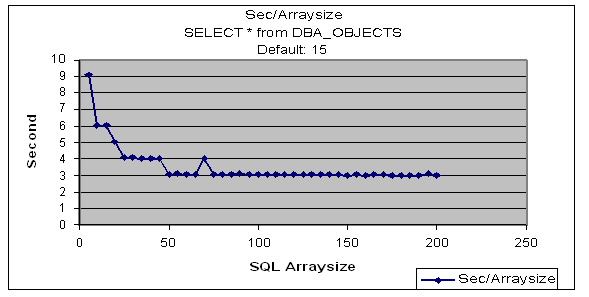
As you can see the benefits for this select statement fall off after an ARRAYSIZE of 50 is reached. A plot of the roundtrips verses ARRAYSIZE tells why. In the following chart of roundtrips verses ARRAYSIZE setting you see that at 50 the value for roundtrips is 147 having reduced from the high of 1606 by 90%, from array sizes 50 to 200 it only decreases to 42 a change of only 10% (based on the original 1606) fewer roundtrips.

Where this can be of real benefit is in a Java situation. To set the array size, use the setDefaultRowPrefetch method of the OracleConnection class. However, the size should be determined empirically by setting the size and running test runs because this is a case of diminishing returns as the array size gets larger. Also, the size of network buffers and packets need to be factored in when sizing the buffers in SQL.
Friday, January 20, 2006
Much Ado About Nothing
Well actually, a NULL is UNKOWN not the absence of a value. But how would “Much Ado About Unknown” sound as a title?
I had to explain to a fellow DBA the impact of null on processing where the columns that where null were also used in joining of tables. It took a while, but finally he caught on. It made me wonder how many folks are confused by this. The major issue is that nulls are not tracked in normal indexes. It is true that while bitmap indexes may be used to track null values, they have their own issues for OLTP environments and usually have very restricted use in OLTP environments.
I decided to develop a little test case just to show what is going on with NULLs. Let’s take a look at this test case:
SQL> create table test as select * from dba_objects;
Table created.
SQL> desc test
Name Null? Type
----------------------------------------- -------- ----------------------------
OWNER VARCHAR2(30)
OBJECT_NAME VARCHAR2(128)
SUBOBJECT_NAME VARCHAR2(30)
OBJECT_ID NUMBER
DATA_OBJECT_ID NUMBER
OBJECT_TYPE VARCHAR2(18)
CREATED DATE
LAST_DDL_TIME DATE
TIMESTAMP VARCHAR2(19)
STATUS VARCHAR2(7)
TEMPORARY VARCHAR2(1)
GENERATED VARCHAR2(1)
SECONDARY VARCHAR2(1)
SQL> create index test_ind on test(object_id);
Index created.
SQL> analyze table test compute statistics;
Table analyzed.
SQL> set autotrace on
SQL> select count(*) from test where object_id is not null;
COUNT(*)
----------
33732
Execution Plan
----------------------------------------------------------
0 SELECT STATEMENT Optimizer=CHOOSE (Cost=19 Card=1 Bytes=4)
1 0 SORT (AGGREGATE)
2 1 INDEX (FAST FULL SCAN) OF 'TEST_IND' (NON-UNIQUE) (Cost=
19 Card=33732 Bytes=134928)
Statistics
----------------------------------------------------------
0 recursive calls
0 db block gets
79 consistent gets
0 physical reads
0 redo size
381 bytes sent via SQL*Net to client
499 bytes received via SQL*Net from client
2 SQL*Net roundtrips to/from client
0 sorts (memory)
0 sorts (disk)
1 rows processed
SQL> select count(*) from test where object_id is null;
COUNT(*)
----------
11
Execution Plan
----------------------------------------------------------
0 SELECT STATEMENT Optimizer=CHOOSE (Cost=104 Card=1 Bytes=4)
1 0 SORT (AGGREGATE)
2 1 TABLE ACCESS (FULL) OF 'TEST' (Cost=104 Card=11 Bytes=44
)
Statistics
----------------------------------------------------------
0 recursive calls
0 db block gets
464 consistent gets
0 physical reads
0 redo size
379 bytes sent via SQL*Net to client
499 bytes received via SQL*Net from client
2 SQL*Net roundtrips to/from client
0 sorts (memory)
0 sorts (disk)
1 rows processed
SQL>
SQL> create index fbi_test on test(nvl(object_id,-1));
Index created.
SQL> analyze table test compute statistics;
Table analyzed.
SQL> select count(*) from test where nvl(object_id,-1)=-1;
COUNT(*)
----------
11
Execution Plan
----------------------------------------------------------
0 SELECT STATEMENT Optimizer=CHOOSE (Cost=2 Card=1 Bytes=4)
1 0 SORT (AGGREGATE)
2 1 INDEX (RANGE SCAN) OF 'FBI_TEST' (NON-UNIQUE) (Cost=2 Ca
rd=12 Bytes=48)
Statistics
----------------------------------------------------------
0 recursive calls
0 db block gets
2 consistent gets
0 physical reads
0 redo size
379 bytes sent via SQL*Net to client
499 bytes received via SQL*Net from client
2 SQL*Net roundtrips to/from client
0 sorts (memory)
0 sorts (disk)
1 rows processed
SQL> update test set object_id=-1 where object_id is null;
11 rows updated.
Execution Plan
----------------------------------------------------------
0 UPDATE STATEMENT Optimizer=CHOOSE (Cost=104 Card=11 Bytes=44
)
1 0 UPDATE OF 'TEST'
2 1 TABLE ACCESS (FULL) OF 'TEST' (Cost=104 Card=11 Bytes=44
)
Statistics
----------------------------------------------------------
2 recursive calls
78 db block gets
465 consistent gets
0 physical reads
9208 redo size
625 bytes sent via SQL*Net to client
548 bytes received via SQL*Net from client
3 SQL*Net roundtrips to/from client
2 sorts (memory)
0 sorts (disk)
11 rows processed
SQL> commit;
Commit complete.
SQL> select count(*) from test where object_id=-1;
COUNT(*)
----------
11
Execution Plan
----------------------------------------------------------
0 SELECT STATEMENT Optimizer=CHOOSE (Cost=2 Card=1 Bytes=4)
1 0 SORT (AGGREGATE)
2 1 INDEX (RANGE SCAN) OF 'TEST_IND' (NON-UNIQUE) (Cost=2 Ca
rd=1 Bytes=4)
Statistics
----------------------------------------------------------
0 recursive calls
0 db block gets
2 consistent gets
0 physical reads
0 redo size
379 bytes sent via SQL*Net to client
499 bytes received via SQL*Net from client
2 SQL*Net roundtrips to/from client
0 sorts (memory)
0 sorts (disk)
1 rows processed
1. We create a test table with nulls in the column OBJECT_ID
2. We then created a normal index on the OBJECT_ID column
3. Using IS NULL and IS NOT NULL based WHERE clauses we determined:
I had to explain to a fellow DBA the impact of null on processing where the columns that where null were also used in joining of tables. It took a while, but finally he caught on. It made me wonder how many folks are confused by this. The major issue is that nulls are not tracked in normal indexes. It is true that while bitmap indexes may be used to track null values, they have their own issues for OLTP environments and usually have very restricted use in OLTP environments.
I decided to develop a little test case just to show what is going on with NULLs. Let’s take a look at this test case:
SQL> create table test as select * from dba_objects;
Table created.
SQL> desc test
Name Null? Type
----------------------------------------- -------- ----------------------------
OWNER VARCHAR2(30)
OBJECT_NAME VARCHAR2(128)
SUBOBJECT_NAME VARCHAR2(30)
OBJECT_ID NUMBER
DATA_OBJECT_ID NUMBER
OBJECT_TYPE VARCHAR2(18)
CREATED DATE
LAST_DDL_TIME DATE
TIMESTAMP VARCHAR2(19)
STATUS VARCHAR2(7)
TEMPORARY VARCHAR2(1)
GENERATED VARCHAR2(1)
SECONDARY VARCHAR2(1)
SQL> create index test_ind on test(object_id);
Index created.
SQL> analyze table test compute statistics;
Table analyzed.
SQL> set autotrace on
SQL> select count(*) from test where object_id is not null;
COUNT(*)
----------
33732
Execution Plan
----------------------------------------------------------
0 SELECT STATEMENT Optimizer=CHOOSE (Cost=19 Card=1 Bytes=4)
1 0 SORT (AGGREGATE)
2 1 INDEX (FAST FULL SCAN) OF 'TEST_IND' (NON-UNIQUE) (Cost=
19 Card=33732 Bytes=134928)
Statistics
----------------------------------------------------------
0 recursive calls
0 db block gets
79 consistent gets
0 physical reads
0 redo size
381 bytes sent via SQL*Net to client
499 bytes received via SQL*Net from client
2 SQL*Net roundtrips to/from client
0 sorts (memory)
0 sorts (disk)
1 rows processed
SQL> select count(*) from test where object_id is null;
COUNT(*)
----------
11
Execution Plan
----------------------------------------------------------
0 SELECT STATEMENT Optimizer=CHOOSE (Cost=104 Card=1 Bytes=4)
1 0 SORT (AGGREGATE)
2 1 TABLE ACCESS (FULL) OF 'TEST' (Cost=104 Card=11 Bytes=44
)
Statistics
----------------------------------------------------------
0 recursive calls
0 db block gets
464 consistent gets
0 physical reads
0 redo size
379 bytes sent via SQL*Net to client
499 bytes received via SQL*Net from client
2 SQL*Net roundtrips to/from client
0 sorts (memory)
0 sorts (disk)
1 rows processed
SQL>
SQL> create index fbi_test on test(nvl(object_id,-1));
Index created.
SQL> analyze table test compute statistics;
Table analyzed.
SQL> select count(*) from test where nvl(object_id,-1)=-1;
COUNT(*)
----------
11
Execution Plan
----------------------------------------------------------
0 SELECT STATEMENT Optimizer=CHOOSE (Cost=2 Card=1 Bytes=4)
1 0 SORT (AGGREGATE)
2 1 INDEX (RANGE SCAN) OF 'FBI_TEST' (NON-UNIQUE) (Cost=2 Ca
rd=12 Bytes=48)
Statistics
----------------------------------------------------------
0 recursive calls
0 db block gets
2 consistent gets
0 physical reads
0 redo size
379 bytes sent via SQL*Net to client
499 bytes received via SQL*Net from client
2 SQL*Net roundtrips to/from client
0 sorts (memory)
0 sorts (disk)
1 rows processed
SQL> update test set object_id=-1 where object_id is null;
11 rows updated.
Execution Plan
----------------------------------------------------------
0 UPDATE STATEMENT Optimizer=CHOOSE (Cost=104 Card=11 Bytes=44
)
1 0 UPDATE OF 'TEST'
2 1 TABLE ACCESS (FULL) OF 'TEST' (Cost=104 Card=11 Bytes=44
)
Statistics
----------------------------------------------------------
2 recursive calls
78 db block gets
465 consistent gets
0 physical reads
9208 redo size
625 bytes sent via SQL*Net to client
548 bytes received via SQL*Net from client
3 SQL*Net roundtrips to/from client
2 sorts (memory)
0 sorts (disk)
11 rows processed
SQL> commit;
Commit complete.
SQL> select count(*) from test where object_id=-1;
COUNT(*)
----------
11
Execution Plan
----------------------------------------------------------
0 SELECT STATEMENT Optimizer=CHOOSE (Cost=2 Card=1 Bytes=4)
1 0 SORT (AGGREGATE)
2 1 INDEX (RANGE SCAN) OF 'TEST_IND' (NON-UNIQUE) (Cost=2 Ca
rd=1 Bytes=4)
Statistics
----------------------------------------------------------
0 recursive calls
0 db block gets
2 consistent gets
0 physical reads
0 redo size
379 bytes sent via SQL*Net to client
499 bytes received via SQL*Net from client
2 SQL*Net roundtrips to/from client
0 sorts (memory)
0 sorts (disk)
1 rows processed
1. We create a test table with nulls in the column OBJECT_ID
2. We then created a normal index on the OBJECT_ID column
3. Using IS NULL and IS NOT NULL based WHERE clauses we determined:
a. The IS NOT NULL type WHERE clause will use an index
b. The IS NULL type WHERE doesn’t use an index
4. Next we create a function base index using the NVL function to convert the NULL values into a default value.
When we use the NVL function in our SELECT in place of the IS NULL we get index usage and much better performance, however, this may lead to improper relationships between tables.
5. As a final step, we replace the NULL values in TEST with a default value of -1, now using that in our select instead of IS NULL we get response virtually identical with the use of NVL function based index.
Of course the issues we are trying to prevent with all this is processing of IS NULL type queries forcing such items as full table scans and causing developers to have to use OUTER JOIN type syntax to resolve NULL conditions between tables. By eliminating these OUTER JOIN and IS NULL processing steps which result in large HASH and full table scans in many cases, we can dramatically reduce the execution times of queries. Notice in the example how we reduced cost figures from 104 for a full table scan to 2 for an index (either our normal or the function based index) scan.
So, what should we take from this? Several conclusions can be reached:
- Whenever possible avoid the use of NULLable columns for columns that will be joined.
- Use default values in place of NULL, note that to avoid outer joins, both parent and child tables must have a value, for example if we had a parent table the related to the OBJECT_ID in our example, we would have an entry of (-1, ‘NO ID’) in that parent to resolve the -1 entries in the child.
- If IS NULL is required, consider replacing it with a NVL call and a function based index, while this may not help with outer joins, it will help with IS NULL type selects.
Have fun!
Mike
Tuesday, January 03, 2006
New Years Day Dive
I got up this morning and built a tank rack. A tank rack holds scuba tanks so they don’t do major damage to you, your vehicle or themselves rolling wily-nily about the back of your vehicle. I did this feat of carpentry legerdemain because I was going to meet up the infamous Lake Lanier Loonies for their annual New Years Day dive and picnic.
So what you are probably saying. Well, even though we are in the “south” part of the states (Georgia) our nightly temperatures hover around freezing this time of year and even today it only reached a balmy 57 degrees Fahrenheit. The lake is undergoing turnover, which means there is no warm layer, it was a uniform 47 degrees from the top down to the depths we planned on diving. Now you can see where the Loony part of the name comes from.
Even when it is at its peak summer temperatures Lake Lanier rarely gets above 60 degrees below its thermocline. On a good day you use a 3mm wetsuit. For 47 degrees you use 5-7mm full wetsuits with hood and gloves, 5-7 mm shorties with hood, boots and gloves or a drysuit. I thought I had it covered with a 5mm drysuit I had been assured was a large and would fit me after I described myself (accurately) to the seller.
The night before I had decided, since this would be the first dive of the drysuit, that I had better learn how to put the thing on without making a big fool of myself. I put on my swimsuit and a lycra dive skin (a dive skin is a lightweight suit, think of a whole-body leotard). The next step involved unzipping the drysuit, the zipper goes from the middle back all the way around between the legs to the upper chest. You begin donning the drysuit by inserting your legs into the legs of the suit, think of 5 mm (one half inch) thick panty hose with a sealing ring at the ankle and you will get the idea. The next step is to simply (right) stick your arms into the arms (again, think of 5mm panty hose for your arms with seal rings at the wrists) and at the same time thrust your head up through the neck seal into the tight hood. The neck seal is like the tightest turtleneck sweater you can imagine.
Anyway, I got the arms in, got the head started and then realized I had run out of standup room in the suit. As I stood there hunched over with the neck seal tight around my forehead I glanced on one of the inside panels where I hadn’t had a chance to look before. I suddenly realized why I had run out of room and if I had succeeded in thrusting my head through the seal I would have instantly regretted it. All it took was one small word, “Medium” scrawled in permanent marker.
Since by design I am a extra-large type of guy, had I succeeded in thrusting my size 16 and half neck into the medium size neck seal I probably would have choked to death before a I could have got the thing off. Needless to say I was a bit upset. I had expected to get two 3mm wetsuits the previous week, one for my wife and one for me, which I could have used as a 6mm combo in a pinch, but alas, they fell prey to the holiday mails so here I was, the day before the dive, a holiday, no dry or wet suit capable of making the dive. I posted to the Scubaboard website my predicament. A fellow Looney came to my rescue, seems he had a 5mm “shorty”, a suit with no boots or hood, that he could let me use and was, as I, an XL kind of guy. So, here we are back at were I began the story.
After I built the tank rack I placed into it both my personal and a rental tank, both loaded to 3000 PSI of air, and strapped it down to the bed of my Montero. We then loaded up the other dive gear, some broiled chicken and warm drinks and drove the 20 some miles to the West Bank Park at Lake Lanier where we met, for the first time, with the other Loonies.
The Loonies are a diverse lot, from instructors and dive masters to the barely qualified, nine intrepid divers ready to face the challenges of Lake Lanier, some driving for over an hour and a half for the privilege. While on shore waited our wives, bravely smiling and laughing as we struggled into our dive gear, hiding their fears, at least I hope they were just hiding their fears, I noticed none of them were diving…
We finished donning our dive gear and marched proudly, well, as proudly as you can walking backward since you are wearing fins, into the water. The suit I was borrowing was a 5 mm wetsuit, as its name implies, it is designed to allow a small bit of water in next to your skin, your body heat warms it and it acts as an insulation layer, as long as there isn’t too much water flow. Needless to say, the first five-to-ten minutes of any dive in cold water with a wetsuit are always interesting as you warm the cold (in this case 47 degree) water up to body temperature. After the first ten minutes I was actually pretty comfortable except for my hands. Afraid I only had on what are known as “reef” gloves, they are used to protect your hands from rough reef surfaces, not to keep them warm.
We finally were able to turn around once we got to mid-chest level and could start to swim out to deeper water. I had on strap-on fins since I was wearing dive boots. Usually I use a pair of full-foot fins (Velocity model) that have a bit of flex to them. The strap-on ones find felt like a couple of boards since they were much stiffer than what I was used to. So what should have been a fairly easy swim was a bit more difficult, but manageable.
Finally we got out to about 15 feet of water. I pulled my mask up over my face (only rookies keep it up on the forehead, which is actually a distress signal) and just then a wave filled my mouth with wonderful Lake Lanier Water. After coughing and hacking and scaring my dive buddies, I finally got my breath back and placed my regulator into my mouth. After a look around and a synchronization of watches we held our BCD inflator hoses over our head and releasing the air that was holding us on the surface slid like German U-boats (well, more like distressed seals) beneath the cold water’s surface.
I would like to report that we had excellent visibility and it was grand, however, I don’t like to lie. Visibility was about 6-8 feet, this is not so good, even for Lake Lanier. Lake Lanier can have visibility of 10-15 feet above the thermocline and even more below the thermocline, however, when the lake is turning over, visibility gets pretty bad. After sinking though 8 feet of moss-green water we had to switch on our dive lights. I was using one of my Christmas presents, a small UK40 light that attaches to your mask strap for hands free operation. Unfortunately when you look at other divers straight on, you end up blinding them, something my dive buddy pointed out to me after the dive by telling me if I ever used that light with it hooked to my mask strap again he would mount somewhere the light don’t shine…wonder what he meant?
Anyway, our assignment was to proceed to a structure known as “the lumber yard” which was a pile of submerged timber at a heading of 45 degrees east of the main swim marker buoys and place a dive buoy over it so one of the other divers could do a laser sighting and range calculation for a diver’s map of the features. We proceeded down the underwater incline, 20 feet, 30 feet, 50 feet when suddenly I saw the dive leader stop and start messing with his dive computer. He signaled me to come over and show him mine, which I did. It seems his had stopped displaying. We found out later his battery was at the near-end-of-life level and would work fine topside, as soon as it cooled down the voltage would drop and the computer would switch off its display.
The lumber yard was supposedly at 75 feet. After messing around along the bottom for a while we came upon some large logs, not a bunch, but a few, we assumed this was the lumber yard so we placed the buoy and swam back on our reciprocal heading. Only once did the silt we kicked up from the bottom cause me to get disoriented and temporarily lose site of my dive partners, but I rose enough to get out of the brown-silt filled bottom water and up into the murky-green water and soon spotted their dive lights and with a prayer of thanks rejoined them. It would have been the height of embarrassment to be the new-kid and get lost from my dive buddies.
Since the dive leader’s computer was malfunctioning and we were all nearing less than 1000 PSI on our tanks he decided to halt the dive and return to shore. Giving the thumbs up signal which means “let’s surface” we all three went vertical, held our inflators over our heads and vented our BCDs, kicking for the surface. If you don’t vent the BCD's they can rapidly expand as you decrease depth and rocket you to the surface, if you return to the surface too fast you risk decompression sickness, commonly called the bends. Besides, your dive computer will yell at you with rather loud beeps if you ascend too quickly and let everyone know you are being bad.
We reached the surface safely after having reached a maximum depth of 67 feet and spending 26 minutes in the cold murky water and back pedaled to shallow water, where we once again walked backward out to the shore. Walking backward like that felt like we were in a movie someone had placed in reverse. I really prefer boat dives, it is just more dramatic to do a back roll from the gunwale or a giant stride from a dive platform into the water and forcefully pulling your way up a dive ladder than this trudging backward stuff.
Now came the real hard part, taking off the wet gear. As the dive suit is exposed to air the evaporative cooling from the air can chill you quickly. Again we had the snickers and smiles from the women folk to contend with as we struggled with our gear. Of course my Susan came over and helped me, sometimes it is rather tough to get the shoulders off in a front zip suit.
After everyone else returned from the dive we went up the hill to the barbecue grill and had a wonderful picnic. All in all it was a great day. Even though the dive was cold, dark, murky and we saw nothing but some old logs, suspended algae and silt and a lot of bottom mud, it still beat a day at the office. I’ll be back next year!
New Years Dive Profile
So what you are probably saying. Well, even though we are in the “south” part of the states (Georgia) our nightly temperatures hover around freezing this time of year and even today it only reached a balmy 57 degrees Fahrenheit. The lake is undergoing turnover, which means there is no warm layer, it was a uniform 47 degrees from the top down to the depths we planned on diving. Now you can see where the Loony part of the name comes from.
Even when it is at its peak summer temperatures Lake Lanier rarely gets above 60 degrees below its thermocline. On a good day you use a 3mm wetsuit. For 47 degrees you use 5-7mm full wetsuits with hood and gloves, 5-7 mm shorties with hood, boots and gloves or a drysuit. I thought I had it covered with a 5mm drysuit I had been assured was a large and would fit me after I described myself (accurately) to the seller.
The night before I had decided, since this would be the first dive of the drysuit, that I had better learn how to put the thing on without making a big fool of myself. I put on my swimsuit and a lycra dive skin (a dive skin is a lightweight suit, think of a whole-body leotard). The next step involved unzipping the drysuit, the zipper goes from the middle back all the way around between the legs to the upper chest. You begin donning the drysuit by inserting your legs into the legs of the suit, think of 5 mm (one half inch) thick panty hose with a sealing ring at the ankle and you will get the idea. The next step is to simply (right) stick your arms into the arms (again, think of 5mm panty hose for your arms with seal rings at the wrists) and at the same time thrust your head up through the neck seal into the tight hood. The neck seal is like the tightest turtleneck sweater you can imagine.
Anyway, I got the arms in, got the head started and then realized I had run out of standup room in the suit. As I stood there hunched over with the neck seal tight around my forehead I glanced on one of the inside panels where I hadn’t had a chance to look before. I suddenly realized why I had run out of room and if I had succeeded in thrusting my head through the seal I would have instantly regretted it. All it took was one small word, “Medium” scrawled in permanent marker.
Since by design I am a extra-large type of guy, had I succeeded in thrusting my size 16 and half neck into the medium size neck seal I probably would have choked to death before a I could have got the thing off. Needless to say I was a bit upset. I had expected to get two 3mm wetsuits the previous week, one for my wife and one for me, which I could have used as a 6mm combo in a pinch, but alas, they fell prey to the holiday mails so here I was, the day before the dive, a holiday, no dry or wet suit capable of making the dive. I posted to the Scubaboard website my predicament. A fellow Looney came to my rescue, seems he had a 5mm “shorty”, a suit with no boots or hood, that he could let me use and was, as I, an XL kind of guy. So, here we are back at were I began the story.
After I built the tank rack I placed into it both my personal and a rental tank, both loaded to 3000 PSI of air, and strapped it down to the bed of my Montero. We then loaded up the other dive gear, some broiled chicken and warm drinks and drove the 20 some miles to the West Bank Park at Lake Lanier where we met, for the first time, with the other Loonies.
The Loonies are a diverse lot, from instructors and dive masters to the barely qualified, nine intrepid divers ready to face the challenges of Lake Lanier, some driving for over an hour and a half for the privilege. While on shore waited our wives, bravely smiling and laughing as we struggled into our dive gear, hiding their fears, at least I hope they were just hiding their fears, I noticed none of them were diving…
We finished donning our dive gear and marched proudly, well, as proudly as you can walking backward since you are wearing fins, into the water. The suit I was borrowing was a 5 mm wetsuit, as its name implies, it is designed to allow a small bit of water in next to your skin, your body heat warms it and it acts as an insulation layer, as long as there isn’t too much water flow. Needless to say, the first five-to-ten minutes of any dive in cold water with a wetsuit are always interesting as you warm the cold (in this case 47 degree) water up to body temperature. After the first ten minutes I was actually pretty comfortable except for my hands. Afraid I only had on what are known as “reef” gloves, they are used to protect your hands from rough reef surfaces, not to keep them warm.
We finally were able to turn around once we got to mid-chest level and could start to swim out to deeper water. I had on strap-on fins since I was wearing dive boots. Usually I use a pair of full-foot fins (Velocity model) that have a bit of flex to them. The strap-on ones find felt like a couple of boards since they were much stiffer than what I was used to. So what should have been a fairly easy swim was a bit more difficult, but manageable.
Finally we got out to about 15 feet of water. I pulled my mask up over my face (only rookies keep it up on the forehead, which is actually a distress signal) and just then a wave filled my mouth with wonderful Lake Lanier Water. After coughing and hacking and scaring my dive buddies, I finally got my breath back and placed my regulator into my mouth. After a look around and a synchronization of watches we held our BCD inflator hoses over our head and releasing the air that was holding us on the surface slid like German U-boats (well, more like distressed seals) beneath the cold water’s surface.
I would like to report that we had excellent visibility and it was grand, however, I don’t like to lie. Visibility was about 6-8 feet, this is not so good, even for Lake Lanier. Lake Lanier can have visibility of 10-15 feet above the thermocline and even more below the thermocline, however, when the lake is turning over, visibility gets pretty bad. After sinking though 8 feet of moss-green water we had to switch on our dive lights. I was using one of my Christmas presents, a small UK40 light that attaches to your mask strap for hands free operation. Unfortunately when you look at other divers straight on, you end up blinding them, something my dive buddy pointed out to me after the dive by telling me if I ever used that light with it hooked to my mask strap again he would mount somewhere the light don’t shine…wonder what he meant?
Anyway, our assignment was to proceed to a structure known as “the lumber yard” which was a pile of submerged timber at a heading of 45 degrees east of the main swim marker buoys and place a dive buoy over it so one of the other divers could do a laser sighting and range calculation for a diver’s map of the features. We proceeded down the underwater incline, 20 feet, 30 feet, 50 feet when suddenly I saw the dive leader stop and start messing with his dive computer. He signaled me to come over and show him mine, which I did. It seems his had stopped displaying. We found out later his battery was at the near-end-of-life level and would work fine topside, as soon as it cooled down the voltage would drop and the computer would switch off its display.
The lumber yard was supposedly at 75 feet. After messing around along the bottom for a while we came upon some large logs, not a bunch, but a few, we assumed this was the lumber yard so we placed the buoy and swam back on our reciprocal heading. Only once did the silt we kicked up from the bottom cause me to get disoriented and temporarily lose site of my dive partners, but I rose enough to get out of the brown-silt filled bottom water and up into the murky-green water and soon spotted their dive lights and with a prayer of thanks rejoined them. It would have been the height of embarrassment to be the new-kid and get lost from my dive buddies.
Since the dive leader’s computer was malfunctioning and we were all nearing less than 1000 PSI on our tanks he decided to halt the dive and return to shore. Giving the thumbs up signal which means “let’s surface” we all three went vertical, held our inflators over our heads and vented our BCDs, kicking for the surface. If you don’t vent the BCD's they can rapidly expand as you decrease depth and rocket you to the surface, if you return to the surface too fast you risk decompression sickness, commonly called the bends. Besides, your dive computer will yell at you with rather loud beeps if you ascend too quickly and let everyone know you are being bad.
We reached the surface safely after having reached a maximum depth of 67 feet and spending 26 minutes in the cold murky water and back pedaled to shallow water, where we once again walked backward out to the shore. Walking backward like that felt like we were in a movie someone had placed in reverse. I really prefer boat dives, it is just more dramatic to do a back roll from the gunwale or a giant stride from a dive platform into the water and forcefully pulling your way up a dive ladder than this trudging backward stuff.
Now came the real hard part, taking off the wet gear. As the dive suit is exposed to air the evaporative cooling from the air can chill you quickly. Again we had the snickers and smiles from the women folk to contend with as we struggled with our gear. Of course my Susan came over and helped me, sometimes it is rather tough to get the shoulders off in a front zip suit.
After everyone else returned from the dive we went up the hill to the barbecue grill and had a wonderful picnic. All in all it was a great day. Even though the dive was cold, dark, murky and we saw nothing but some old logs, suspended algae and silt and a lot of bottom mud, it still beat a day at the office. I’ll be back next year!
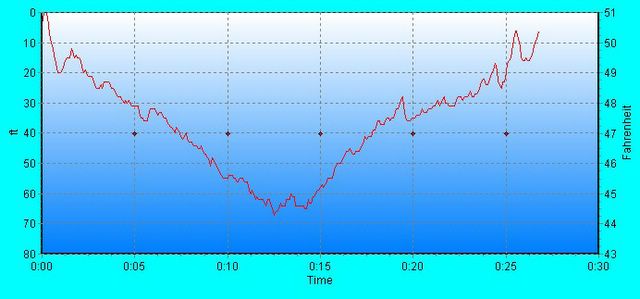
New Years Dive Profile
Thursday, December 22, 2005
On Vacation...
Well, I'm on holiday vacation down in Florida. The wife and I got to do something we wanted to do for a long time, we snorkeled with the Manatees in Crystal River. These gentle sea mammals known as sea cows are on the endangered species list with less than 2500 of them still around.
In the Crystal River area 1500 or so of these spend the winter in the warm springs (72 degrees year round) that abound in this area of Florida. Anyway, we saw about a half dozen and most came over to us and wanted to be scratched and petted just like big dogs. We had one that was smaller than a person, but most where anywhere from 10-15 feet long and weighed up to 1200 or more pounds.
The biggest hazard to these gentle herbivores is man. Between speed boats, fishing boats and other forms of propeller driven transport we kill many of these gentle giants each year. What aren't killed directly from collision may die from infection from the serious wounds. One we petted showed a series of parallel scars form being struck by a boat sometime in the past. What Manatees aren't killed by boats are affected by the red-tides caused by warmer water, pollution and algae-blooms some scientists say are being made more deadly because of global warming.
Anyway, we thoroughly enjoyed the snorkeling and the gentle Manatees. Afterward I got to do a cavern dive into the spring cavern near the Manatee reserve. The cavern water was clear and warmer than the outside water. Inside were many interesting items such as fossils and of course, the spring itself. Well, back to vacation!

Susan Petting Manatee
In the Crystal River area 1500 or so of these spend the winter in the warm springs (72 degrees year round) that abound in this area of Florida. Anyway, we saw about a half dozen and most came over to us and wanted to be scratched and petted just like big dogs. We had one that was smaller than a person, but most where anywhere from 10-15 feet long and weighed up to 1200 or more pounds.
The biggest hazard to these gentle herbivores is man. Between speed boats, fishing boats and other forms of propeller driven transport we kill many of these gentle giants each year. What aren't killed directly from collision may die from infection from the serious wounds. One we petted showed a series of parallel scars form being struck by a boat sometime in the past. What Manatees aren't killed by boats are affected by the red-tides caused by warmer water, pollution and algae-blooms some scientists say are being made more deadly because of global warming.
Anyway, we thoroughly enjoyed the snorkeling and the gentle Manatees. Afterward I got to do a cavern dive into the spring cavern near the Manatee reserve. The cavern water was clear and warmer than the outside water. Inside were many interesting items such as fossils and of course, the spring itself. Well, back to vacation!
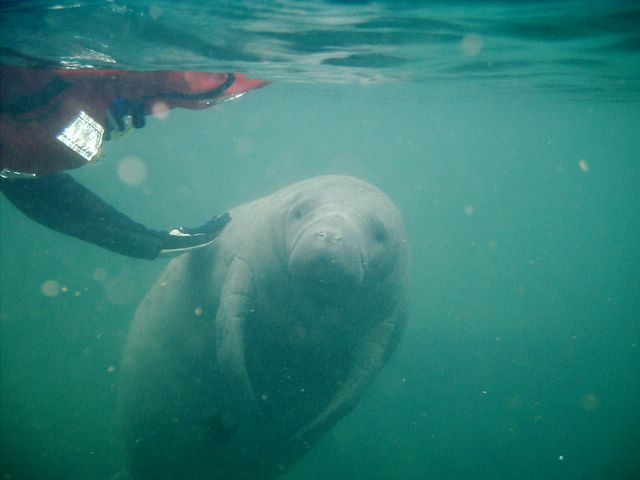
Susan Petting Manatee
Wednesday, November 30, 2005
Becoming Non-Dimensional
No, I am not talking about switching into some star-trek universe, however, this may help deliver warp-speed performance!
Dimensionless Star Schema (Bitmap Star)
Introduction
In standard data warehousing we are taught to utilize a central fact table surrounded by multiple dimension tables. The dimension tables contain, for lack of a better description, report headers and maybe a description, usually they are very lean tables. In Oracle9i and later these dimensions are then related to the fact table by means of bitmap indexes on the foreign key columns in the fact table.
Examination of a Star Schema
So in closer examination we have three major components in a star:
- Central Fact table
- Dimension tables
- Bitmap indexes on foreign keys
Note that in Oracle9i and later the actual foreign keys do not have to be declared, but the bitmap indexes must be present.
So when a star is searched the outer dimension tables are first scanned then the bitmaps are merged based on the results from the scan of the dimension tables and the fact table is then sliced and diced based on the bitmap merges. Generally the dimension tables have little more than the lookup value, maybe a description, maybe a count or sum. In most cases the measures stored in the dimension tables can be easily derived, especially for counts and sums.
This all points to an interesting thought, in the case where the dimension table actually adds nothing to the data available, but merely serves as a scan table for values stored in the database, why not eliminate it all together and simply create the bitmap index on the fact table as if it did exist? Many dimension tables can be eliminated in this fashion.
A New Star is Born
Eliminating most, if not all of a fact tables dimension tables but leaving the bitmap indexes in place on what were the foreign keys leaves us with what I call a bitmap star. By eliminating the fact tables we reduce our maintenance and storage requirements and may actually improve the performance of our queries that now simply do a bitmap merge operation to resolve the query, eliminating many un-needed table and index operations from the now defunct dimensions.
Essentially you are flattening the structure into a potentially sparse fact table that is heavily bitmap indexed. The bitmap indexes become the “dimensions” in this new structure.
Caveat Emptor!
However, this structure is not suitable for all star schemas but can be applied in a limited fashion to many where the duplicitous storage of values in both the fact and dimension tables occurs. The applicability of this structure has to be determined on a case by case basis and is not a suggested one-size-fits-all solution for all data warehouses.
If I get some spare time I will create some test cases to try out this new structure in comparison to a traditional star schema. In tests of the bitmap star we achieved sub-second response time utilizing Oracle Discoverer against a 2.5 million row bitmap star table built on a 7-disk RAID5 array. The fact table had 6 bitmap indexes and one 5-column primary key index. Only a single “normal” dimension table was required due to a needed additional breakout of values on one of the columns in the fact table.
Wednesday, October 26, 2005
Through the Looking Glass: 10gR2 RAC Installation
On my most recent assignment I had the dubious pleasure of installing Oracle10g Release 2 for a RAC installation on an OCFS2 file system on RedHat 4.0 on a Xeon 64 bit system. Of course the first issue is, as of this writing the OCFS2 file system is not certified for use in RedHat4.o -64 bit with 10gR2 RAC. Just because 10gR2 is the latest RAC and OCFS2 is the latest cluster file system from Oracle don’t let that confuse you…far be it for me to state they should work together.
The client had the boxes up and running just as asked, of course we had to add a few packages, notably the config libraries that don’t get installed with the base “total” install of RedHat, the vim editor and a couple of other convenience packages. We also were using iscsi which had yet to be configured. However within a day we had the iscsi running over Gig Enet to a Left-Hand disk array and OCFS2 up and running.
Next of course you install Cluster Ready Services. The client had the latest install disks sent directly from Oracle. I loaded the DVD and commenced installation. Other than the new screens, such as multiple OCR configuration files (they now allow a mirror, bravo!) and multiple voting disk locations (up to three, another kudo) the screens are similar to the ones we know and love. However, once it got to the final screen where it does the actual install, link, configuration and setup is where the fun began.
On the link step the system complained:
### Error Messages: ###
INFO: Start output from spawned process:
INFO: ----------------------------------
INFO:
INFO: /var/oracle/product/10.2.0/crs/bin/genclntsh
INFO: /usr/bin/ld: skipping incompatible /var/oracle/product/10.2.0/crs/lib/libxml10.a when searching for -lxml10/usr/bin/ld: cannot find -lxml10
INFO: collect2: ld returned 1 exit status
INFO: genclntsh: Failed to link libclntsh.so.10.1
INFO: make: *** [client_sharedlib] Error 1
INFO: End output from spawned process.
INFO: ----------------------------------
The lxm10 module deals with XML parsing in the client stack, so naturally the first thing out of Oracle support was: OCFS2 is NOT yet certified to use with RHEL4.0 10g R2 in RAC env.
Workaround is to use:
a) raw device or ASM
b) RHEL3 with OCFS1
So, please go to a supported config and if the problem still persists, please update this TAR.
Huh? What the heck does OCSF2 have to do with the XML parsing library not being found? We were not using a shared ORACLE_HOME and were not using OCFS2 for anything yet (that doesn’t happen until root.sh is run on the last step).
After getting to a duty manager we were able to get a bit more help. Next, after uploading several sets of logs and traces that all said basically the same thing (lxml10 was missing) it was suggested that perhaps downloading the OTN version might help since it was newer.
This we did. It linked. Now I realize this is a radical suggestion, but shouldn’t Oracle QC have taken one of the production run DVDs and did a full test install on the target platform before making it available?
Call me crazy I guess…but it seems to me something this obvious would have been caught by a one-eyed QC inspector with one arm tied behind his back wearing an ipod blasting heavy metal into his ears while driving down the 101 freeway watching the install on his web enabled cell phone…
Now we got to root.sh execution, and of course it went without a hitch…not! Next we got:
/var/oracle/product/10.2.0/crs/bin/crsctl create scr oracle/var/oracle/product/10.2.0/crs/bin/crsctl.bin:
error while loading shared libraries:
libstdc++.so.5: cannot open shared object file:
No such file or directory
/bin/echo Failure initializing entries in /etc/oracle/scls_scr/rhora1.
Long sigh….the LD_LIBRARY_PATH shows the /usr/lib as being a part of it, and the libstdc++.so.5 soft link to libstdc++.so.5.0.7 library is there, as is the links target library. I even tried placing a softlink to the libstdc++.so.5.0.7 in /usr/lib in the $ORACLE_CRS/lib directory (calling it libstdc++.so.5 of course). Can’t wait to see the next response from support… Will keep you all posted!
Latest news: We found the DVD ordered/sent was the X86 not the X86_64 version, however, since the library in the first issue is from the DVD seems like it is still an issue. However, the downloaded version is definitely X86_64. Of course the latest twist is even though support asked us to download and see if it would install they now say since we loaded a downloaded version it is not supported until we get new CDs. You just can't win...however, the support analyst says he is still pursuing the issue internally and will keep the tar open. Someone is showing some sense!
While we were waiting I decided to check the reboot on both machines. During a reboot command the system issues a call to the halt command which stops all processes, this causes the system to spin on the ocfs2 o2hb_bio_end_io:222 Error: IO error -5 because the ocfs2 filesystems are not unmounted yet. We have attempted to place the umount commands into an init.d script and run it at priorities as high as 2 however, it seems the init scripts are run after the halt command so it does no good.
The question now becomes: How can we force the unmount of the OCFS2 filesystems before the halt call during a shutdown/reboot?
The latest response on our sev 2 TAR:
Thank you for the update. The owning support engineer, xxxx.AU, has gone off shift for the weekend in Australia and is not currently available; however, they will have the opportunity to review and progress the issue during their next scheduled shift. In the mean time, if you feel that this is a critical down production issue or an issue for which you require prompt assistance from an available support engineer, please advise us of this specifically by phoning your local support number (see http://www.oracle.com/support/contact.html for a listing) to advise call response of your need for attention; otherwise, no update is required on your part at this time and xxxx.AU will follow-up with you during their next scheduled shift.
Ok, we bought it that OCFS2 is not supported. We switched to RAWS and used them, got the same error on CRS install. Week after next if nothing new from Oracle we back track to 10gR1 and go with RAWs and ASM.
First lesson learned...Oracle demands the libstdc.so.5 library it will accept no substitutions! The only thing Oracle helped with so far...but we had to find the issue and the proper RPM to install.
Second lesson learned...do not use links with the raws needed for CRS (2 for the config disk and its mirror and 3, yes 3! for the voting disks) or the root.sh will fail. Once we went directly to the raw devices themselves CRS installed. Solved this ourselves.
Third lesson learned...Oracle expects routable IP addresses on the VIP if it doesn't get it them the cluster configuration verification step fails (ignore it if you use unroutable IPs) and the vipca silent install will fail at the end of the root.sh, just run it manually from the command line. We found this ourselves after first error.
Fourth Lesson Learned: Don't let the SA configure the entire system disk as one large partition, leave room to add swap if needed.
Fifth Lesson: If the ssh won't equivilize on the second (third, fourth..etc) node even though you've done everything right, on the offending node do this:
Login as oracle user:
$ cd $HOME
$ chmod 755 .
$ chmod 700 .ssh
$ cd $HOME/.ssh
$ chmod 600 authorized_keys
Also, to get rid of the annoying last login message, which will result in an error, add this to your sshd_config file on the RAC system nodes:
PrintMotd no
PrintLastLog no
Now on to the actual database and ASM install. I can't wait...
Well...ASM wouldn't link properly... so:
Article-ID: Note 339367.1
Title: Installing 10.2.0.1 Db On A Redhat Linux X86-64 Os Version 4.0, Errors
SOLUTION/ACTION PLAN
=====================
To implement the solution, please execute the following steps:
Download this file at http://oss.oracle.com/projects/compat-oracle/files/RedHat/Red Hat:
binutils-2.15.92.0.2-13.0.0.0.2.x86_64.rpm 2005.10.05
RHEL 4 Update 1 patched binutils necessary for 10gR2 install on x86_64
Then try the relink all again
Ok...now everything worked but lsnrctl threw segmentation faults, so...
Article-ID: Note 316746.1 (Which by the way, can't be found on metalink)
Title: Segmentation Fault When Execute Sqlplus, Oracle, Lsnrctl After New/Patchset Install
ACTION PLAN
============
Please do the following:
1. cd /usr/bin (as root)
2. mv gcc gcc.script
3. mv g++ g++.script
4. ln -s gcc32 gcc
5. ln -s g++32 g++
6. login as oracle software owner (make sure environment is correct)
7. cd $ORACLE_HOME/bin
8. $ script /tmp/env_relink.out
9. $ env 10. $ ls -l /usr/bin
11. $ relink all
12. $ exit
13. Send env_relink.out to Oracle support
Finally! A system with CRS running, OracleNet running and ASM running hopefully ready for the databases to be created...11/17/2005.
Isn't attention to prompt and courteous customer support a wonderful thing?
Mike
The client had the boxes up and running just as asked, of course we had to add a few packages, notably the config libraries that don’t get installed with the base “total” install of RedHat, the vim editor and a couple of other convenience packages. We also were using iscsi which had yet to be configured. However within a day we had the iscsi running over Gig Enet to a Left-Hand disk array and OCFS2 up and running.
Next of course you install Cluster Ready Services. The client had the latest install disks sent directly from Oracle. I loaded the DVD and commenced installation. Other than the new screens, such as multiple OCR configuration files (they now allow a mirror, bravo!) and multiple voting disk locations (up to three, another kudo) the screens are similar to the ones we know and love. However, once it got to the final screen where it does the actual install, link, configuration and setup is where the fun began.
On the link step the system complained:
### Error Messages: ###
INFO: Start output from spawned process:
INFO: ----------------------------------
INFO:
INFO: /var/oracle/product/10.2.0/crs/bin/genclntsh
INFO: /usr/bin/ld: skipping incompatible /var/oracle/product/10.2.0/crs/lib/libxml10.a when searching for -lxml10/usr/bin/ld: cannot find -lxml10
INFO: collect2: ld returned 1 exit status
INFO: genclntsh: Failed to link libclntsh.so.10.1
INFO: make: *** [client_sharedlib] Error 1
INFO: End output from spawned process.
INFO: ----------------------------------
The lxm10 module deals with XML parsing in the client stack, so naturally the first thing out of Oracle support was: OCFS2 is NOT yet certified to use with RHEL4.0 10g R2 in RAC env.
Workaround is to use:
a) raw device or ASM
b) RHEL3 with OCFS1
So, please go to a supported config and if the problem still persists, please update this TAR.
Huh? What the heck does OCSF2 have to do with the XML parsing library not being found? We were not using a shared ORACLE_HOME and were not using OCFS2 for anything yet (that doesn’t happen until root.sh is run on the last step).
After getting to a duty manager we were able to get a bit more help. Next, after uploading several sets of logs and traces that all said basically the same thing (lxml10 was missing) it was suggested that perhaps downloading the OTN version might help since it was newer.
This we did. It linked. Now I realize this is a radical suggestion, but shouldn’t Oracle QC have taken one of the production run DVDs and did a full test install on the target platform before making it available?
Call me crazy I guess…but it seems to me something this obvious would have been caught by a one-eyed QC inspector with one arm tied behind his back wearing an ipod blasting heavy metal into his ears while driving down the 101 freeway watching the install on his web enabled cell phone…
Now we got to root.sh execution, and of course it went without a hitch…not! Next we got:
/var/oracle/product/10.2.0/crs/bin/crsctl create scr oracle/var/oracle/product/10.2.0/crs/bin/crsctl.bin:
error while loading shared libraries:
libstdc++.so.5: cannot open shared object file:
No such file or directory
/bin/echo Failure initializing entries in /etc/oracle/scls_scr/rhora1.
Long sigh….the LD_LIBRARY_PATH shows the /usr/lib as being a part of it, and the libstdc++.so.5 soft link to libstdc++.so.5.0.7 library is there, as is the links target library. I even tried placing a softlink to the libstdc++.so.5.0.7 in /usr/lib in the $ORACLE_CRS/lib directory (calling it libstdc++.so.5 of course). Can’t wait to see the next response from support… Will keep you all posted!
Latest news: We found the DVD ordered/sent was the X86 not the X86_64 version, however, since the library in the first issue is from the DVD seems like it is still an issue. However, the downloaded version is definitely X86_64. Of course the latest twist is even though support asked us to download and see if it would install they now say since we loaded a downloaded version it is not supported until we get new CDs. You just can't win...however, the support analyst says he is still pursuing the issue internally and will keep the tar open. Someone is showing some sense!
While we were waiting I decided to check the reboot on both machines. During a reboot command the system issues a call to the halt command which stops all processes, this causes the system to spin on the ocfs2 o2hb_bio_end_io:222 Error: IO error -5 because the ocfs2 filesystems are not unmounted yet. We have attempted to place the umount commands into an init.d script and run it at priorities as high as 2 however, it seems the init scripts are run after the halt command so it does no good.
The question now becomes: How can we force the unmount of the OCFS2 filesystems before the halt call during a shutdown/reboot?
The latest response on our sev 2 TAR:
Thank you for the update. The owning support engineer, xxxx.AU, has gone off shift for the weekend in Australia and is not currently available; however, they will have the opportunity to review and progress the issue during their next scheduled shift. In the mean time, if you feel that this is a critical down production issue or an issue for which you require prompt assistance from an available support engineer, please advise us of this specifically by phoning your local support number (see http://www.oracle.com/support/contact.html for a listing) to advise call response of your need for attention; otherwise, no update is required on your part at this time and xxxx.AU will follow-up with you during their next scheduled shift.
Ok, we bought it that OCFS2 is not supported. We switched to RAWS and used them, got the same error on CRS install. Week after next if nothing new from Oracle we back track to 10gR1 and go with RAWs and ASM.
First lesson learned...Oracle demands the libstdc.so.5 library it will accept no substitutions! The only thing Oracle helped with so far...but we had to find the issue and the proper RPM to install.
Second lesson learned...do not use links with the raws needed for CRS (2 for the config disk and its mirror and 3, yes 3! for the voting disks) or the root.sh will fail. Once we went directly to the raw devices themselves CRS installed. Solved this ourselves.
Third lesson learned...Oracle expects routable IP addresses on the VIP if it doesn't get it them the cluster configuration verification step fails (ignore it if you use unroutable IPs) and the vipca silent install will fail at the end of the root.sh, just run it manually from the command line. We found this ourselves after first error.
Fourth Lesson Learned: Don't let the SA configure the entire system disk as one large partition, leave room to add swap if needed.
Fifth Lesson: If the ssh won't equivilize on the second (third, fourth..etc) node even though you've done everything right, on the offending node do this:
Login as oracle user:
$ cd $HOME
$ chmod 755 .
$ chmod 700 .ssh
$ cd $HOME/.ssh
$ chmod 600 authorized_keys
Also, to get rid of the annoying last login message, which will result in an error, add this to your sshd_config file on the RAC system nodes:
PrintMotd no
PrintLastLog no
Now on to the actual database and ASM install. I can't wait...
Well...ASM wouldn't link properly... so:
Article-ID: Note 339367.1
Title: Installing 10.2.0.1 Db On A Redhat Linux X86-64 Os Version 4.0, Errors
SOLUTION/ACTION PLAN
=====================
To implement the solution, please execute the following steps:
Download this file at http://oss.oracle.com/projects/compat-oracle/files/RedHat/Red Hat:
binutils-2.15.92.0.2-13.0.0.0.2.x86_64.rpm 2005.10.05
RHEL 4 Update 1 patched binutils necessary for 10gR2 install on x86_64
Then try the relink all again
Ok...now everything worked but lsnrctl threw segmentation faults, so...
Article-ID: Note 316746.1 (Which by the way, can't be found on metalink)
Title: Segmentation Fault When Execute Sqlplus, Oracle, Lsnrctl After New/Patchset Install
ACTION PLAN
============
Please do the following:
1. cd /usr/bin (as root)
2. mv gcc gcc.script
3. mv g++ g++.script
4. ln -s gcc32 gcc
5. ln -s g++32 g++
6. login as oracle software owner (make sure environment is correct)
7. cd $ORACLE_HOME/bin
8. $ script /tmp/env_relink.out
9. $ env 10. $ ls -l /usr/bin
11. $ relink all
12. $ exit
13. Send env_relink.out to Oracle support
Finally! A system with CRS running, OracleNet running and ASM running hopefully ready for the databases to be created...11/17/2005.
Isn't attention to prompt and courteous customer support a wonderful thing?
Mike
Sunday, October 16, 2005
Bureaucracy at its Finest
A young, recently married, couple I know did something few would have the courage or conviction to do. They gave up their jobs, sold or stored their possessions and joined the Peace Corps. I wish I could say that they finished their training, have been assigned to an interesting post and are enthusiastically pursuing their new endeavor together. Unfortunately that is not the case.
Upon arrival to their training assignment, as I understand it, they were informed that they have no place to stay. Then they were informed that it would be at least another three months before a training slot became available and then they probably couldn’t be trained, or assigned together. They were then sent back home. Needless to say, they are both very upset and have completely reversed their decision to join the Peace Corps. The Peace Corps is losing two fine candidates, and the young couple a great life enhancing opportunity, all through bureaucratic incompetence.
Luckily both of the couple are well qualified (one is a teacher, the other has a good degree) so finding new jobs or getting back the jobs they left should not be a problem. However, the shear order of magnitude of the bureaucratic incompetence shown in this episode is staggering. To send people thousands of miles away from home, spending thousands of tax dollars to do so, only to not have housing, not have the training available and finally to tell them that even if they tough it out they wouldn’t be assigned together just boggles the mind. Has to make you wonder how well they are tracking their personnel in the field and what level of support they are providing to them.
In this day of terrorist activity, kidnappings and hate of all things American that these young people would be willing to, at great personal risk, serve others is highly commendable. That they cannot fulfill this desire to be of service to others due to the stupidity and incompetence of others is deplorable.
Upon arrival to their training assignment, as I understand it, they were informed that they have no place to stay. Then they were informed that it would be at least another three months before a training slot became available and then they probably couldn’t be trained, or assigned together. They were then sent back home. Needless to say, they are both very upset and have completely reversed their decision to join the Peace Corps. The Peace Corps is losing two fine candidates, and the young couple a great life enhancing opportunity, all through bureaucratic incompetence.
Luckily both of the couple are well qualified (one is a teacher, the other has a good degree) so finding new jobs or getting back the jobs they left should not be a problem. However, the shear order of magnitude of the bureaucratic incompetence shown in this episode is staggering. To send people thousands of miles away from home, spending thousands of tax dollars to do so, only to not have housing, not have the training available and finally to tell them that even if they tough it out they wouldn’t be assigned together just boggles the mind. Has to make you wonder how well they are tracking their personnel in the field and what level of support they are providing to them.
In this day of terrorist activity, kidnappings and hate of all things American that these young people would be willing to, at great personal risk, serve others is highly commendable. That they cannot fulfill this desire to be of service to others due to the stupidity and incompetence of others is deplorable.
Friday, September 23, 2005
Incommunicado
Another year gone, another vacation due! Just taking time to take stock of where I have been this last 12 months, and the tally is: 9 weeks of onsite training given (RAC and New Features, PL/SQL, SQL, Linux), 22 clients worked for, 5 conferences attended. Guess I will cry all the way to the bank!
Getting ready to go on this year’s vacation, somewhere warm, tropical with great diving. I know, sounds like some of my work sites from last year. However, there will be no cell phone and no laptop and above all NO CLIENT! Just me, Susan, and the kids. Of course the kids are 31 and 27 and the 27 year old has been married for 4 years…my how time flies. Looking forward to time with my Son-in-law.
I plan on relaxing on a beach with a drink in hand. No fru-fru drink of course, I like a tequila with a side of Sangrita. Not sangria, Sangrita. Sangrita is a mix of orange, lime, tomato juices and some seasonings. For example, from http://cocktails.about.com/library/recipes/blsangrita.htm:
Sangrita
2 Cups Tomato Juice
1 Cup Orange Juice
1/4 Cup Lime Juice
2 Tsp. Hot Sauce (Tabasco)
2 Tsp. Minced Onion
2 Tsp. Worcestershire Sauce
Cracked Pepper, Celery Salt & Seasoned Salt to taste.
Shake very well, strain, and refrigerate.
Anyway, an acquired taste.
And of course I intend to dive, maybe do some deep sea fishing and spend a lot of time with the Wife just sitting, walking on the beach and enjoying our vacation. So at least for this next week I am incommunicado and loving it.
Somewhere warm and tropical,
Mike
Getting ready to go on this year’s vacation, somewhere warm, tropical with great diving. I know, sounds like some of my work sites from last year. However, there will be no cell phone and no laptop and above all NO CLIENT! Just me, Susan, and the kids. Of course the kids are 31 and 27 and the 27 year old has been married for 4 years…my how time flies. Looking forward to time with my Son-in-law.
I plan on relaxing on a beach with a drink in hand. No fru-fru drink of course, I like a tequila with a side of Sangrita. Not sangria, Sangrita. Sangrita is a mix of orange, lime, tomato juices and some seasonings. For example, from http://cocktails.about.com/library/recipes/blsangrita.htm:
Sangrita
2 Cups Tomato Juice
1 Cup Orange Juice
1/4 Cup Lime Juice
2 Tsp. Hot Sauce (Tabasco)
2 Tsp. Minced Onion
2 Tsp. Worcestershire Sauce
Cracked Pepper, Celery Salt & Seasoned Salt to taste.
Shake very well, strain, and refrigerate.
Anyway, an acquired taste.
And of course I intend to dive, maybe do some deep sea fishing and spend a lot of time with the Wife just sitting, walking on the beach and enjoying our vacation. So at least for this next week I am incommunicado and loving it.
Somewhere warm and tropical,
Mike
Sunday, August 28, 2005
Things to Take on a Tropical Assignment
Having recently returned from a tropical worksite let me inform you who might want to go about a few things to take:
1. Suntan lotion, SPF45 or so
2. Bug repellent, as strong as you can stand
3. Zip lock bags (large ones!)
4. Patience
5. Diarrhea medicine
6. Sinus medicine
7. Desiccant packs
8. Anti-itch cream
Ok, items 1 and 2 are probably self evident. Item 3 is used for dirty clothes, packing food away from various local bugs, storing things that might leak in a suitcase, etc. However, the most important thing for item 3, zip lock bag, or a resealable, airtight bag, is for transporting your laptop. Usually the offices and hotels will be airconditioned and low humidity. However, as soon as you step outside the heat and humidity smack you like a piece of liver warmed in the microwave, it also smacks your laptop. My Vaio just died, well, actually its power switch did, due to I believe, to excess of humidity.
By placing the laptop into a large, sealable bag with a couple of desiccant packs (those things that look like packages of salt which usually say “Do Not Eat” on them) and then transporting the laptop between office and hotel an untimely demise can be prevented.
Item 4, patience, the heat and the humidity have resulted in the natives taking a rather laid back view where the word rush is unknown. They learn early in life that the person who rushes about tends to get heat stroke. This can take some getting used to. Plan on long lunches and long dinners. If you go expecting things to be like they are where you come from (or rather insisting) you are in for a hard time of it.
Item 5, diarrhea medicine. Even if you take care not to eat fresh (perhaps unwashed or washed in local water) vegetables, not drink the water, not use the water for brushing teeth, etc., you can still get this travelers nightmare, diarrhea. I usually have a bit of a cast iron stomach after traveling as much as I have, but even I get a case once in a while. It is strongly suggested to carry various medicines for gastro-intestinal difficulties just in case that tropical feast you were just dying to try, does you in.
Item 6, sinus medicine. There are pollens in tropical areas that you have never heard of, neither has your doctor. There are molds, fungus and just about all other types of allergens you can imagine. Bring allergy and sinus medicine.
Item 7: desiccant packs. Collect them from the various electronics you buy. Reuse them to keep moisture from delicate circuits. See the section on ziplock bags.
Item 8: No matter how strong your bug repellent is, some will get through. Anti-itch cream (benadril, Hydrocortizone, etc.) can be a real relief when bugs get through.
Don’t get me wrong, I love to travel to the tropics, like to work there and love the people. You just have to take a few precautions to make sure the dream assignment, doesn’t turn into a nightmare.
Mike
1. Suntan lotion, SPF45 or so
2. Bug repellent, as strong as you can stand
3. Zip lock bags (large ones!)
4. Patience
5. Diarrhea medicine
6. Sinus medicine
7. Desiccant packs
8. Anti-itch cream
Ok, items 1 and 2 are probably self evident. Item 3 is used for dirty clothes, packing food away from various local bugs, storing things that might leak in a suitcase, etc. However, the most important thing for item 3, zip lock bag, or a resealable, airtight bag, is for transporting your laptop. Usually the offices and hotels will be airconditioned and low humidity. However, as soon as you step outside the heat and humidity smack you like a piece of liver warmed in the microwave, it also smacks your laptop. My Vaio just died, well, actually its power switch did, due to I believe, to excess of humidity.
By placing the laptop into a large, sealable bag with a couple of desiccant packs (those things that look like packages of salt which usually say “Do Not Eat” on them) and then transporting the laptop between office and hotel an untimely demise can be prevented.
Item 4, patience, the heat and the humidity have resulted in the natives taking a rather laid back view where the word rush is unknown. They learn early in life that the person who rushes about tends to get heat stroke. This can take some getting used to. Plan on long lunches and long dinners. If you go expecting things to be like they are where you come from (or rather insisting) you are in for a hard time of it.
Item 5, diarrhea medicine. Even if you take care not to eat fresh (perhaps unwashed or washed in local water) vegetables, not drink the water, not use the water for brushing teeth, etc., you can still get this travelers nightmare, diarrhea. I usually have a bit of a cast iron stomach after traveling as much as I have, but even I get a case once in a while. It is strongly suggested to carry various medicines for gastro-intestinal difficulties just in case that tropical feast you were just dying to try, does you in.
Item 6, sinus medicine. There are pollens in tropical areas that you have never heard of, neither has your doctor. There are molds, fungus and just about all other types of allergens you can imagine. Bring allergy and sinus medicine.
Item 7: desiccant packs. Collect them from the various electronics you buy. Reuse them to keep moisture from delicate circuits. See the section on ziplock bags.
Item 8: No matter how strong your bug repellent is, some will get through. Anti-itch cream (benadril, Hydrocortizone, etc.) can be a real relief when bugs get through.
Don’t get me wrong, I love to travel to the tropics, like to work there and love the people. You just have to take a few precautions to make sure the dream assignment, doesn’t turn into a nightmare.
Mike

Thursday, August 11, 2005
Cursors! Shared Again!
Back in version 8i when we first were introduced to the CURSOR_SHARING initializaiton parameter we thought it was a great idea. However, several false starts, multiple bugs and performance that didn't quite meet expectations caused most users to shelve the idea of CURSOR_SHARING until a more stable release. Essentailly there were two options for the CURSOR_SHARING parameter; EXACT, which meant the cursors (SQL statements) had to be exact in order to be shared, and FORCE which means every literal was replaced with a bind variable. The attraction was, many users were (and are) stuck with poorly implemented applications form third-parties that couldn't have the source code altered except by an act of God, so the ability to force bind variable use seemed a good idea.
We soon discovered that it wasn't always a good idea to force bind variables for 100% of statements. When a bind variable was what is known as "unsafe", that is, it directly affects the execution plan depending on its value (such as in a range type query, or when an IN list is used) then it wasn't such a good idea to replace the literals in a statement with a bind variable. Luckily, in 9i, or so we thought, they gave us SIMILAR which supposedly would only substitute when the bind variable was "safe". However, this doesn't seem to be the case.
At a recent client site I had the perturbing problem that the shared pool (at over 500 megabytes) was filled to 100%, but only with a little over 1700 SQL objects! For those familiar with shared pools and the amount of SQL they can hold, you will realize this size pool should be able to hold 30,000 or more SQL areas. Looking at the statspack SQL reports, showed some of the SQL areas had as many as 900 versions. In V$SQLAREA, these versions all get showed as one object so typical monitoring using counts of the SQL areas in V$SQLAREA didn't show this issue.
Further investigation using the V$SQL_SHARED_CURSOR view showed that in the case of one SQL with over 700 versions, only 7 showed any indication that they shouldn't be shared. We attempted to reconcile this using:
"_sqlexec_progression_cost=0"
"session_shared_cursors=150"
and based on some metalink research, setting event "10503 trace name context forever, level 128" which was suposed to correct some issues when character, raw, long raw and long values where replaced with bind variables. We bounced the database and found absolutely no difference. Using a search on v$sql_shared_cursor (searchs against various forms of "high number of SQL versions" proved fruitless) found bug report 3406977.8 which talked about a bug, 3406977, which affects versions 9.2.0.2 through 9.2.0.5 and is fixed in 9.2.0.6 that causes statements like "select * from test where id in (1,2,3);" and "select * from test where id in (2,2,3);" to be made into multiple versions if CURSOR_SHARING is set to FORCE or SIMILAR!
Luckily there is a back port for 9.2.0.5 for both platforms (AIX 5L and Solaris 64 Bit) at the client site that we can apply that (crossing my virtual fingers) will fix the issue. Some of the effects of this also cause high CPU usage (CPU Usage showing as a major amount of the response time, with the result of CPU usage - (CPU recursive + CPU Parse) being a major fraction, in our case CPU Recursive and the result of the equation (known as CPU Other) where both near 50% of the total CPU Usage with CPU parse being at 2%. This large value for the CPU other calculation points at the multi-versioning as being a possible issue. I will keep you all posted on the results of the patch.
We soon discovered that it wasn't always a good idea to force bind variables for 100% of statements. When a bind variable was what is known as "unsafe", that is, it directly affects the execution plan depending on its value (such as in a range type query, or when an IN list is used) then it wasn't such a good idea to replace the literals in a statement with a bind variable. Luckily, in 9i, or so we thought, they gave us SIMILAR which supposedly would only substitute when the bind variable was "safe". However, this doesn't seem to be the case.
At a recent client site I had the perturbing problem that the shared pool (at over 500 megabytes) was filled to 100%, but only with a little over 1700 SQL objects! For those familiar with shared pools and the amount of SQL they can hold, you will realize this size pool should be able to hold 30,000 or more SQL areas. Looking at the statspack SQL reports, showed some of the SQL areas had as many as 900 versions. In V$SQLAREA, these versions all get showed as one object so typical monitoring using counts of the SQL areas in V$SQLAREA didn't show this issue.
Further investigation using the V$SQL_SHARED_CURSOR view showed that in the case of one SQL with over 700 versions, only 7 showed any indication that they shouldn't be shared. We attempted to reconcile this using:
"_sqlexec_progression_cost=0"
"session_shared_cursors=150"
and based on some metalink research, setting event "10503 trace name context forever, level 128" which was suposed to correct some issues when character, raw, long raw and long values where replaced with bind variables. We bounced the database and found absolutely no difference. Using a search on v$sql_shared_cursor (searchs against various forms of "high number of SQL versions" proved fruitless) found bug report 3406977.8 which talked about a bug, 3406977, which affects versions 9.2.0.2 through 9.2.0.5 and is fixed in 9.2.0.6 that causes statements like "select * from test where id in (1,2,3);" and "select * from test where id in (2,2,3);" to be made into multiple versions if CURSOR_SHARING is set to FORCE or SIMILAR!
Luckily there is a back port for 9.2.0.5 for both platforms (AIX 5L and Solaris 64 Bit) at the client site that we can apply that (crossing my virtual fingers) will fix the issue. Some of the effects of this also cause high CPU usage (CPU Usage showing as a major amount of the response time, with the result of CPU usage - (CPU recursive + CPU Parse) being a major fraction, in our case CPU Recursive and the result of the equation (known as CPU Other) where both near 50% of the total CPU Usage with CPU parse being at 2%. This large value for the CPU other calculation points at the multi-versioning as being a possible issue. I will keep you all posted on the results of the patch.
Saturday, August 06, 2005
Hard at Work in Paradise

Well, here in paradise we are working hard. Between the lessons and tuning we also squeeze in a bit of recreation. Lucky for me I am a diver and believe me here there is no shortage of prime diving.
Here I am on a recent dive as you can see, I also do underwater photography.
Of course working hard, I generally only get to do night dives. They are a pleasure unto themslves. The night dive wraps you in a world of darkness with only your dive light, and those of your buddies, to reveal the wonders around you.
Of course Don is asking for us to work as much as possible, so after a bit of a search I found the following:
http://wetpc.com.au/html/technology/wearable.htm
And now I fear that Don may have us tuning databases at 100 feet down while diving! I tried to explain that you need to concentrate on diving when you dive, but I fear a wearable dive capable computer is probably in my future.
Anyway, until that happens I get to do normal diving and will be able to enjoy working in paradise as well as dive there when I get the chance.
Here is a sea turtle I recently photographed on one of my day dives. They are all over here in paradise and it is rare not to see one on a dive.
Also to be seen are eels, many breeds of sharks, and all the tropical fish you could ask for. Of course on night dives you get to see the exotic creatures such as the numerous types of squid, shrimp and of course, the king of the night underwater, the octopus.
The octopus are fascinating creatures able to change color and so flexible they can easily squeeze into crevices you would feel certain couldn't contain them. You can generally find them by looking for coral heads that have fish waiting around them, the other fish let the octopus scare out the small fish they desire to consume.

In the shallows here the sting rays are used to being hand fed and as soon as you start to wade they literally come up and eat right out of your hand. Of course be sure to keep you fingers together as they can't see what they are eating as their eyes are on the top of their bodies and their mouths are on the bottom. They suck up the food given like an ocean going vacuum cleaner. Like I said, it isn't but a few minutes after you start wading until these kittens of the deep come zooming in looking for handouts. I call them kittens of the deep because they tend to rub up against your legs just like a kitten as they try to get your attention so you will feed them.
Well, got to get to bed after a hard day of ...working.

We know this is going to lead to many more assignments in this area of the world, believe me, I really look forward to it...even if I do start tuning databases at 100 feet down....
From somewhere warm and tropical...
Mike
Thursday, July 21, 2005
DBA's Desiderata
When I was a teen in the 60's and 70's there was a poem called "Desiderata" that gave simple suggestions for living a good life. I couldn't help when I came across it the other day converting it to a DBA's Desiderata:
DBA'S DESIDERATA
GO PLACIDLY AMID THE NOISE AND HASTE,
AND REMEMEMBER WHAT PEACE THERE IS IN GOOD BACKUPS.
AS MUCH AS POSSIBLE WITHOUT SURRENDER
BE ON GOOD TERMS WITH ALL PERSONS, EVEN MANAGERS.
SPEAK YOUR TRUTH QUIETLY AND CLEARLY,
AND LISTEN TO OTHERS,
EVEN THE DULL, IGNORANT AND SYSTEM ADMINS, THEY TOO HAVE THEIR STORY.
AVOID LOUD AND AGGRESSIVE SALESPEOPLE,
THEY ARE A VEXATION TO THE SPIRIT.
IF YOU COMPARE YOUR DATABASE WITH OTHERS,
YOU MAY BECOME VAIN OR BITTER, FOR ALWAYS THERE WILL
BE GREATER AND LESSER DATABASES THAN YOURS.
ENJOY YOUR ORACLE ACHIEVEMENTS AS WELL AS YOUR PLANS.
KEEP INTERESTED IN YOUR OWN ORACLE CAREER,
HOWEVER HUMBLE,
IT IS A REAL POSSESSION IN THE CHANGING
FORTUNES OF BUSINESS.
EXERCISE CAUTION IN YOUR DATABASE MANAGEMENT,
FOR THE DBA WORLD IS FULL OF QUACKERY,
BUT LET THIS NOT BLIND YOU TO WHAT VIRTUE THERE IS,
MANY DBAS STRIVE FOR HIGH IDEALS,
AND EVERYWHERE LIFE IS FULL OF PROPER TECHNIQUES.
BE YOURSELF.
ESPECIALLY, DO NOT FEIGN AFFECTION FOR OTHER DATABASES.
NEITHER BE CYNICAL ABOUT TUNING,
FOR IN THE FACE OF ALL ARIDITY AND DISENCHANTMENT
IT'S NEED IS AS PERENNIAL AS THE GRASS.
TAKE KINDLY THE COUNSEL OF THE YEARS,
GRACEFULLY SURRENDERING THE BELIEFS OF YOUTH.
NUTURE STRENGTH OF BANK ACCOUNT TO SHIELD YOU
IN SUDDEN LAYOFF,
BUT DO NOT DISTRESS YOURSELF WITH IMAGININGS.
MANY FEARS ARE BORN OF FATIGUE, LONELINESS AND BABYSITTING UPGRADES.
BEYOND A WHOLESOME DISCIPLINE,
BE GENTLE WITH THE DATABASE.
IT IS A CHILD OF THE ORACLE UNIVERSE,
NO LESS THAT THE OLTPS AND THE DWHS,
IT HAS A RIGHT TO BE HERE.
AND WHETHER OR NOT IT IS CLEAR TO YOU,
NO DOUBT THE DATABASE IS ROLLING BACK AS IT SHOULD.
THEREFORE BE AT PEACE WITH ELLISON,
WHATEVER YOU CONCEIVE HIM TO BE,
AND WHATEVER YOUR LABORS AND ASPIRATIONS,
IN THE NOISY CONFUSION OF BUSINESS
KEEP MONITORING YOUR DATABASE.
WITH ALL ITS SHAM, DRUDGERY AND BROKEN DREAMS,
ORACLE IS STILL A GOOD DATABASE.
BE CAREFUL WITH UPGRADES.
STRIVE TO BE HAPPY.
Mike ...from DB central, Alpharetta, Ga.
And now...for a commercial message...Burleson Consulting job openings for 5-10 certified Oracle DBA’s with HTML-DB experience. It’s a long-term contract, 100% work-at-home, developing an exciting online system with HTML-DB. If you meet the minimum requirements, just click here to submit your Curriculum Vitae or Resume for immediate consideration.
DBA'S DESIDERATA
GO PLACIDLY AMID THE NOISE AND HASTE,
AND REMEMEMBER WHAT PEACE THERE IS IN GOOD BACKUPS.
AS MUCH AS POSSIBLE WITHOUT SURRENDER
BE ON GOOD TERMS WITH ALL PERSONS, EVEN MANAGERS.
SPEAK YOUR TRUTH QUIETLY AND CLEARLY,
AND LISTEN TO OTHERS,
EVEN THE DULL, IGNORANT AND SYSTEM ADMINS, THEY TOO HAVE THEIR STORY.
AVOID LOUD AND AGGRESSIVE SALESPEOPLE,
THEY ARE A VEXATION TO THE SPIRIT.
IF YOU COMPARE YOUR DATABASE WITH OTHERS,
YOU MAY BECOME VAIN OR BITTER, FOR ALWAYS THERE WILL
BE GREATER AND LESSER DATABASES THAN YOURS.
ENJOY YOUR ORACLE ACHIEVEMENTS AS WELL AS YOUR PLANS.
KEEP INTERESTED IN YOUR OWN ORACLE CAREER,
HOWEVER HUMBLE,
IT IS A REAL POSSESSION IN THE CHANGING
FORTUNES OF BUSINESS.
EXERCISE CAUTION IN YOUR DATABASE MANAGEMENT,
FOR THE DBA WORLD IS FULL OF QUACKERY,
BUT LET THIS NOT BLIND YOU TO WHAT VIRTUE THERE IS,
MANY DBAS STRIVE FOR HIGH IDEALS,
AND EVERYWHERE LIFE IS FULL OF PROPER TECHNIQUES.
BE YOURSELF.
ESPECIALLY, DO NOT FEIGN AFFECTION FOR OTHER DATABASES.
NEITHER BE CYNICAL ABOUT TUNING,
FOR IN THE FACE OF ALL ARIDITY AND DISENCHANTMENT
IT'S NEED IS AS PERENNIAL AS THE GRASS.
TAKE KINDLY THE COUNSEL OF THE YEARS,
GRACEFULLY SURRENDERING THE BELIEFS OF YOUTH.
NUTURE STRENGTH OF BANK ACCOUNT TO SHIELD YOU
IN SUDDEN LAYOFF,
BUT DO NOT DISTRESS YOURSELF WITH IMAGININGS.
MANY FEARS ARE BORN OF FATIGUE, LONELINESS AND BABYSITTING UPGRADES.
BEYOND A WHOLESOME DISCIPLINE,
BE GENTLE WITH THE DATABASE.
IT IS A CHILD OF THE ORACLE UNIVERSE,
NO LESS THAT THE OLTPS AND THE DWHS,
IT HAS A RIGHT TO BE HERE.
AND WHETHER OR NOT IT IS CLEAR TO YOU,
NO DOUBT THE DATABASE IS ROLLING BACK AS IT SHOULD.
THEREFORE BE AT PEACE WITH ELLISON,
WHATEVER YOU CONCEIVE HIM TO BE,
AND WHATEVER YOUR LABORS AND ASPIRATIONS,
IN THE NOISY CONFUSION OF BUSINESS
KEEP MONITORING YOUR DATABASE.
WITH ALL ITS SHAM, DRUDGERY AND BROKEN DREAMS,
ORACLE IS STILL A GOOD DATABASE.
BE CAREFUL WITH UPGRADES.
STRIVE TO BE HAPPY.
Mike ...from DB central, Alpharetta, Ga.
And now...for a commercial message...Burleson Consulting job openings for 5-10 certified Oracle DBA’s with HTML-DB experience. It’s a long-term contract, 100% work-at-home, developing an exciting online system with HTML-DB. If you meet the minimum requirements, just click here to submit your Curriculum Vitae or Resume for immediate consideration.
Tuesday, July 19, 2005
Tailoring Parameters in Oracle By User
Many times I am asked how to tailor the initialization parameters for a specific process or user. Essentially the easiest way to set custom initialization parameters for a particular session is to use the ALTER SESSION SET command in a logon trigger keyed to a specific schema or schemas. For example, say we had an application where we wanted to setup cursor sharing and all of the users who will need it are prefixed with “APPL” the logon trigger would resemble:
CREATE OR REPLACE TRIGGER set_cursor_sharing AFTER LOGON ON DATABASE
DECLARE
username VARCHAR2(30);
cmmd VARCHAR2(64);
BEGIN
cmmd:='ALTER SESSION SET CURSOR_SHARING=SIMILAR';
username:=SYS_CONTEXT('USERENV','SESSION_USER');
IF username LIKE 'APPL%' then
EXECUTE IMMEDIATE cmmd;
END IF;
EXCEPTION
WHEN OTHERS THEN
NULL;
END;
/
However, this is a very simplistic trigger and should only be used as a template. If you are in an environment where the usernames aren’t quite so restricted you could either use and IN list, or, better yet and offering the most flexibility, a small table, which could contain both the username and the parameter as well as the required setting. For example:
SQL> desc user_param
Name Null? Type
----------------------------------------- -------- ------------
USERNAME NOT NULL VARCHAR2(64)
PARAMETER_NAME NOT NULL VARCHAR2(64)
SETTING NOT NULL VARCHAR2(64)
Also make a primary key across the first two columns to make sure no duplicates get entered:
(Thanks Ajay for catching this)
SQL> alter table user_param add constraint pk_user_param primary key (username, parameter_name);
Then the trigger becomes:
CREATE OR REPLACE TRIGGER set_cursor_sharing AFTER
LOGON ON DATABASE
DECLARE
usern VARCHAR2(30);
username varchar2(30);
cmmd VARCHAR2(64);
i integer;
cursor get_values(usern varchar2) IS
SELECT * FROM user_param where username=usern;
type usernt is table of user_param%ROWTYPE;
user_param_t usernt;
BEGIN
username:=SYS_CONTEXT('USERENV','SESSION_USER');
FOR user_param_t in get_values(username)
LOOP
IF substr(user_param_t.parameter_name,1,1)!='_'
THEN
SELECT
'ALTER SESSION SET '
user_param_t.parameter_name'='
user_param_t.setting INTO cmmd FROM dual;
ELSE
SELECT
'ALTER SESSION SET 'chr(34)
user_param_t.parameter_namechr(34)'='
user_param_t.setting INTO cmmd FROM dual;
END IF;
-- dbms_output.put_line(cmmd);
EXECUTE IMMEDIATE cmmd;
END LOOP;
EXCEPTION
WHEN OTHERS THEN
NULL;
-- dbms_output.put_line('err on: 'cmmd);
END;
/
Now we can simply add a row to our user_param table and next time the user logs in they will get the new setting. This new form also allows us to have different settings for different schemas. We may want to make a specific users sort area larger, or smaller, another we may want to set specific hash or other settings. Any settings added must be session alterable.
For example:
SQL> insert into user_param values (‘APPLTEST’,’SORT_AREA_SIZE’,’10M’);
Will reset the user APPLTEST’s sort_area_size to 10m on next login.
The procedure will also handle any undocumented parameters that begin with an underscore, or event settings.
The above trigger should be modified to include more robust exception handling and is for example purposes only.
And now...for a commercial message...
Burleson Consulting job openings for 5-10 certified Oracle DBA’s with HTML-DB experience. It’s a long-term contract, 100% work-at-home, developing an exciting online system with HTML-DB. If you meet the minimum requirements, just click here to submit your Curriculum Vitae or Resume for immediate consideration.
CREATE OR REPLACE TRIGGER set_cursor_sharing AFTER LOGON ON DATABASE
DECLARE
username VARCHAR2(30);
cmmd VARCHAR2(64);
BEGIN
cmmd:='ALTER SESSION SET CURSOR_SHARING=SIMILAR';
username:=SYS_CONTEXT('USERENV','SESSION_USER');
IF username LIKE 'APPL%' then
EXECUTE IMMEDIATE cmmd;
END IF;
EXCEPTION
WHEN OTHERS THEN
NULL;
END;
/
However, this is a very simplistic trigger and should only be used as a template. If you are in an environment where the usernames aren’t quite so restricted you could either use and IN list, or, better yet and offering the most flexibility, a small table, which could contain both the username and the parameter as well as the required setting. For example:
SQL> desc user_param
Name Null? Type
----------------------------------------- -------- ------------
USERNAME NOT NULL VARCHAR2(64)
PARAMETER_NAME NOT NULL VARCHAR2(64)
SETTING NOT NULL VARCHAR2(64)
Also make a primary key across the first two columns to make sure no duplicates get entered:
(Thanks Ajay for catching this)
SQL> alter table user_param add constraint pk_user_param primary key (username, parameter_name);
Then the trigger becomes:
CREATE OR REPLACE TRIGGER set_cursor_sharing AFTER
LOGON ON DATABASE
DECLARE
usern VARCHAR2(30);
username varchar2(30);
cmmd VARCHAR2(64);
i integer;
cursor get_values(usern varchar2) IS
SELECT * FROM user_param where username=usern;
type usernt is table of user_param%ROWTYPE;
user_param_t usernt;
BEGIN
username:=SYS_CONTEXT('USERENV','SESSION_USER');
FOR user_param_t in get_values(username)
LOOP
IF substr(user_param_t.parameter_name,1,1)!='_'
THEN
SELECT
'ALTER SESSION SET '
user_param_t.parameter_name'='
user_param_t.setting INTO cmmd FROM dual;
ELSE
SELECT
'ALTER SESSION SET 'chr(34)
user_param_t.parameter_namechr(34)'='
user_param_t.setting INTO cmmd FROM dual;
END IF;
-- dbms_output.put_line(cmmd);
EXECUTE IMMEDIATE cmmd;
END LOOP;
EXCEPTION
WHEN OTHERS THEN
NULL;
-- dbms_output.put_line('err on: 'cmmd);
END;
/
Now we can simply add a row to our user_param table and next time the user logs in they will get the new setting. This new form also allows us to have different settings for different schemas. We may want to make a specific users sort area larger, or smaller, another we may want to set specific hash or other settings. Any settings added must be session alterable.
For example:
SQL> insert into user_param values (‘APPLTEST’,’SORT_AREA_SIZE’,’10M’);
Will reset the user APPLTEST’s sort_area_size to 10m on next login.
The procedure will also handle any undocumented parameters that begin with an underscore, or event settings.
The above trigger should be modified to include more robust exception handling and is for example purposes only.
And now...for a commercial message...
Burleson Consulting job openings for 5-10 certified Oracle DBA’s with HTML-DB experience. It’s a long-term contract, 100% work-at-home, developing an exciting online system with HTML-DB. If you meet the minimum requirements, just click here to submit your Curriculum Vitae or Resume for immediate consideration.
Monday, July 11, 2005
Don't be a zero case for a social virus!
Many of you won’t know what I am referring to when I say a social virus in relation to the Internet. Essentially a social virus is an email that by itself is totally harmless but because of its content it inspires good meaning people to send it out to a group of other good meaning people.
Now maybe this doesn’t sound so bad, a nice social thing to do. But let’s do the math. Joe sends out the email to 10 folks. Three of the ten send it out to an additional 10 folks and so forth, essentially we have what is known as a power equation here, at each branch of the power equation the number of emails doubles or triples, maybe worse. This is how one little neutron turns in to an atomic blast. Now imagine this happening thousands of times every day all over the world. While the Internet is a wonderful thing it wasn’t really designed for this type of base loading. Many times the emails that become social virus may have started out a good thing, a fund raising effort, an attempt to raise consciousness or awareness. However they soon morph into a bad thing, unfortunately they don’t come with an expiration date. I have seen most of the social virus varieties multiple times, sometimes the names are different, and sometimes the bill number, but essentially they are the same emails. One persistent problem with social virus is that the senders don't master the art of using a bcc send, a bcc (I believe it is blank-carbon-copy) allows you to send to a list of folks without exposing their emails to everyone else on the list. Using bcc helps prevent spammers from getting email addresses and also helps reduce the email traffic.
Perhaps the ones I have the greatest difficulty with are those that admonish you that you aren’t a good Christian if you don’t pass it on to everyone on your email list. When I examine the email lists that are attached to these messages of faith invariably they are being sent out to family and friends. In my environment virtually all of my contacts are business related and while I won’t debate whether it is a good thing or a bad thing, my company would frown on me sending such messages to my clients. Of course in these situations I remember the biblical quote (sorry, can’t remember chapter and verse) that basically says: “Do not stand on the street corner and pray as the hypocrites do, seeking recognition for their piousness, for they will have received their reward. Instead go into your closet and pray” My relationship with God is private. I have made it clear I believe (go to a book store, find one of my books and look at the dedication page.) I have never denied Jesus or God and will never deny him. Refusing to pass along a social virus, clothed as a message of faith, is not denying God; it is showing good Internet manners.
The Internet for me is a work place and a place I do research. Just as someone standing up in the middle of a library and preaching the word of God would be frowned on, so are the religious emails that seem to go around and around the internet. It isn’t the inspirational stories I mind, but I do mind the ones that tell me I am a bad Christian if I don’t immediately pass it along.
Many times we are duped into passing these along because it sounds like a good cause, rescue so-and-so, prevent this bill from becoming law, help so-and-so reach this goal, etc. However, before you pass them along to all and sundry on your mailing list, do a simple search at www.google.com for the names, bill numbers or other details. If your message or one very similar shows up on one of the hoax sites, do not pass it on. I would actually prefer a personal note once in while telling me how you are and what’s happening in your life.
It hasn’t happened yet, maybe because the real virus writers feel they are above (or are) God, but I am waiting for one of these inspirational stories to have attached a dangerous worm or other virus that is quickly spread by well meaning people. Social virus emails are the chain letters of this millennium, do yourself and all the rest of us a favor, and break the chain. Do not pass this on to all your friends. You will have bad luck if you do so. Joe Stromworthy passed this on to 10 of his friends and I punched him in the nose….
Oh, and I don't care what country you are from, how much money you are trying to steal, sneak out, get out of a bank, transfer to a US account, don't email me, I want nothing to do with it...
My .02 worth,
Mike Ault
Now maybe this doesn’t sound so bad, a nice social thing to do. But let’s do the math. Joe sends out the email to 10 folks. Three of the ten send it out to an additional 10 folks and so forth, essentially we have what is known as a power equation here, at each branch of the power equation the number of emails doubles or triples, maybe worse. This is how one little neutron turns in to an atomic blast. Now imagine this happening thousands of times every day all over the world. While the Internet is a wonderful thing it wasn’t really designed for this type of base loading. Many times the emails that become social virus may have started out a good thing, a fund raising effort, an attempt to raise consciousness or awareness. However they soon morph into a bad thing, unfortunately they don’t come with an expiration date. I have seen most of the social virus varieties multiple times, sometimes the names are different, and sometimes the bill number, but essentially they are the same emails. One persistent problem with social virus is that the senders don't master the art of using a bcc send, a bcc (I believe it is blank-carbon-copy) allows you to send to a list of folks without exposing their emails to everyone else on the list. Using bcc helps prevent spammers from getting email addresses and also helps reduce the email traffic.
Perhaps the ones I have the greatest difficulty with are those that admonish you that you aren’t a good Christian if you don’t pass it on to everyone on your email list. When I examine the email lists that are attached to these messages of faith invariably they are being sent out to family and friends. In my environment virtually all of my contacts are business related and while I won’t debate whether it is a good thing or a bad thing, my company would frown on me sending such messages to my clients. Of course in these situations I remember the biblical quote (sorry, can’t remember chapter and verse) that basically says: “Do not stand on the street corner and pray as the hypocrites do, seeking recognition for their piousness, for they will have received their reward. Instead go into your closet and pray” My relationship with God is private. I have made it clear I believe (go to a book store, find one of my books and look at the dedication page.) I have never denied Jesus or God and will never deny him. Refusing to pass along a social virus, clothed as a message of faith, is not denying God; it is showing good Internet manners.
The Internet for me is a work place and a place I do research. Just as someone standing up in the middle of a library and preaching the word of God would be frowned on, so are the religious emails that seem to go around and around the internet. It isn’t the inspirational stories I mind, but I do mind the ones that tell me I am a bad Christian if I don’t immediately pass it along.
Many times we are duped into passing these along because it sounds like a good cause, rescue so-and-so, prevent this bill from becoming law, help so-and-so reach this goal, etc. However, before you pass them along to all and sundry on your mailing list, do a simple search at www.google.com for the names, bill numbers or other details. If your message or one very similar shows up on one of the hoax sites, do not pass it on. I would actually prefer a personal note once in while telling me how you are and what’s happening in your life.
It hasn’t happened yet, maybe because the real virus writers feel they are above (or are) God, but I am waiting for one of these inspirational stories to have attached a dangerous worm or other virus that is quickly spread by well meaning people. Social virus emails are the chain letters of this millennium, do yourself and all the rest of us a favor, and break the chain. Do not pass this on to all your friends. You will have bad luck if you do so. Joe Stromworthy passed this on to 10 of his friends and I punched him in the nose….
Oh, and I don't care what country you are from, how much money you are trying to steal, sneak out, get out of a bank, transfer to a US account, don't email me, I want nothing to do with it...
My .02 worth,
Mike Ault
Wednesday, July 06, 2005
Automatic UNDO...almost!
I’ve been doing a lot of database health checks on 9i and now 10g databases recently. Most are using the automatic undo management feature and on the whole it does a pretty good job of managing the undo segments (for you other old timers, rollback segments).
However, I have been noticing, shall I say, some rather retro behavior as a result of the automatic undo management. In the bad old days when we managed the undo segments manually we would tune to reduce extends and the subsequent shrinks which resulted. The shrinks would cause waits on the next session to use the segment as the segment shrank back to the “optimal” setting.
The usual method to set the initial, next and optimal was to examine the rollback segment views and determine such values as average transaction size, max transaction size and also, determine the number of active DML and DDL statements (SELECT didn’t and doesn’t really count for much in rollback/undo activity, generally speaking). From these values we could set initial, next and optimal to reduce over extending the segments and reduce the subsequent shrinks and waits as well as the needed number of segments.
What seems to be happening is that Oracle looks at two basic parameters, TRANSACTIONS (based on 1.1*SESSIONS) and TRANSACTIONS_PER_ROLLBACK_SEGMENT, and then uses an internal algorithm to determine the number of undo segments to create in the undo tablespace. The size seems to be determined by the number created and the overall size of the tablespace. So, if you set up for 300 SESSIONS this usually means about 330 TRANSACTIONS, the TRANSACTIONS_PER_ROLLBACK_SEGMENT defaults to 5 so Oracle right from the gate assumes you will ultimately need 66 undo segments. Seems they forgot that generally speaking, only about 1 in 10 “transactions” in most databases actually do DML/DDL and that 90% are usually SELECT. I have seen in almost all Oracle databases with automatic undo used, that reach near the setting of SESSIONS number of actual connected users, that Oracle over allocates the number of undo segments leaving sometimes dozens offline and never used.
The other thing I see a great deal of is the old extends, shrinks and waits we used to spend so much time tuning away. In many cases I also see the old ORA-01555 (snapshot too old) errors coming back. If the undo segment tablespace is too small and Oracle creates too many small segments, then it is quite easy to see why.
So, am I saying don’t use automatic undo? No, not at all. I say use the automatic undo, but understand how to use it wisely. Essentially, utilize the TRANSACTIONS_PER_ROLLBACK_SEGMENT to control the number of segments created, and size the undo tablespace large enough that the segments are sized appropriately. In addition, if you are not going to use 300 sessions, don’t set the SESSIONS to 300! Make sure to align the SESSIONS parameter to the proper number of expected sessions.
If you need to change the undo segment configuration in your environment (look at the v$rollstat view to see if you have excessive waits, shrinks and extends) you will need to alter the parameters, configure a second undo segment tablespace, and then restart the database (if you changed SESSIONS or TRANSACTIONS_PER_ROLLBACK_SEGMENT) to utilize the new settings.
What seems to be happening, is that as a start the Oracle algorithm will create 10 active undo segments and sets the MAX_ROLLBACK_SEGMENTS parameter equal to the value TRANSACTIONS/TRANSACTIONS_PER_ROLLBACK_SEGMENT, as the number of session increases, Oracle adds a new segment at each increment of TRANSACTIONS_PER_ROLLBACK_SEGMENT above 10*TRANSACTIONS_PER_ROLLBACK_SEGMENT that your user count reaches. It doesn’t seem to care if the session is doing anything, it just has to be present. Oracle leaves the new segment offline, just taking up space, unless the user does DML or DDL. The minimum setting Oracle seems to utilize is 30 for MAX_ROLLBACK_SEGMENTS. For example, with a SESSIONS setting of 300, this resulted in a TRANSACTIONS setting of 330, with a default TRANSACTIONS_PER_ROLLBACK_SEGMENT of 5, the MAX_ROLLBACK_SEGMENTS parameter was set to 66. With a setting of 20, instead of a new setting of 17 (330/20 rounded up) we get a setting of 30. If we set it to 10, we get a setting of 33. Note that even with manually setting the parameter MAX_ROLLBACK_SEGMENTS, if automatic UNDO management is turned on, your setting will be overridden with the calculated one.
So watch the settings of SESSIONS, TRANSACTIONS_PER_ROLLBACK_SEGMENT and the size of the undo tablespace to properly use the automatic undo feature in Oracle9i and 10g.
However, I have been noticing, shall I say, some rather retro behavior as a result of the automatic undo management. In the bad old days when we managed the undo segments manually we would tune to reduce extends and the subsequent shrinks which resulted. The shrinks would cause waits on the next session to use the segment as the segment shrank back to the “optimal” setting.
The usual method to set the initial, next and optimal was to examine the rollback segment views and determine such values as average transaction size, max transaction size and also, determine the number of active DML and DDL statements (SELECT didn’t and doesn’t really count for much in rollback/undo activity, generally speaking). From these values we could set initial, next and optimal to reduce over extending the segments and reduce the subsequent shrinks and waits as well as the needed number of segments.
What seems to be happening is that Oracle looks at two basic parameters, TRANSACTIONS (based on 1.1*SESSIONS) and TRANSACTIONS_PER_ROLLBACK_SEGMENT, and then uses an internal algorithm to determine the number of undo segments to create in the undo tablespace. The size seems to be determined by the number created and the overall size of the tablespace. So, if you set up for 300 SESSIONS this usually means about 330 TRANSACTIONS, the TRANSACTIONS_PER_ROLLBACK_SEGMENT defaults to 5 so Oracle right from the gate assumes you will ultimately need 66 undo segments. Seems they forgot that generally speaking, only about 1 in 10 “transactions” in most databases actually do DML/DDL and that 90% are usually SELECT. I have seen in almost all Oracle databases with automatic undo used, that reach near the setting of SESSIONS number of actual connected users, that Oracle over allocates the number of undo segments leaving sometimes dozens offline and never used.
The other thing I see a great deal of is the old extends, shrinks and waits we used to spend so much time tuning away. In many cases I also see the old ORA-01555 (snapshot too old) errors coming back. If the undo segment tablespace is too small and Oracle creates too many small segments, then it is quite easy to see why.
So, am I saying don’t use automatic undo? No, not at all. I say use the automatic undo, but understand how to use it wisely. Essentially, utilize the TRANSACTIONS_PER_ROLLBACK_SEGMENT to control the number of segments created, and size the undo tablespace large enough that the segments are sized appropriately. In addition, if you are not going to use 300 sessions, don’t set the SESSIONS to 300! Make sure to align the SESSIONS parameter to the proper number of expected sessions.
If you need to change the undo segment configuration in your environment (look at the v$rollstat view to see if you have excessive waits, shrinks and extends) you will need to alter the parameters, configure a second undo segment tablespace, and then restart the database (if you changed SESSIONS or TRANSACTIONS_PER_ROLLBACK_SEGMENT) to utilize the new settings.
What seems to be happening, is that as a start the Oracle algorithm will create 10 active undo segments and sets the MAX_ROLLBACK_SEGMENTS parameter equal to the value TRANSACTIONS/TRANSACTIONS_PER_ROLLBACK_SEGMENT, as the number of session increases, Oracle adds a new segment at each increment of TRANSACTIONS_PER_ROLLBACK_SEGMENT above 10*TRANSACTIONS_PER_ROLLBACK_SEGMENT that your user count reaches. It doesn’t seem to care if the session is doing anything, it just has to be present. Oracle leaves the new segment offline, just taking up space, unless the user does DML or DDL. The minimum setting Oracle seems to utilize is 30 for MAX_ROLLBACK_SEGMENTS. For example, with a SESSIONS setting of 300, this resulted in a TRANSACTIONS setting of 330, with a default TRANSACTIONS_PER_ROLLBACK_SEGMENT of 5, the MAX_ROLLBACK_SEGMENTS parameter was set to 66. With a setting of 20, instead of a new setting of 17 (330/20 rounded up) we get a setting of 30. If we set it to 10, we get a setting of 33. Note that even with manually setting the parameter MAX_ROLLBACK_SEGMENTS, if automatic UNDO management is turned on, your setting will be overridden with the calculated one.
So watch the settings of SESSIONS, TRANSACTIONS_PER_ROLLBACK_SEGMENT and the size of the undo tablespace to properly use the automatic undo feature in Oracle9i and 10g.
Wednesday, June 29, 2005
Just a little 10g Bug
Found an interesting bug in Oracle 10g Release 1 yesterday. While working with a MERGE command we got the following results:
SQL> select count(*) from indv_d;
COUNT(*)
----------
62579
SQL> merge into dw1.indv_d f
2 using
3 (select a.cwin, a.dob, nvl(a.ethn_cd,'NA') ethn_cd,
4 nvl(b.ethic_desc,' Not Available') ethic_desc, a.sex_cd, c.sex_desc, a.prm_lang_cd,
5 nvl(d.lang_name,' Not Available') lang_name
6 from hra1.indv a
7 left outer join cis0.rt_ethic b
8 on a.ethn_cd = b.ethic_cd
9 left outer join cis0.rt_sex c
10 on a.sex_cd = c.sex_cd
11 left outer join cis0.rt_lang d
12 on a.prm_lang_cd = d.lang_cd
13 order by a.cwin
14 ) e
15 on
16 (
17 get_sign(e.cwinto_char(trunc(e.dob))e.ethn_cde.ethic_desce.sex_cd
18 e.sex_desce.prm_lang_cde.lang_name)
=
get_sign(f.cwinto_char(trunc(f.dob))f.ethn_cdf.ethic_descf.sex_cd
f.sex_descf.prm_lang_cdf.lang_name)
19 20 21 22 )
23 when not matched
24 then insert
25 (cwin, dob, ethn_cd,
26 ethic_desc, sex_cd, sex_desc, prm_lang_cd,
27 lang_name, indv_d_as_of)
28 values(e.cwin, e.dob, e.ethn_cd,
29 e.ethic_desc, e.sex_cd, e.sex_desc, e.prm_lang_cd,
30 e.lang_name, to_date('31-may-2005'))
31 ;
3179 rows merged.
SQL> select count(*) from indv_d;
COUNT(*)
----------
62579
SQL> select distinct indv_d_as_of, count(*)
2 from indv_d
3 group by indv_d_as_of;
INDV_D_AS COUNT(*)
--------- ----------
30-APR-05 62579
SQL> commit;
Commit complete.
Hmm…not quite what we expected….let’s do that again…
SQL> merge into dw1.indv_d f
2 using
3 (select a.cwin, a.dob, nvl(a.ethn_cd,'NA') ethn_cd,
4 nvl(b.ethic_desc,' Not Available') ethic_desc, a.sex_cd, c.sex_desc, a.prm_lang_cd,
5 nvl(d.lang_name,' Not Available') lang_name
6 from hra1.indv a
7 left outer join cis0.rt_ethic b
8 on a.ethn_cd = b.ethic_cd
9 left outer join cis0.rt_sex c
10 on a.sex_cd = c.sex_cd
11 left outer join cis0.rt_lang d
12 on a.prm_lang_cd = d.lang_cd
13 order by a.cwin
14 ) e
15 on
16 (
17 get_sign(e.cwinto_char(trunc(e.dob))e.ethn_cde.ethic_desce.sex_cd
18 e.sex_desce.prm_lang_cde.lang_name)
19 =
20 get_sign(f.cwinto_char(trunc(f.dob))f.ethn_cdf.ethic_descf.sex_cd
21 f.sex_descf.prm_lang_cdf.lang_name)
22 )
23 when not matched
24 then insert
25 (cwin, dob, ethn_cd,
26 ethic_desc, sex_cd, sex_desc, prm_lang_cd,
27 lang_name, indv_d_as_of)
28 values(e.cwin, e.dob, e.ethn_cd,
29 e.ethic_desc, e.sex_cd, e.sex_desc, e.prm_lang_cd,
30 e.lang_name, to_date('31-may-2005'))
31 ;
0 rows merged.
SQL> select count(*) from indv_d;
COUNT(*)
----------
62579
So, something happened to make it so that the source and target of the merge are no longer out of sync, but the good old standby “SELECT COUNT(*)” doesn’t seem to be working…let’s look at some additional queries and see what happens…
SQL> select count(*)
2 from hra1.indv a
3 left outer join cis0.rt_ethic b
4 on a.ethn_cd = b.ethic_cd
5 left outer join cis0.rt_sex c
6 on a.sex_cd = c.sex_cd
7 left outer join cis0.rt_lang d
8 on a.prm_lang_cd = d.lang_cd
9 order by a.cwin;
COUNT(*)
----------
64570
SQL> select (64570-62579) from dual;
(64570-62579)
-------------
1991
Hmm…seems we have a slight discrepancy here…let’ do some further investigation.
SQL> select distinct scn_to_timestamp(ora_rowscn), count(*)
2 from indv_d
3* group by scn_to_timestamp(ora_rowscn)
SQL> /
SCN_TO_TIMESTAMP(ORA_ROWSCN) COUNT(*)
------------------------------------------- --------
27-JUN-05 01.28.57.000000000 PM 2354
27-JUN-05 01.29.00.000000000 PM 12518
27-JUN-05 01.29.03.000000000 PM 7117
27-JUN-05 01.29.06.000000000 PM 8062
27-JUN-05 01.29.09.000000000 PM 7329
27-JUN-05 01.29.12.000000000 PM 7119
27-JUN-05 01.29.15.000000000 PM 7471
27-JUN-05 01.29.18.000000000 PM 7522
27-JUN-05 01.29.21.000000000 PM 2996
27-JUN-05 02.54.22.000000000 PM 3270
10 rows selected.
The total of the SCN counts above is 65758, so obviously something is hooky with the COUNT(*) process.
A check of the explain plan for the COUNT(*) (sorry, I didn’t get a capture of that, it was done in PL/SQL Developer) shows the COUNT(*) is using one of our bitmap indexes to resolve the count, which makes sense as the COUNT(*) has been optimized to use the lowest cost path and since bitmaps also index NULL values, it should be quickest. However, a quick metalink check (armed with the proper search criteria now (bitmap count(*)) brings up the following:
BUG: 4243687
Problem statement: COUNT(*) WRONG RESULTS WITH MERGE INSERT AND BITMAP INDEXES
Which goes on to explain:
While inserting a record with the merge insert, maintenance of bitmap indexes is not done.
Just a bit of an annoyance.
So be careful out there in 10g release 1 when using bitmaps and merge based inserts as this is not scheduled to be fixed until Release 2. Always drop the bitmap indexes before a merge insert and rebuild the bitmap indexes after your merge completes.
When we dropped the bitmap indexes we got the proper results and we also got the proper counts after rebuilding them.
From somewhere in coastal California, this is Mike Ault signing off…
SQL> select count(*) from indv_d;
COUNT(*)
----------
62579
SQL> merge into dw1.indv_d f
2 using
3 (select a.cwin, a.dob, nvl(a.ethn_cd,'NA') ethn_cd,
4 nvl(b.ethic_desc,' Not Available') ethic_desc, a.sex_cd, c.sex_desc, a.prm_lang_cd,
5 nvl(d.lang_name,' Not Available') lang_name
6 from hra1.indv a
7 left outer join cis0.rt_ethic b
8 on a.ethn_cd = b.ethic_cd
9 left outer join cis0.rt_sex c
10 on a.sex_cd = c.sex_cd
11 left outer join cis0.rt_lang d
12 on a.prm_lang_cd = d.lang_cd
13 order by a.cwin
14 ) e
15 on
16 (
17 get_sign(e.cwinto_char(trunc(e.dob))e.ethn_cde.ethic_desce.sex_cd
18 e.sex_desce.prm_lang_cde.lang_name)
=
get_sign(f.cwinto_char(trunc(f.dob))f.ethn_cdf.ethic_descf.sex_cd
f.sex_descf.prm_lang_cdf.lang_name)
19 20 21 22 )
23 when not matched
24 then insert
25 (cwin, dob, ethn_cd,
26 ethic_desc, sex_cd, sex_desc, prm_lang_cd,
27 lang_name, indv_d_as_of)
28 values(e.cwin, e.dob, e.ethn_cd,
29 e.ethic_desc, e.sex_cd, e.sex_desc, e.prm_lang_cd,
30 e.lang_name, to_date('31-may-2005'))
31 ;
3179 rows merged.
SQL> select count(*) from indv_d;
COUNT(*)
----------
62579
SQL> select distinct indv_d_as_of, count(*)
2 from indv_d
3 group by indv_d_as_of;
INDV_D_AS COUNT(*)
--------- ----------
30-APR-05 62579
SQL> commit;
Commit complete.
Hmm…not quite what we expected….let’s do that again…
SQL> merge into dw1.indv_d f
2 using
3 (select a.cwin, a.dob, nvl(a.ethn_cd,'NA') ethn_cd,
4 nvl(b.ethic_desc,' Not Available') ethic_desc, a.sex_cd, c.sex_desc, a.prm_lang_cd,
5 nvl(d.lang_name,' Not Available') lang_name
6 from hra1.indv a
7 left outer join cis0.rt_ethic b
8 on a.ethn_cd = b.ethic_cd
9 left outer join cis0.rt_sex c
10 on a.sex_cd = c.sex_cd
11 left outer join cis0.rt_lang d
12 on a.prm_lang_cd = d.lang_cd
13 order by a.cwin
14 ) e
15 on
16 (
17 get_sign(e.cwinto_char(trunc(e.dob))e.ethn_cde.ethic_desce.sex_cd
18 e.sex_desce.prm_lang_cde.lang_name)
19 =
20 get_sign(f.cwinto_char(trunc(f.dob))f.ethn_cdf.ethic_descf.sex_cd
21 f.sex_descf.prm_lang_cdf.lang_name)
22 )
23 when not matched
24 then insert
25 (cwin, dob, ethn_cd,
26 ethic_desc, sex_cd, sex_desc, prm_lang_cd,
27 lang_name, indv_d_as_of)
28 values(e.cwin, e.dob, e.ethn_cd,
29 e.ethic_desc, e.sex_cd, e.sex_desc, e.prm_lang_cd,
30 e.lang_name, to_date('31-may-2005'))
31 ;
0 rows merged.
SQL> select count(*) from indv_d;
COUNT(*)
----------
62579
So, something happened to make it so that the source and target of the merge are no longer out of sync, but the good old standby “SELECT COUNT(*)” doesn’t seem to be working…let’s look at some additional queries and see what happens…
SQL> select count(*)
2 from hra1.indv a
3 left outer join cis0.rt_ethic b
4 on a.ethn_cd = b.ethic_cd
5 left outer join cis0.rt_sex c
6 on a.sex_cd = c.sex_cd
7 left outer join cis0.rt_lang d
8 on a.prm_lang_cd = d.lang_cd
9 order by a.cwin;
COUNT(*)
----------
64570
SQL> select (64570-62579) from dual;
(64570-62579)
-------------
1991
Hmm…seems we have a slight discrepancy here…let’ do some further investigation.
SQL> select distinct scn_to_timestamp(ora_rowscn), count(*)
2 from indv_d
3* group by scn_to_timestamp(ora_rowscn)
SQL> /
SCN_TO_TIMESTAMP(ORA_ROWSCN) COUNT(*)
------------------------------------------- --------
27-JUN-05 01.28.57.000000000 PM 2354
27-JUN-05 01.29.00.000000000 PM 12518
27-JUN-05 01.29.03.000000000 PM 7117
27-JUN-05 01.29.06.000000000 PM 8062
27-JUN-05 01.29.09.000000000 PM 7329
27-JUN-05 01.29.12.000000000 PM 7119
27-JUN-05 01.29.15.000000000 PM 7471
27-JUN-05 01.29.18.000000000 PM 7522
27-JUN-05 01.29.21.000000000 PM 2996
27-JUN-05 02.54.22.000000000 PM 3270
10 rows selected.
The total of the SCN counts above is 65758, so obviously something is hooky with the COUNT(*) process.
A check of the explain plan for the COUNT(*) (sorry, I didn’t get a capture of that, it was done in PL/SQL Developer) shows the COUNT(*) is using one of our bitmap indexes to resolve the count, which makes sense as the COUNT(*) has been optimized to use the lowest cost path and since bitmaps also index NULL values, it should be quickest. However, a quick metalink check (armed with the proper search criteria now (bitmap count(*)) brings up the following:
BUG: 4243687
Problem statement: COUNT(*) WRONG RESULTS WITH MERGE INSERT AND BITMAP INDEXES
Which goes on to explain:
While inserting a record with the merge insert, maintenance of bitmap indexes is not done.
Just a bit of an annoyance.
So be careful out there in 10g release 1 when using bitmaps and merge based inserts as this is not scheduled to be fixed until Release 2. Always drop the bitmap indexes before a merge insert and rebuild the bitmap indexes after your merge completes.
When we dropped the bitmap indexes we got the proper results and we also got the proper counts after rebuilding them.
From somewhere in coastal California, this is Mike Ault signing off…
Monday, June 13, 2005
Using Extended Memory in RedHat
In order to move above the 1.7-2.7 gig limit on SGA size for 32 bit Linux, many sites look at using the PAE capability with the shm or ramfs file system to utilize up to 62 gigabytes of memory for db block buffers. This is accomplished by using a 36 rather than a 32 bit addressing for the memory area and mapping the extended memory through the PAE (Page Address Extensions) to the configured memory file system. If upgrade to 64 bit CPUs and Linux is not an option, then this is a viable option. It is easy to accomplish:
1. Use the hugemem kernel in Linux RedHat 3.0 AS enterprise version.
2. Set up the shm file system or the ramfs filesystem to the size you want the upper memory for Oracle, plus about 10% or so.
3. Set use_indirect_data_buffers to true
For example:
· Mount the shmfs file system as root using command:
% mount -t shm shmfs -o nr_blocks=8388608 /dev/shm
· Set the shmmax parameter to half of RAM size
$ echo 3000000000 >/proc/sys/kernel/shmmax
· Set the init.ora parameter use_indirect_data_buffers=true
· Startup oracle.
However there are catches.
In recent testing it was found that unless the size of the memory used in the PAE extended memory configuration exceeded twice that available in the base 4 gigabytes, little was gained. However, the testing performed may not have been large enough to truly test the memory configuration. The test consisted of replay of a trace file through a testing tool to simulate multiple users performing statements. During this testing it was found that unless the memory is to be set at twice to three times the amount available in the base configuration using the PAE extensions may not be advisable.
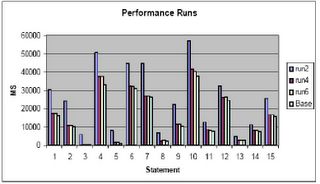
Memory Testing
In this chart I show:
Base Run: Run with 300 megabytes in lower memory
Run2: Run with 300 megabytes in upper memory
Run4: Run with 800 megabytes in upper memory
Run6: Run with 1200 megabytes in upper memory
In my opinion do not implement PAE unless larger memory sizes must be implemented than can be handled by the normal 4 gigabytes of lower memory. Unless you can double the available lower memory, that is, for a 1.7 gigabyte lower db_cache_size, to get similar performance, you must implement nearly a 3.4 gigabyte upper memory cache, you may not see a benefit, in fact, your performance may suffer. As can be seen from a comparison of the base run (300 megabytes lower memory) to run2 (run1 was to establish base load of the cache) performance actually decreased by 68% overall!
As you can see, even with 1200 megabytes in upper memory we still don’t get equal to the performance of 300 megabytes in lower memory (performance is still 7% worse than the base run). I can only conjecture at this point that the test:
1. Only utilized around 300 megabytes of cache or less
2. Should have performed more IO and had more users
3. All of the above
4. Shows you get a diminishing return as you add upper memory.
I tend to believe it is a combination of 1,2 and 4. There may be addition parameter tuning that could be applied to achieve better results (setting of the AWE_MEMORY_WINDOW parameter away from the default of 512M). If anyone knows of any, post them and I will see if I can get the client to retest.
1. Use the hugemem kernel in Linux RedHat 3.0 AS enterprise version.
2. Set up the shm file system or the ramfs filesystem to the size you want the upper memory for Oracle, plus about 10% or so.
3. Set use_indirect_data_buffers to true
For example:
· Mount the shmfs file system as root using command:
% mount -t shm shmfs -o nr_blocks=8388608 /dev/shm
· Set the shmmax parameter to half of RAM size
$ echo 3000000000 >/proc/sys/kernel/shmmax
· Set the init.ora parameter use_indirect_data_buffers=true
· Startup oracle.
However there are catches.
In recent testing it was found that unless the size of the memory used in the PAE extended memory configuration exceeded twice that available in the base 4 gigabytes, little was gained. However, the testing performed may not have been large enough to truly test the memory configuration. The test consisted of replay of a trace file through a testing tool to simulate multiple users performing statements. During this testing it was found that unless the memory is to be set at twice to three times the amount available in the base configuration using the PAE extensions may not be advisable.

Memory Testing
In this chart I show:
Base Run: Run with 300 megabytes in lower memory
Run2: Run with 300 megabytes in upper memory
Run4: Run with 800 megabytes in upper memory
Run6: Run with 1200 megabytes in upper memory
In my opinion do not implement PAE unless larger memory sizes must be implemented than can be handled by the normal 4 gigabytes of lower memory. Unless you can double the available lower memory, that is, for a 1.7 gigabyte lower db_cache_size, to get similar performance, you must implement nearly a 3.4 gigabyte upper memory cache, you may not see a benefit, in fact, your performance may suffer. As can be seen from a comparison of the base run (300 megabytes lower memory) to run2 (run1 was to establish base load of the cache) performance actually decreased by 68% overall!
As you can see, even with 1200 megabytes in upper memory we still don’t get equal to the performance of 300 megabytes in lower memory (performance is still 7% worse than the base run). I can only conjecture at this point that the test:
1. Only utilized around 300 megabytes of cache or less
2. Should have performed more IO and had more users
3. All of the above
4. Shows you get a diminishing return as you add upper memory.
I tend to believe it is a combination of 1,2 and 4. There may be addition parameter tuning that could be applied to achieve better results (setting of the AWE_MEMORY_WINDOW parameter away from the default of 512M). If anyone knows of any, post them and I will see if I can get the client to retest.
Subscribe to:
Posts (Atom)